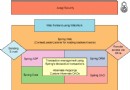
Spring Web Flow (SWF) 將「流程」提升為一等公民,提供宣告式流程定義(XML/Java DSL),支援與 Spring MVC、Struts、JSF 整合。核心優勢:
叢集 vs 快取:叢集 = 多 JVM 共享應用狀態;快取 = 讓狀態貼近執行上下文。快取是叢集子集。
<servlet>
  <servlet-name>sellitem</servlet-name>
  <servlet-class>org.springframework.web.servlet.DispatcherServlet</servlet-class>
  <init-param>
    <param-name>contextConfigLocation</param-name>
    <param-value>/WEB-INF/sellitem-servlet-config.xml /WEB-INF/sellitem-webflow-config.xml</param-value>
  </init-param>
</servlet>
<servlet-mapping>
  <servlet-name>sellitem</servlet-name>
  <url-pattern>*.htm</url-pattern>
</servlet-mapping>
<flow:executor id="flowExecutor" registry-ref="flowRegistry"/>
<flow:registry id="flowRegistry">
  <flow:location path="/WEB-INF/flows/**-flow.xml" />
</flow:registry>
<flow xmlns="https://www.springframework.org/schema/webflow" ...>
  <var name="sale" class="org.springframework.webflow.samples.sellitem.Sale"/>
  <start-state idref="enterPriceAndItemCount"/>

  <view-state id="enterPriceAndItemCount" view="priceAndItemCountForm">
    <render-actions><action bean="formAction" method="setupForm"/></render-actions>
    <transition on="submit" to="enterCategory">
      <action bean="formAction" method="bindAndValidate">
        <attribute name="validatorMethod" value="validatePriceAndItemCount"/>
      </action>
    </transition>
  </view-state>

  <view-state id="enterCategory" view="categoryForm">
    <transition on="submit" to="requiresShipping">
      <action bean="formAction" method="bind"/>
    </transition>
  </view-state>

  <decision-state id="requiresShipping">
    <if test="${flowScope.sale.shipping}" then="enterShippingDetails" else="processSale"/>
  </decision-state>

  <view-state id="enterShippingDetails" view="shippingDetailsForm">
    <transition on="submit" to="processSale">
      <action bean="formAction" method="bind"/>
    </transition>
  </view-state>

  <action-state id="processSale">
    <bean-action bean="saleProcessor" method="process">
      <method-arguments><argument expression="flowScope.sale"/></method-arguments>
    </bean-action>
    <transition on="success" to="finish"/>
  </action-state>

  <end-state id="finish" view="costOverview">
    <entry-actions><action bean="formAction" method="setupForm"/></entry-actions>
  </end-state>

  <import resource="sellitem-beans.xml"/>
</flow>
關鍵點:flowScope 存放跨請求共享的 Sale 物件;FormAction 處理表單綁定與驗證;action-state 呼叫業務邏輯 SaleProcessor。
<bean id="formAction" class="org.springframework.webflow.action.FormAction">
  <property name="formObjectName" value="sale"/>
  <property name="validator">
    <bean class="org.springframework.webflow.samples.sellitem.SaleValidator"/>
  </property>
</bean>
<application>
  <spring>
    <jee-application name="swf-sellitem">
      <session-support>true</session-support>
      <instrumented-classes>
        <include>
          <class-expression>org.springframework.webflow.samples.sellitem.Sale</class-expression>
        </include>
      </instrumented-classes>
    </jee-application>
  </spring>
</application>
啟用 session-support 即可自動叢集 HTTP Session 及其中引用的 Sale 類別實例。
set JAVA_OPTS=-Xbootclasspath/p:"%DSO_BOOT_JAR%"
set JAVA_OPTS=%JAVA_OPTS% -Dtc.install-root="%TC_INSTALL_DIR%"
set JAVA_OPTS=%JAVA_OPTS% -Dtc.config="%LOCAL_DIR%\tc-config.xml"
DSO_BOOT_JAR:指向 dso-boot.jar(Terracotta 安裝目錄 common/lib/dso-boot)。TC_INSTALL_DIR:Terracotta 安裝根目錄。LOCAL_DIR:包含 tc-config.xml 的目錄。Spring Web Flow 提供強大的有狀態 Web 應用開發模型;Terracotta for Spring 以零代碼修改、聲明式配置賦予其企業級高可用、橫向擴展與透明故障轉移能力。兩者結合,開啟「有狀態、基於會話、可擴展、高可用」Web 應用建構新范式。