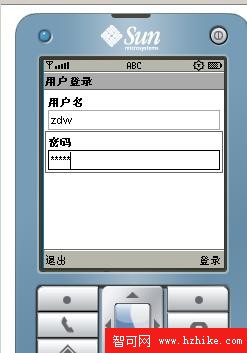
展示手機端(MIDlet)透過 HTTP POST 與 Servlet 伺服器進行用戶名/密碼驗證的完整流程:客戶端表單輸入 → 獨立執行緒發送請求 → Servlet 邏輯判斷 → 回傳 true/false → 客戶端顯示結果。含完整 Servlet 與 MIDlet 代碼、部署注意事項。
[手機 MIDlet] --HTTP POST (username/password)--> [Tomcat Servlet] --二進制 UTF 回傳 true/false--> [MIDlet 顯示 Alert]
package com;

import java.io.*;
import javax.servlet.*;
import javax.servlet.http.*;

public class LoginServlet extends HttpServlet {
    protected void doPost(HttpServletRequest req, HttpServletResponse resp)
            throws ServletException, IOException {
        String username = req.getParameter("username");
        String password = req.getParameter("password");

        ByteArrayOutputStream baos = new ByteArrayOutputStream();
        DataOutputStream dos = new DataOutputStream(baos);

        // 簡單邏輯演示,實際應查資料庫、加密比對
        if ("zdw".equals(username) && "admin".equals(password)) {
            dos.writeUTF("true");
        } else {
            dos.writeUTF("false");
        }

        byte[] data = baos.toByteArray();
        resp.setStatus(HttpServletResponse.SC_OK);
        resp.setContentLength(data.length);
        resp.setContentType("application/octet-stream");
        OutputStream os = resp.getOutputStream();
        os.write(data);
        os.close();
    }

    protected void doGet(HttpServletRequest req, HttpServletResponse resp)
            throws ServletException, IOException {
        doPost(req, resp);
    }
}
package com;

import javax.microedition.io.*;
import javax.microedition.lcdui.*;
import javax.microedition.midlet.*;

public class LoginForm extends MIDlet implements CommandListener {
    private Form form;
    private Display display;
    private Command cmdLogin, cmdExit;
    private TextField txtUser, txtPass;
    private Alert alertOk, alertErr;

    public LoginForm() {
        display = Display.getDisplay(this);
        form = new Form("用戶登入");
        display.setCurrent(form);

        cmdLogin = new Command("登入", Command.SCREEN, 1);
        cmdExit = new Command("退出", Command.EXIT, 1);
        form.addCommand(cmdLogin);
        form.addCommand(cmdExit);

        txtUser = new TextField("用戶名", "", 20, TextField.ANY);
        txtPass = new TextField("密碼", "", 20, TextField.PASSWORD);
        form.append(txtUser);
        form.append(txtPass);
        form.setCommandListener(this);
    }

    protected void startApp() {}
    protected void pauseApp() {}
    protected void destroyApp(boolean unconditional) {}

    public void commandAction(Command c, Displayable d) {
        if (c == cmdExit) {
            notifyDestroyed();
            return;
        }
        if (c == cmdLogin) {
            new Thread(new Runnable() {
                public void run() {
                    try { loginToServer(); } catch (Exception e) { e.printStackTrace(); }
                }
            }).start();
        }
    }

    private void loginToServer() throws IOException {
        String url = "https://localhost:8888/LoginWeb/LoginServlet"; // 實機測試需換真實 IP
        String user = txtUser.getString();
        String pass = txtPass.getString();

        HttpConnection conn = (HttpConnection) Connector.open(url);
        conn.setRequestMethod(HttpConnection.POST);
        conn.setRequestProperty("Content-Type", "application/x-www-form-urlencoded");
        conn.setRequestProperty("User-Agent", "Profile/MIDP-1.0 Configuration/CLDC-1.0");
        conn.setRequestProperty("Accept", "application/octet-stream");
        conn.setRequestProperty("Connection", "close");

        String formData = "username=" + user + "&password=" + pass;
        byte[] data = formData.getBytes();
        conn.setRequestProperty("Content-Length", String.valueOf(data.length));

        OutputStream os = conn.openOutputStream();
        os.write(data);
        os.close();

        int rc = conn.getResponseCode();
        if (rc == HttpConnection.HTTP_OK) {
            DataInputStream dis = new DataInputStream(conn.openInputStream());
            String result = dis.readUTF();
            dis.close();

            if ("true".equals(result)) {
                showAlert("登入成功!!\n用戶名:" + user + "\n密碼:" + pass, AlertType.INFO);
            } else {
                showAlert("登入失敗,用戶名或密碼錯誤", AlertType.ERROR);
                txtUser.delete(0, txtUser.getString().length());
                txtPass.delete(0, txtPass.getString().length());
            }
        }
        conn.close();
    }

    private void showAlert(String msg, AlertType type) {
        Alert a = new Alert("提示", msg, null, type);
        a.setTimeout(Alert.FOREVER);
        display.setCurrent(a);
    }
}
localhost 必須換成電腦實際 LAN IP,且手機與電腦同網段(Wi-Fi 或 CMWAP/NET 代理設定)。application/octet-stream + DataOutputStream.writeUTF,客戶端用 DataInputStream.readUTF 讀取,避免編碼問題。