C# 提供 DataSet 實現離線資料操作,Java 對應的是 javax.sql.rowset 套件下的 RowSet 介面。自 JDK 1.4 引入,JDK 5.0 起提供參考實作。RowSet 繼承自 ResultSet,預設為可捲動、可更新、可序列化的結果集,並作為 JavaBeans 便於網路傳輸與雙端資料同步。
五大 RowSet 介面:
ResultSet 封裝,使其可作為 JavaBeans 使用,唯一保持資料庫連線的 RowSet。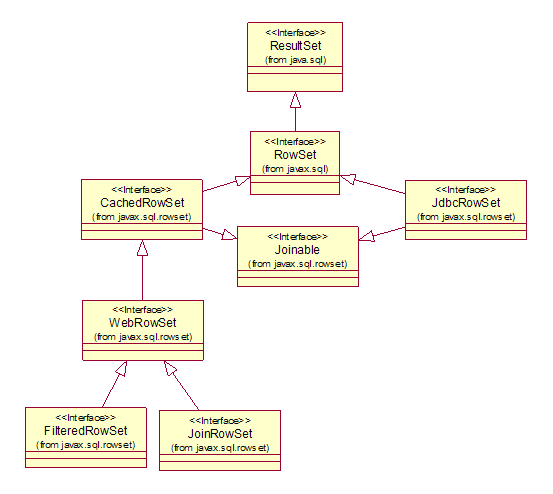
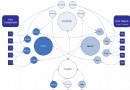
圖1:RowSet 繼承結構圖
CUSTOMERS (ID, NAME, REMARK) 與 ORDERS (ID, USER_ID, PRODUCT)1. execute() 方法:需設定 URL、命令、帳密,自動建立連線、查詢、填充、關閉連線。
cachedRS.setUrl(DBCreator.DERBY_URL);
cachedRS.setCommand(DBCreator.SQL_SELECT_CUSTOMERS);
cachedRS.setUsername("APP");
cachedRS.setPassword("APP");
cachedRS.execute();亦可傳入既有連線:cachedRS.execute(conn);
2. populate(ResultSet) 方法:手動執行查詢後填充。
ResultSet rs = stmt.executeQuery(DBCreator.SQL_SELECT_CUSTOMERS);
cachedRS.populate(rs);
rs.close();更新:移動游標 → updateXXX() → updateRow() → acceptChanges()
cachedRS.first();
cachedRS.updateString(2, "Hello");
cachedRS.updateRow();
cachedRS.acceptChanges();刪除:deleteRow() → acceptChanges()。注意 showDeleted 屬性控制已刪除未同步列是否可見(預設 false)。
新增:moveToInsertRow() → updateXXX() → insertRow() → moveToCurrentRow() → acceptChanges()。步驟不可省略。
當記憶體資料過期導致同步衝突,acceptChanges() 拋出 SyncProviderException。透過 SyncResolver 遍歷衝突:
SyncResolver resolver = e.getSyncResolver();
while (resolver.nextConflict()) {
    System.out.println(resolver.getStatus()); // UPDATE_ROW_CONFLICT 等
}注意:Sun JDK 對 SyncResolver 支援有限,繼承自 RowSet 的方法會拋 UnsupportedOperationException,getConflictValue() 回傳 null。
實作 RowSetListener 監聽三類事件:游標移動、列變更、RowSet 變更。CachedRowSet 多個方法會觸發監聽器(如 absolute()、updateRow()、acceptChanges()、execute()、nextPage() 等)。
預設不使用交易。手動控制需傳入 Connection 並關閉自動提交:
conn.setAutoCommit(false);
try {
    cachedRS.acceptChanges(conn);
    cachedRS.commit();
} catch (SyncProviderException e) {
    cachedRS.rollback();
}
conn.setAutoCommit(true);
必須在 execute 或 acceptChanges 傳入 Connection,否則 commit()/rollback() 會拋 NullPointerException。
設定 setPageSize(int) 限制每頁筆數,配合 populate(rs, startPage)、nextPage()、previousPage() 實現分頁。注意:
ResultSet 必須可捲動populateResultSet 需遍歷完畢後才能關閉nextPage() 前用 next() 會導致第一頁重複輸出setMaxRows(int) 限制最大筆數,與分頁配合使用。頁面大小修改僅影響後續頁面。
刪除含 null 值列會拋 NullPointerException,JDK 6.0 已修正。
繼承 CachedRowSet,新增 readXml(Reader) 與 writeXml(Writer)。
// 寫入 XML
WebRowSet webRS = new WebRowSetImpl();
CachedRowSetDemo.fillRowSetWithExecute(webRS);
webRS.writeXml(new FileWriter("CUSTOMERS.xml"));

// 讀取 XML
WebRowSet newWebRS = new WebRowSetImpl();
newWebRS.readXml(new FileReader("CUSTOMERS.xml"));已知問題:更新列輸出標籤為 <currentRow> 非 <modifyRow>;更新值標籤為 <updateRow> 非 <updateValue>;讀取 <deleteRow> 狀態會遺失。
透過實作 Predicate 介面定義過濾規則。三個 evaluate 方法分別檢查新增列值、依欄位索引/名稱檢查、檢查整個 RowSet 列是否符合。
class Range implements Predicate {
    public boolean evaluate(RowSet rs) {
        try { return rs.getInt(1) > 1; } catch (SQLException e) { return false; }
    }
    public boolean evaluate(Object value, int column) { return false; }
    public boolean evaluate(Object value, String columnName) { return false; }
}

// 使用
FilteredRowSet filterRS = new FilteredRowSetImpl();
CachedRowSetDemo.fillRowSetWithExecute(filterRS);
filterRS.setFilter(new Range()); // 僅保留第一欄 > 1 的列注意:設定過濾器後 absolute(1) 可能回傳 false(按規範應跳至第一個符合條件列)。JDK 5.0 未設過濾器時新增列會拋 NPE,JDK 6.0 已修正。
僅支援 execute() 填充,操作方式類似 ResultSet。
JdbcRowSet jrs = new JdbcRowSetImpl();
jrs.setCommand(SQL_SELECT_CUSTOMERS);
jrs.setUrl(DERBY_URL);
jrs.execute();
while (jrs.next()) { /* 列印資料 */ }定義五種常數(INNER_JOIN、LEFT_OUTER_JOIN 等)與對應 supportsXxxJoin() 方法。Java 5/6 僅支援 INNER JOIN,其他會拋 UnsupportedOperationException。未呼叫 setJoinType() 前呼叫 getJoinType() 會拋 ArrayIndexOutOfBoundsException。
提供五個 addRowSet 多載。JdbcRowSet 僅能用 addRowSet(Joinable),且須先呼叫 setMatchColumn() 指定關聯欄位。
// 正確加入 JdbcRowSet
jdbcRS.setMatchColumn("ID");
joinRS.addRowSet(jdbcRS);

// 加入 CachedRowSet
joinRS.addRowSet(cachedRS, "ID");
關聯欄位會合併為 MergedCol,可繼續加入其他 RowSet 進行多表關聯。
execute()、populate() 無作用,不應使用acceptChanges() 有效;包含多個 RowSet 時無效(類似資料庫 View 不可更新)addRowSet 非對所有 RowSet 皆可用善用 RowSet 離線資料處理功能可事半功倍。本文詳述五大介面用法並針對實務陷阱提出預警。