JSF 組件模型支援第三方組件即插即用,亦允許開發者自行開發可重用組件。儘管流傳「開發組件困難」的 FUD,實際上 JSF 基類已處理大部分繁重工作,開發組件不僅可行,更能大幅節省重複代碼。本文通過兩個完整範例——簡單輸出型 Label 組件與復合輸入型 Field 組件——示範直接實現與委託渲染器兩種開發模式。
UIComponentBase 提供預設實作。saveState/restoreState 保存屬性值。輸出 <label>文字</label>,無輸入需求,繼承 UIOutput。
public class LabelComponent extends UIOutput {
    private String label;

    public String getLabel() { return label; }
    public void setLabel(String label) { this.label = label; }

    @Override public Object saveState(FacesContext ctx) {
        Object[] v = new Object[2];
        v[0] = super.saveState(ctx); v[1] = label; return v;
    }
    @Override public void restoreState(FacesContext ctx, Object state) {
        Object[] v = (Object[]) state;
        super.restoreState(ctx, v[0]); label = (String) v[1];
    }

    @Override public String getFamily() { return "simple.Label"; }

    // 直接編碼輸出
    @Override public void encodeBegin(FacesContext ctx) throws IOException {
        ResponseWriter w = ctx.getResponseWriter();
        w.startElement("label", this);
        w.write(label);
        w.endElement("label");
        w.flush();
    }

    // JSF RI 相容性:空實作 encodeEnd/decode
    @Override public void encodeEnd(FacesContext ctx) {}
    @Override public void decode(FacesContext ctx) {}
}<component>
<component-type>simple.Label</component-type>
<component-class>arcmind.simple.LabelComponent</component-class>
</component>public class LabelTag extends UIComponentTag {
private String label;
public String getLabel() { return label; }
public void setLabel(String label) { this.label = label; }
@Override protected void setProperties(UIComponent comp) {
super.setProperties(comp);
((LabelComponent) comp).setLabel(label);
}
@Override public String getComponentType() { return "simple.Label"; }
@Override public String getRendererType() { return null; } // 無獨立渲染器
}<tag>
<name>slabel</name>
<tag-class>arcmind.simple.LabelTag</tag-class>
<attribute><name>label</name></attribute>
</tag><%@ taglib prefix="arcmind" uri="https://arcmind.com/jsf/component/tags" %>
<arcmind:slabel label="Form Test"/>整合「標籤 + 輸入框 + 錯誤訊息」,必填欄位顯示紅星號,錯誤時標籤變紅。繼承 UIInput,使用獨立 FieldRenderer。
public class FieldComponent extends UIInput {
    private String label;
    // saveState/restoreState 同 LabelComponent,保存 label

    public FieldComponent() { setRendererType("arcmind.Field"); }
    @Override public String getFamily() { return "arcmind.Field"; }

    public String getLabel() { return label; }
    public void setLabel(String label) { this.label = label; }

    public boolean isError() { return !isValid(); }
}public class FieldTag extends UIComponentTag {
private String label, errorStyleClass, errorStyle, value;
private boolean required;
// Getter/Setter 略...
@Override protected void setProperties(UIComponent comp) {
super.setProperties(comp);
FieldComponent fc = (FieldComponent) comp;
fc.setLabel(label);
fc.setRequired(required);
// HTML 特有屬性放入屬性映射,由渲染器讀取
comp.getAttributes().put("errorStyleClass", errorStyleClass);
comp.getAttributes().put("errorStyle", errorStyle);
// 值綁定:建立 ValueBinding 關聯 Backing Bean 屬性
FacesContext ctx = FacesContext.getCurrentInstance();
ValueBinding vb = ctx.getApplication().createValueBinding(value);
comp.setValueBinding("value", vb);
}
@Override public String getComponentType() { return "arcmind.Field"; }
@Override public String getRendererType() { return "arcmind.Field"; }
}public class FieldRenderer extends Renderer {
// 解碼:從請求參數取值
@Override public void decode(FacesContext ctx, UIComponent comp) {
Map reqMap = ctx.getExternalContext().getRequestParameterMap();
String clientId = comp.getClientId(ctx);
String value = (String) reqMap.get(clientId);
((UIInput) comp).setSubmittedValue(value);
}
// 編碼入口:委託三個輔助方法
@Override public void encodeBegin(FacesContext ctx, UIComponent comp) throws IOException {
FieldComponent fc = (FieldComponent) comp;
ResponseWriter w = ctx.getResponseWriter();
encodeLabel(w, fc);
encodeInput(w, fc);
encodeMessage(ctx, w, fc);
w.flush();
}
private void encodeLabel(ResponseWriter w, FieldComponent fc) throws IOException {
w.startElement("label", fc);
if (fc.isError()) {
w.writeAttribute("class", fc.getAttributes().get("errorStyleClass"), "class");
w.writeAttribute("style", fc.getAttributes().get("errorStyle"), "style");
}
w.write(fc.getLabel());
if (fc.isRequired()) w.write("*");
w.endElement("label");
}
private void encodeInput(ResponseWriter w, FieldComponent fc) throws IOException {
w.startElement("input", fc);
w.writeAttribute("type", "text", "type");
w.writeAttribute("id", fc.getClientId(ctx), "id");
w.writeAttribute("name", fc.getClientId(ctx), "name");
if (fc.getValue() != null) w.writeAttribute("value", fc.getValue().toString(), "value");
w.endElement("input");
}
private void encodeMessage(FacesContext ctx, ResponseWriter w, FieldComponent fc) throws IOException {
Iterator it = ctx.getMessages(fc.getClientId(ctx));
while (it.hasNext()) w.write(((FacesMessage) it.next()).getDetail());
}
// 【關鍵】手動調用轉換器:JSF 核心 API 未自動調用,必須覆寫
@Override public Object getConvertedValue(FacesContext ctx, UIComponent comp, Object submitted) throws ConverterException {
ValueBinding vb = comp.getValueBinding("value");
if (vb == null) return null;
Class type = vb.getType(ctx);
if (type == null || String.class.equals(type) || Object.class.equals(type)) return submitted;
Converter conv = ((UIInput) comp).getConverter();
if (conv == null) conv = ctx.getApplication().createConverter(type);
return (conv != null) ? conv.getAsObject(ctx, comp, (String) submitted) : submitted;
}
}<component>
<component-type>arcmind.Field</component-type>
<component-class>com.arcmind.jsfquickstart.FieldComponent</component-class>
</component>
<render-kit>
<renderer>
<component-family>arcmind.Field</component-family>
<renderer-type>arcmind.Field</renderer-type>
<renderer-class>com.arcmind.jsfquickstart.FieldRenderer</renderer-class>
</renderer>
</render-kit><arcmind:field id="title" value="#{CDManagerBean.title}" label="Title:" errorStyleClass="errorText" required="true"/>
<arcmind:field id="price" value="#{CDManagerBean.price}" label="CD Price:" errorStyleClass="errorText" required="true">
<f:validateDoubleRange minimum="1.0" maximum="1000.0"/>
</arcmind:field>輸出 HTML (錯誤時):
<label class="errorText">Artist*</label>
<input type="text" id="cdForm:artist" name="cdForm:artist" />
Artist is blank, it must contain characters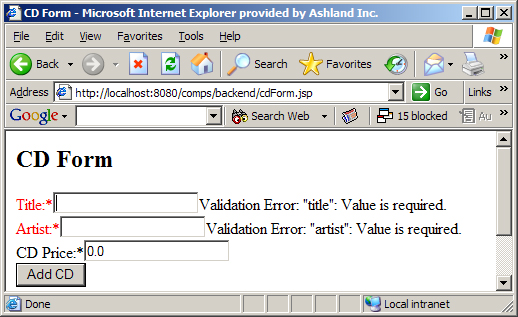
圖 5 Field 組件
Renderer 基類不會自動調用轉換器(RI/MyFaces 有私有實現),自製渲染器必須覆寫此方法,否則轉換失效。super.saveState(),自有屬性從 1 開始。binding="#{bean.comp}" 可將組件實例注入 Backing Bean,支援程式化控制 (如動態顯示/隱藏)。JSF 組件開發核心在於理解「組件狀態+渲染器分離」與「標籤處理器橋接 JSP」。掌握 encode/decode、saveState/restoreState、setProperties 三大鉤子,即可構建從原子組件到復合組件的完整生態。下一篇將探討進階主題:組件事件發射、國際化、命令型組件開發。