Eclipse RAP(Rich Ajax Platform)讓RCP(Rich Client Platform)應用幾乎零修改即可在瀏覽器中運行。本文通過將官方Mail模板從RCP遷移至RAP的完整過程,演示依賴替換、擴展點重構、啟動機制改造、主題品牌化等關鍵步驟。
com.vwpolo.rcp.mail,選擇「RCP Mail Template」| RCP原依賴 | RAP替換依賴 |
|---|---|
| org.eclipse.ui | org.eclipse.rap.ui |
| org.eclipse.core.runtime | org.eclipse.rap.ui.views |
根據項目實際引用補充其他RAP bundles(如org.eclipse.rap.jface)。
| RCP擴展點 | RAP替換擴展點 | 說明 |
|---|---|---|
| org.eclipse.core.runtime.applications | org.eclipse.rap.ui.entrypoint | 啟動入口:IApplication → IEntryPoint |
| org.eclipse.core.runtime.products | org.eclipse.rap.ui.branding | 品牌化:產品定義 → Servlet/主題/圖標/標題 |
| org.eclipse.ui.bindings | 移除 | RAP不支持鍵綁定 |
原Application實現IApplication,改為實現IEntryPoint:
public class Application implements IEntryPoint {
    @Override
    public int createUI() {
        Display display = PlatformUI.createDisplay();
        return PlatformUI.createAndRunWorkbench(display, new ApplicationWorkbenchAdvisor());
    }
}
對比RCPstart():無需處理事件循環、display.dispose()、重啟邏輯,RAP容器自動管理生命周期。
<branding
    id="com.vwpolo.rap.mail.branding"
    servletName="rapmail"
    defaultEntrypointId="com.vwpolo.rap.mail.entrypoint"
    themeId="org.eclipse.rap.ui.defaultTheme"
    title="RAP Mail Demo"
    favicon="icons/favicon.ico"
    body="loading.html"
    exitConfirmationClass="com.vwpolo.rap.mail.ExitConfirmation">
</branding>
servletName:瀏覽器訪問路徑/rapmailbody:加載頁面(如GMail風格「正在載入...」)exitConfirmationClass:關閉瀏覽器彈出確認對話框RAP無ActionFactory.ABOUT,兩種方案:
aboutAction = new Action() {
    public void run() {
        Shell shell = window.getShell();
        Bundle bundle = Platform.getBundle(MailActivator.PLUGIN_ID);
        String version = bundle.getHeaders().get(Constants.BUNDLE_VERSION);
        MessageDialog.openInformation(shell, "RAP MailDemo", "版本: " + version);
    }
};
aboutAction.setText("關於");
aboutAction.setId("com.vwpolo.rap.mail.about");
https://localhost:8080/rapmail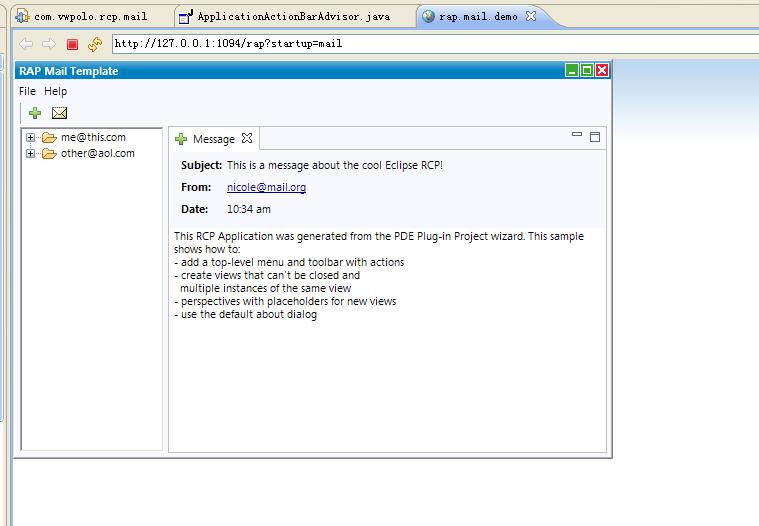
| 維度 | RCP | RAP |
|---|---|---|
| UI線程 | SWT事件循環 | RAP單線程模型(服務端) |
| 客戶端 | 原生OS控件 | HTML/JS(Qooxdoo/RWT) |
| 會話管理 | 單進程 | 多用戶HTTP Session隔離 |
| 資源訪問 | 本地文件系統 | ClassLoader/getResourceAsStream |
PlatformUI.isWorkbenchRunning()區分RCP/RAP運行時邏輯完成上述步驟,RCP應用即可零成本擁抱Web部署優勢。