本系列教程將系統講解 Struts 1.x 核心原理與實戰技巧,讀者可對照《Struts 2 系列教程》理解兩代框架異同。首篇通過「產品信息錄入查詢系統」完整演示 MyEclipse 從零構建 Struts 專案的全流程。
CREATE DATABASE IF NOT EXISTS struts DEFAULT CHARACTER SET GBK;

CREATE TABLE IF NOT EXISTS struts.t_products (
  product_id varchar(4) NOT NULL,
  product_name varchar(50) NOT NULL,
  price float NOT NULL,
  PRIMARY KEY (product_id)
) ENGINE=InnoDB DEFAULT CHARSET=gbk;
Struts specification: Struts 1.2
Base package for new classes: struts
Default application resources: struts.ApplicationResources
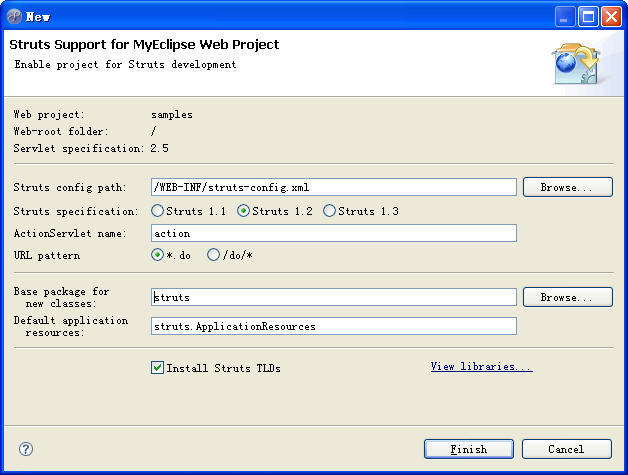
點擊 Finish 後自動完成三項操作:
<?xml version="1.0" encoding="UTF-8"?>
<!DOCTYPE struts-config PUBLIC "-//Apache Software Foundation//DTD Struts Configuration 1.2//EN"
"https://struts.apache.org/dtds/struts-config_1_2.dtd">
<struts-config>
  <data-sources />
  <form-beans />
  <global-exceptions />
  <global-forwards />
  <action-mappings />
  <message-resources parameter="struts.ApplicationResources" />
</struts-config>
<servlet>
  <servlet-name>action</servlet-name>
  <servlet-class>org.apache.struts.action.ActionServlet</servlet-class>
  <init-param><param-name>config</param-name><param-value>/WEB-INF/struts-config.xml</param-value></init-param>
  <init-param><param-name>debug</param-name><param-value>3</param-value></init-param>
  <init-param><param-name>detail</param-name><param-value>3</param-value></init-param>
  <load-on-startup>0</load-on-startup>
</servlet>
<servlet-mapping>
  <servlet-name>action</servlet-name>
  <url-pattern>*.do</url-pattern>
</servlet-mapping>
<%@ page pageEncoding="GBK"%>
<%@ taglib uri="https://struts.apache.org/tags-html" prefix="html"%>
<html><head><title>主界面</title></head><body>
<table align="center" cellpadding="10" width="100%">
  <tr>
    <td align="right" width="50%">
      <html:link forward="newProduct">錄入產品信息</html:link>
    </td>
    <td>
      <html:link forward="searchProduct">查詢產品信息</html:link>
    </td>
  </tr>
</table>
</body></html>
啟動 Tomcat 訪問報錯:Cannot retrieve ActionForward named newProduct。需在 struts-config.xml 添加全局 forward:
<global-forwards>
  <forward name="newProduct" path="/mystruts/newProduct.jsp" />
  <forward name="searchProduct" path="/mystruts/searchProduct.jsp" />
</global-forwards>
重新訪問 https://localhost:8080/samples/mystruts/index.jsp 正常顯示。若需設為默認頁,在 web.xml 添加:
<welcome-file-list><welcome-file>index.jsp</welcome-file></welcome-file-list>
<%@ page pageEncoding="GBK"%>
<%@ taglib uri="https://struts.apache.org/tags-html" prefix="html"%>
<html:form action="saveProduct">
  <table width="100%">
    <tr><td align="center">
      產品編號:<html:text property="productID" maxlength="4" /><p>
      產品名稱:<html:text property="productName" /><p>
      產品價格:<html:text property="price" />
    </td></tr>
    <tr><td align="center"><br>
      <html:submit value=" 保存 " />
    </td></tr>
  </table>
</html:form>
<%@ page pageEncoding="GBK"%>
<%@ taglib uri="https://struts.apache.org/tags-html" prefix="html"%>
<html:form action="searchProduct">
  <table width="100%">
    <tr><td align="center">
      產品名稱:<html:text property="productName" />
    </td></tr>
    <tr><td align="center"><br>
      <html:submit value=" 查詢 " />
    </td></tr>
  </table>
</html:form>
在 <Tomcat安裝目錄>/conf/Catalina/localhost/samples.xml 中配置:
<Resource name="jdbc/struts" auth="Container"
  type="javax.sql.DataSource"
  driverClassName="com.mysql.jdbc.Driver"
  url="jdbc:mysql://localhost:3306/struts?characterEncoding=GBK"
  username="root" password="1234"
  maxActive="200" maxIdle="50" maxWait="3000"/>
package util;
import java.sql.Connection;
public class Struts {
  protected javax.naming.Context ctx = new javax.naming.InitialContext();
  protected javax.sql.DataSource ds;
  protected Connection conn;
  public Struts() throws Exception {
    ds = (javax.sql.DataSource) ctx.lookup("java:/comp/env/jdbc/struts");
    conn = ds.getConnection();
  }
}
package mystruts.model;
import java.sql.*;
import mystruts.actionform.*;

public class Product extends util.Struts {
  private ProductForm form;
  public Product(ProductForm form) throws Exception {
    super(); this.form = form; validate();
  }
  public void validate() throws Exception {
    if (form.getProductID().trim().equals("")) throw new Exception("產品ID不能為空!");
    if (form.getProductID().length() > 4) throw new Exception("產品ID最長為4位!");
    if (form.getProductName().trim().equals("")) throw new Exception("產品名稱不能為空");
    if (Float.compare(form.getPrice(), 0) <= 0) throw new Exception("產品價格必須大於0");
  }
  public void save() throws Exception {
    try {
      String sql = "INSERT INTO t_products VALUES('" + form.getProductID() + "','"
          + form.getProductName() + "'," + form.getPrice() + ")";
      PreparedStatement pstmt = conn.prepareStatement(sql);
      pstmt.executeUpdate(); pstmt.close(); conn.close();
    } catch (Exception e) { throw new Exception(e.getMessage()); }
  }
}
package mystruts.model;
import java.sql.*; import java.util.*; import mystruts.actionform.*;

public class SearchProduct extends util.Struts {
  private ProductForm form;
  public SearchProduct(ProductForm form) throws Exception { super(); this.form = form; }
  public List<String[]> search() throws Exception {
    List<String[]> result = new LinkedList<>();
    String sql = "SELECT * FROM t_products WHERE product_name like '%" + form.getProductName() + "%'";
    PreparedStatement pstmt = conn.prepareStatement(sql);
    ResultSet rs = pstmt.executeQuery();
    while(rs.next()) {
      String[] row = {rs.getString(1), rs.getString(2), rs.getString(3)};
      result.add(row);
    }
    rs.close(); conn.close(); return result;
  }
}
package mystruts.actionform;
import org.apache.struts.action.*;

public class ProductForm extends ActionForm {
  private String productID, productName; private float price;
  // getter/setter 省略...
  // 注意:屬性名必須與 JSP 中 html:text 的 property 一致
}
<form-beans>
  <form-bean name="saveProductForm" type="mystruts.actionform.ProductForm" />
  <form-bean name="searchProductForm" type="mystruts.actionform.ProductForm" />
</form-beans>
package mystruts.action;
import javax.servlet.http.*; import org.apache.struts.action.*;
import mystruts.actionform.*; import mystruts.model.*;

public class SaveProductAction extends Action {
  public ActionForward execute(ActionMapping mapping, ActionForm form,
      HttpServletRequest request, HttpServletResponse response) {
    ProductForm saveProductForm = (ProductForm) form;
    try {
      Product product = new Product(saveProductForm);
      product.save(); request.setAttribute("info", "保存成功!");
    } catch (Exception e) { request.setAttribute("info", e.getMessage()); }
    return mapping.findForward("save");
  }
}
<%@ page pageEncoding="GBK"%> ${requestScope.info}
<action name="saveProductForm" path="/saveProduct" scope="request"
    type="mystruts.action.SaveProductAction">
  <forward name="save" path="/mystruts/save.jsp" />
</action>
search.jsp 使用 <logic:iterate> 遍歷結果列表,<logic:present> 判斷是否有數據。
現象:中文產品名稱入庫變亂碼。根因:客戶端提交編碼與數據庫編碼不一致。
package filter;
import java.io.IOException; import javax.servlet.*;

public class EncodingFilter implements Filter {
  public void destroy() {}
  public void doFilter(ServletRequest request, ServletResponse response,
      FilterChain chain) throws IOException, ServletException {
    request.setCharacterEncoding("GBK");  // 統一設置為數據庫編碼
    chain.doFilter(request, response);    // 必須調用,否則請求不再繼續
  }
  public void init(FilterConfig filterConfig) throws ServletException {}
}
<filter>
  <filter-name>EncodingFilter</filter-name>
  <filter-class>filter.EncodingFilter</filter-class>
</filter>
<filter-mapping>
  <filter-name>EncodingFilter</filter-name>
  <url-pattern>/*</url-pattern>
</filter-mapping>
重啟 Tomcat 後測試中文錄入,數據庫將正確存儲中文。