Struts 1.x 通過 ActionForm 封裝表單數據,並利用其 validate() 方法實現服務端數據驗證。本文通過完整的用戶註冊實例,詳細講解 validate 方法機制、ActionErrors 錯誤收集、錯誤信息國際化配置及 struts-config.xml 完整配置。
方法簽名:
public ActionErrors validate(ActionMapping mapping, HttpServletRequest request)
執行流程:
需五步實現:JSP 頁面、Action 類、ActionForm+validate、屬性文件、Struts 配置。
<%@ page pageEncoding="GBK"%>
<%@ taglib uri="https://struts.apache.org/tags-html" prefix="html"%>
<html>
<head><title>注冊信息(測試簡單驗證)</title>
<style>.text {height:20px;width:160px;}</style></head>
<body>
<html:form action="simpleValidation">
<table width="100%">
  <tr>
    <td align="right" width="45%"> 用戶名:</td>
    <td width="55%">
      <html:text property="user" styleClass="text" />
      <font color="red"><html:errors property="errorUser" /></font>
    </td>
  </tr><tr /><tr />
  <tr>
    <td align="right">登錄密碼:</td>
    <td>
      <html:password property="password" styleClass="text" />
      <font color="red"><html:errors property="errorPassword" /></font>
    </td>
  </tr><tr /><tr />
  <tr>
    <td align="right">重復登錄密碼:</td>
    <td>
      <html:password property="password1" styleClass="text" />
      <font color="red"><html:errors property="errorPassword1" /></font>
    </td>
  </tr><tr /><tr />
  <tr>
    <td align="right">電子郵件:</td>
    <td>
      <html:text property="email" styleClass="text" />
      <font color="red"><html:errors property="errorEmail" /></font>
    </td>
  </tr><tr /><tr />
  <tr>
    <td align="right"> <br> ${requestScope.success } </td>
    <td align="left"> <br> <html:submit value=" 提交 " /> </td>
  </tr>
</table>
</html:form>
</body>
</html>
註:<html:errors property="..." /> 用於顯示特定字段的錯誤信息。
package action;
import javax.servlet.http.*;
import org.apache.struts.action.*;

public class SimpleValidationAction extends Action {
  public ActionForward execute(ActionMapping mapping, ActionForm form,
      HttpServletRequest request, HttpServletResponse response) throws Exception {
    request.setAttribute("success", "提交成功!");  // 設置成功信息
    return mapping.findForward("simple");  // 跳轉到 simple 對應的 JSP
  }
}
package actionform;
import javax.servlet.http.*;
import org.apache.struts.action.*;

public class SimpleValidationForm extends ActionForm {
  private String user, password, password1, email;
  // getter/setter 省略...

  public ActionErrors validate(ActionMapping mapping, HttpServletRequest request) {
    ActionErrors errors = new ActionErrors();
    if (user == null || user.trim().equals(""))
      errors.add("errorUser", new ActionMessage("error.user.blank"));
    if (password == null || password.trim().equals(""))
      errors.add("errorPassword", new ActionMessage("error.password.blank"));
    if (password1 == null || !password1.equals(password))
      errors.add("errorPassword1", new ActionMessage("error.password1.confirmation"));
    if (email == null || email.trim().equals(""))
      errors.add("errorEmail", new ActionMessage("error.email.blank"));
    else if (!email.matches("\\w+@\\w+\\.\\w+"))
      errors.add("errorEmail", new ActionMessage("error.email.invalid"));
    return errors;
  }
}
request.getParameter() 獲取原始輸入驗證org.apache.struts.action.ERROR 為鍵保存於 request 屬性中error.user.blank = User can't be null. error.password.blank = Password can't be null. error.password1.confirmation = Password doesn't match confirmation. error.email.blank = Email can't be null. error.email.invalid = It is not a valid email address.
<form-bean name="simpleValidationForm" type="actionform.SimpleValidationForm" />

<action name="simpleValidationForm" path="/simpleValidation" scope="request"
    type="action.SimpleValidationAction" input="simpleValidation.jsp">
  <forward name="simple" path="simpleValidation.jsp" />
</action>

<message-resources parameter="struts.ErrorDescription" />
關鍵屬性解析:
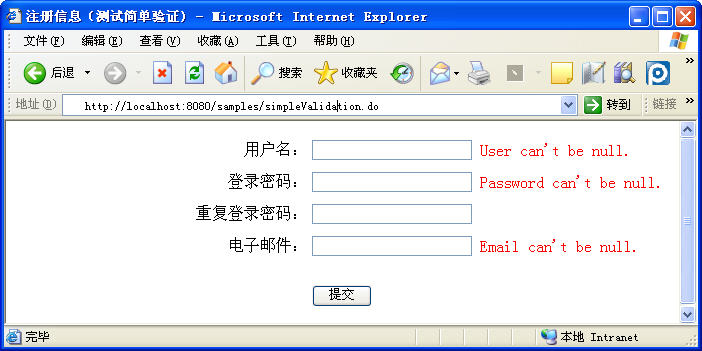
mapping.findForward("simple") 對應的目標頁訪問 https://localhost:8080/samples/simpleValidation.jsp:
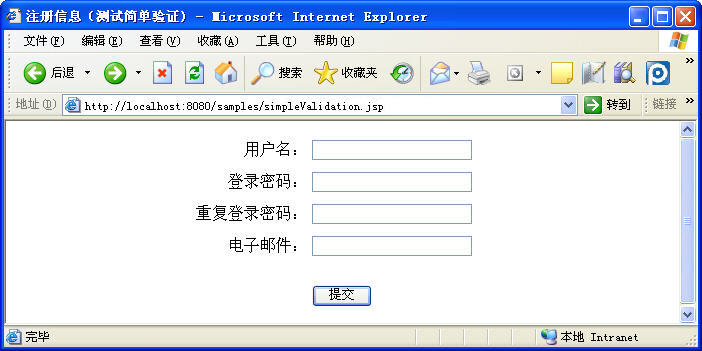
不輸入內容點擊提交: