實務上常遇到儲存格內容過長被截斷,需手動調整欄寬。透過 OLE 呼叫 Range 的 AutoFit 方法(ID 0x000000ED)可自動調整。本文示範針對單一儲存格與整欄自動調寬。
package com.jrkui.example.excel;

import org.eclipse.swt.SWT;
import org.eclipse.swt.layout.FillLayout;
import org.eclipse.swt.ole.win32.OLE;
import org.eclipse.swt.ole.win32.OleAutomation;
import org.eclipse.swt.ole.win32.OleClientSite;
import org.eclipse.swt.ole.win32.OleFrame;
import org.eclipse.swt.ole.win32.Variant;
import org.eclipse.swt.widgets.Display;
import org.eclipse.swt.widgets.Shell;

public class AutofitShell {
    public static void main(String[] args) { new AutofitShell().open(); }

    public void open() {
        Display display = Display.getDefault();
        Shell shell = new Shell();
        shell.setText("Auto Fit");
        shell.setSize(700, 300);
        shell.setLayout(new FillLayout());
        createExcelPart(shell);
        shell.open();
        while (!shell.isDisposed()) {
            if (!display.readAndDispatch()) display.sleep();
        }
        display.dispose();
    }

    private static final int SHEET_ID = 0x000001e5;
    private static final int CELL_ID = 0x000000c5;
    private static final int CELL_VALUE_ID = 0x00000006;

    private void createExcelPart(Shell shell) {
        OleFrame frame = new OleFrame(shell, SWT.NONE);
        OleClientSite clientSite = new OleClientSite(frame, SWT.NONE, "Excel.Sheet");
        clientSite.doVerb(OLE.OLEIVERB_SHOW);
        OleAutomation workbook = new OleAutomation(clientSite);
        OleAutomation worksheet = workbook.getProperty(SHEET_ID, new Variant[]{new Variant(1)}).getAutomation();
        OleAutomation cellA3 = worksheet.getProperty(CELL_ID, new Variant[]{new Variant("A3")}).getAutomation();
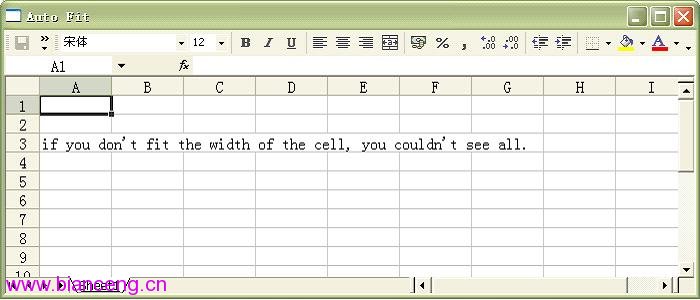
        cellA3.setProperty(CELL_VALUE_ID, new Variant("if you don't fit the width of the cell, you couldn't see all."));
        autoFitWidth(cellA3);
        // autoFitWidth(getColumnOfCell(cellA3));  // 取消註解改為調整整欄
    }

    private static final int AUTO_FIT_RANGE = 0x000000ed;

    private void autoFitWidth(OleAutomation range) {
        // 兩種寫法效果相同
        range.invoke(AUTO_FIT_RANGE);
        // range.getProperty(AUTO_FIT_RANGE);  // 也可用 getProperty 觸發
    }

    private static final int COLUMN_OF_CELL = 0x000000f6;

    private OleAutomation getColumnOfCell(OleAutomation cell) {
        // Range.EntireColumn 屬性 ID
        return cell.getProperty(COLUMN_OF_CELL).getAutomation();
    }
}
getColumnOfCell)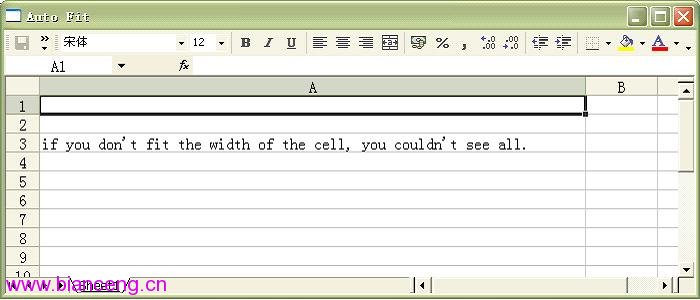
AutoFit 方法屬於 Range 物件,ID 0x000000ED。range.invoke(AUTO_FIT_RANGE) 或 range.getProperty(AUTO_FIT_RANGE) 效果相同。OleAutomation 代表 Range,可為單一儲存格、多儲存格區域、整列、整欄。Range.EntireColumn 屬性 ID 0x000000F6。AutoFit 確保完整顯示。Worksheet.UsedRange.Columns 逐欄 AutoFit。