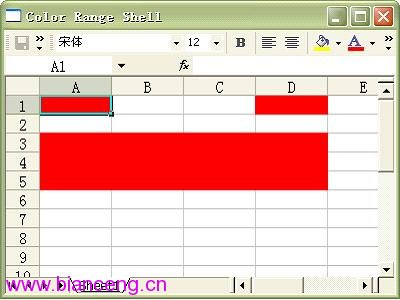
第三篇示範透過 Range 的 Interior 物件設定儲存格背景色。支援單一儲存格與多儲存格區域(如 A3:D5)同步著色。
package com.jrkui.example.excel;

import org.eclipse.swt.SWT;
import org.eclipse.swt.layout.FillLayout;
import org.eclipse.swt.ole.win32.OLE;
import org.eclipse.swt.ole.win32.OleAutomation;
import org.eclipse.swt.ole.win32.OleClientSite;
import org.eclipse.swt.ole.win32.OleFrame;
import org.eclipse.swt.ole.win32.Variant;
import org.eclipse.swt.widgets.Display;
import org.eclipse.swt.widgets.Shell;

public class ColorRangeShell {
    public static void main(String[] args) { new ColorRangeShell().open(); }

    public void open() {
        Display display = Display.getDefault();
        Shell shell = new Shell();
        shell.setText("Color Range Shell");
        shell.setSize(400, 300);
        shell.setLayout(new FillLayout());
        createExcelPart(shell);
        shell.open();
        while (!shell.isDisposed()) {
            if (!display.readAndDispatch()) display.sleep();
        }
        display.dispose();
    }

    private static final int SHEET_ID = 0x000001e5;
    private static final int CELL_ID = 0x000000c5;

    private void createExcelPart(Shell shell) {
        OleFrame frame = new OleFrame(shell, SWT.NONE);
        OleClientSite clientSite = new OleClientSite(frame, SWT.NONE, "Excel.Sheet");
        clientSite.doVerb(OLE.OLEIVERB_SHOW);
        OleAutomation workbook = new OleAutomation(clientSite);
        OleAutomation worksheet = workbook.getProperty(SHEET_ID, new Variant[]{new Variant(1)}).getAutomation();

        // 取得單一儲存格
        OleAutomation cellA1 = worksheet.getProperty(CELL_ID, new Variant[]{new Variant("A1")}).getAutomation();
        OleAutomation cellD1 = worksheet.getProperty(CELL_ID, new Variant[]{new Variant("D1")}).getAutomation();
        // 取得儲存格區域 A3:D5
        OleAutomation areaA3D5 = worksheet.getProperty(CELL_ID, new Variant[]{new Variant("A3"), new Variant("D5")}).getAutomation();

        colorRangeByRed(cellA1);
        colorRangeByRed(cellD1);
        colorRangeByRed(areaA3D5);
    }

    private static final int INTERIOR = 0x00000081;
    private static final int COLOR_INDEX = 0x00000061;
    private static final int RED = 3;  // Excel 色碼索引 3 = 紅色

    private void colorRangeByRed(OleAutomation range) {
        OleAutomation interior = range.getProperty(INTERIOR).getAutomation();  // 取得 Interior 物件
        interior.setProperty(COLOR_INDEX, new Variant(RED));                   // 設定 ColorIndex
    }
}
0x00000081。0x00000061,接受 Excel 56 色調色盤索引(非 RGB)。OleView.exe 查詢完整索引表。Range("A3:D5"))皆可套用。若需精確 RGB,可使用 Interior.Color 屬性(ID 0x00000063),值為 RGB(紅,綠,藍) 的長整數(紅 + 綠*256 + 藍*65536)。範例:
private static final int COLOR = 0x00000063;
interior.setProperty(COLOR, new Variant(0xFF0000)); // 紅色 RGB(255,0,0)