本系列第五篇示範如何透過 SWT OLE 設定 Excel 儲存格字型:大小、字體名稱、粗體、顏色。程式碼簡潔,直接展示關鍵屬性 ID 與操作流程。
package com.jrkui.example.excel;

import org.eclipse.swt.SWT;
import org.eclipse.swt.layout.FillLayout;
import org.eclipse.swt.ole.win32.OLE;
import org.eclipse.swt.ole.win32.OleAutomation;
import org.eclipse.swt.ole.win32.OleClientSite;
import org.eclipse.swt.ole.win32.OleFrame;
import org.eclipse.swt.ole.win32.Variant;
import org.eclipse.swt.widgets.Display;
import org.eclipse.swt.widgets.Shell;

public class FontStyleShell {
    public static void main(String[] args) {
        new FontStyleShell().open();
    }

    public void open() {
        Display display = Display.getDefault();
        Shell shell = new Shell();
        shell.setText("Font Style");
        shell.setSize(400, 300);
        shell.setLayout(new FillLayout());
        createExcelPart(shell);
        shell.open();
        while (!shell.isDisposed()) {
            if (!display.readAndDispatch()) display.sleep();
        }
        display.dispose();
    }

    // Excel OLE 常數
    private static final int SHEET_ID = 0x000001e5;
    private static final int CELL_ID = 0x000000c5;
    private static final int CELL_VALUE_ID = 0x00000006;

    private void createExcelPart(Shell shell) {
        OleFrame frame = new OleFrame(shell, SWT.NONE);
        OleClientSite clientSite = new OleClientSite(frame, SWT.NONE, "Excel.Sheet");
        clientSite.doVerb(OLE.OLEIVERB_SHOW);
        OleAutomation workbook = new OleAutomation(clientSite);
        OleAutomation worksheet = workbook.getProperty(SHEET_ID, new Variant[]{new Variant(1)}).getAutomation();
        OleAutomation cellA3 = worksheet.getProperty(CELL_ID, new Variant[]{new Variant("A3")}).getAutomation();
        cellA3.setProperty(CELL_VALUE_ID, new Variant("Hello OLE!"));
        setFontStyle(cellA3);
    }

    // Font 物件屬性 ID
    private static final int FONT_SIZE = 0x00000068;
    private static final int FONT_NAME = 0x0000006e;
    private static final int COLOR_INDEX = 0x00000061;
    private static final int FONT = 0x00000092;
    private static final int BOLD = 0x00000060;
    private static final int RED = 3;  // Excel 色碼索引:3 = 紅色

    private void setFontStyle(OleAutomation cell) {
        OleAutomation font = cell.getProperty(FONT).getAutomation();  // 取得 Font 物件
        font.setProperty(FONT_SIZE, new Variant(32));                 // 字體大小 32 pt
        font.setProperty(FONT_NAME, new Variant("Arial Black"));      // 字體名稱
        font.setProperty(BOLD, new Variant(true));                    // 粗體
        font.setProperty(COLOR_INDEX, new Variant(RED));              // 字體顏色(索引 3)
    }
}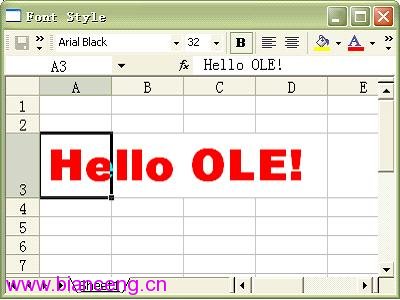
cell.getProperty(FONT),FONT = 0x00000092。OleAutomation.setProperty() 依序設定:FONT_SIZE (0x68):點數大小。FONT_NAME (0x6E):字體名稱字串(需系統安裝該字體)。BOLD (0x60):true/false。COLOR_INDEX (0x61):Excel 色碼索引(非 RGB),紅色為 3。Excel 使用 56 色調色盤索引,常用:
| 索引 | 顏色 |
|---|---|
| 1 | 黑 |
| 2 | 白 |
| 3 | 紅 |
| 4 | 綠 |
| 5 | 藍 |
| 6 | 黃 |
| 7 | 洋紅 |
| 8 | 青 |