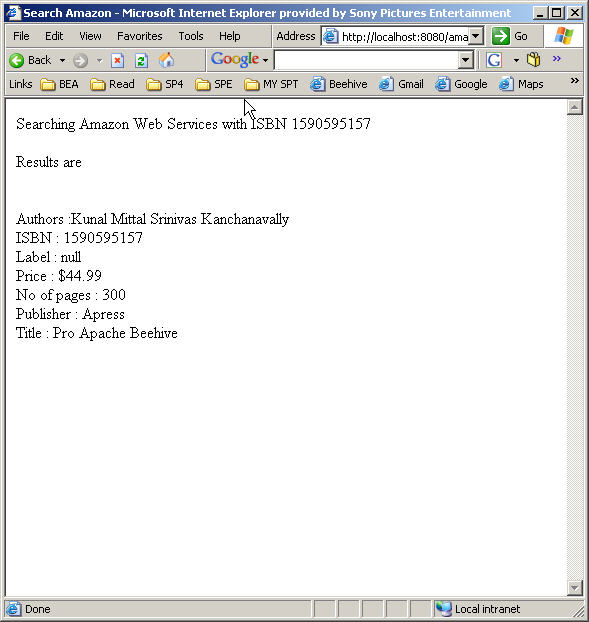
基於 J2EE 1.4,整合 Apache Axis + Apache Scout,支援:
JAVA_HOME。AXIS_HOME。AWSECommerceService.wsdl)。set AXIS_HOME=c:\axis-1-2
set CLASSPATH=.
set CLASSPATH=%AXIS_HOME%\lib\axis.jar;%CLASSPATH%
set CLASSPATH=%AXIS_HOME%\lib\commons-discovery.jar;%CLASSPATH%
set CLASSPATH=%AXIS_HOME%\lib\commons-logging.jar;%CLASSPATH%
set CLASSPATH=%AXIS_HOME%\lib\jaxrpc.jar;%CLASSPATH%
set CLASSPATH=%AXIS_HOME%\lib\saaj.jar;%CLASSPATH%
set CLASSPATH=%AXIS_HOME%\lib\log4j-1.2.8.jar;%CLASSPATH%
set CLASSPATH=%AXIS_HOME%\lib\wsdl4j.jar;%CLASSPATH%java org.apache.axis.wsdl.WSDL2Java AWSECommerceService.wsdl生成 com 目錄,包含 Stubs、Callers、Data Types。
package com.amazon.xml.AWSECommerceServer;
public class AmazonClient {
    public Items[] lookupISBN(String isbn) throws Exception {
        AWSECommerceServiceLocator locator = new AWSECommerceServiceLocator();
        AWSECommerceServicePortType port = locator.getAWSECommerceServicePort();
        ItemLookup lookup = new ItemLookup();
        lookup.setAssociateTag("YOUR_TAG");
        lookup.setSubscriptionId("YOUR_SUB_ID");
        ItemLookupRequest req = new ItemLookupRequest();
        req.setMerchantId("All");
        req.setItemId(new String[]{isbn.trim()});
        req.setResponseGroup(new String[]{"Medium","OfferFull","Variations","Images"});
        lookup.setRequest(new ItemLookupRequest[]{req});
        ItemLookupResponse resp = port.itemLookup(lookup);
        return resp.getItems();
    }
}<%@ page import="com.amazon.xml.AWSECommerceServer.*" %>
<%
AmazonClient client = new AmazonClient();
Items[] items = client.lookupISBN(request.getParameter("isbn"));
if (items != null) {
for (Items item : items) {
// 迭代 Item 顯示書名、作者、圖片、價格...
}
}
%><web-app xmlns="https://java.sun.com/xml/ns/j2ee" version="2.3">
<display-name>Amazon Sample</display-name>
<welcome-file-list><welcome-file>searchAmazon.jsp</welcome-file></welcome-file-list>
</web-app><web-app xmlns="https://geronimo.apache.org/xml/ns/web/jetty"
configId="amazonclient" parentId="amazonClient">
<context-root>/amazonclient</context-root>
<context-priority-classloader>true</context-priority-classloader>
</web-app>jar cf amazon.war .
cp amazon.war $GERONIMO_HOME/
java -jar bin/deployer.jar deploy amazon.war啟動 Geronimo:java -jar bin/server.jar,訪問 https://localhost:8080/amazonclient/searchAmazon.jsp。