預設 Console 黑底白字在資訊密集時極難辨識關鍵日誌。本文展示如何利用 Console.ForegroundColor / BackgroundColor 實現分級彩色輸出,並封裝為執行緒安全的 Logger 類,效果堪比 Log4Net 控制台輸出。
傳統單色輸出:
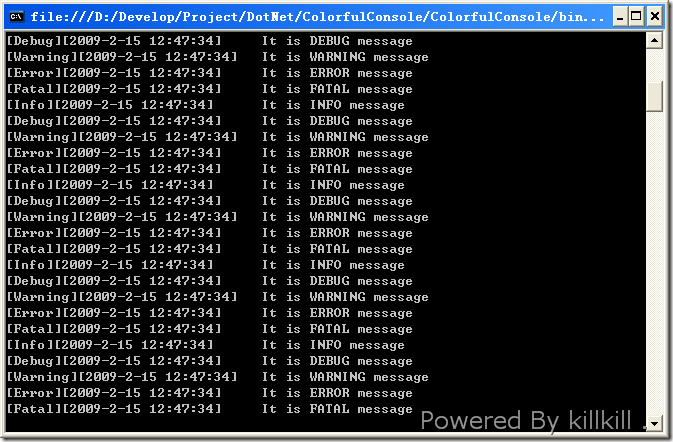
七彩分級輸出:
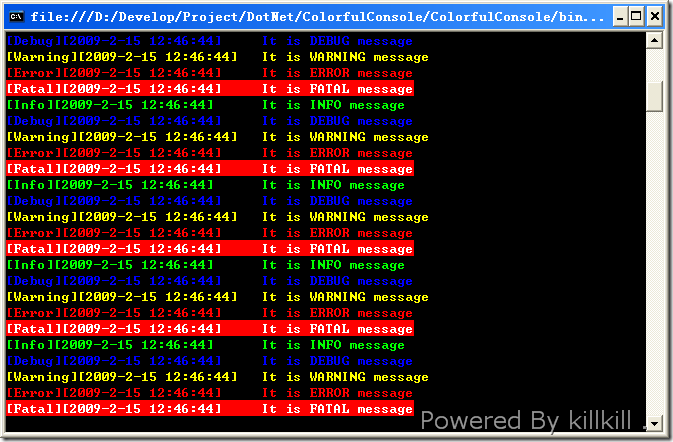
public enum Level { Info, Debug, Warning, Error, Fatal }

public static class Logger {
    private static readonly Mutex mutex = new Mutex(); // 多執行緒同步

    // 傳統單色輸出
    public static void OldLog(Level level, string message) {
        Console.WriteLine($"[{level}][{DateTime.Now}]\t{message}");
    }

    // 七彩輸出 (執行緒安全)
    public static void NewLog(Level level, string message) {
        mutex.WaitOne();
        try {
            SetConsoleColor(level);
            Console.WriteLine($"[{level}][{DateTime.Now}]\t{message}");
        } finally {
            ResetConsoleColor();
            mutex.ReleaseMutex();
        }
    }

    private static void SetConsoleColor(Level level) {
        switch (level) {
            case Level.Info:    Console.ForegroundColor = ConsoleColor.Green; break;
            case Level.Debug:   Console.ForegroundColor = ConsoleColor.Blue; break;
            case Level.Warning: Console.ForegroundColor = ConsoleColor.Yellow; break;
            case Level.Error:   Console.ForegroundColor = ConsoleColor.Red; break;
            case Level.Fatal:
                Console.ForegroundColor = ConsoleColor.White;
                Console.BackgroundColor = ConsoleColor.Red;
                break;
            default:            Console.ForegroundColor = ConsoleColor.Cyan; break;
        }
    }

    private static void ResetConsoleColor() {
        Console.ForegroundColor = ConsoleColor.Gray; // 預設灰白
        Console.BackgroundColor = ConsoleColor.Black;
    }
}static void Main() {
// 單色測試
for (int i = 0; i < 10; i++) {
Logger.OldLog(Level.Info, "It is INFO message");
Logger.OldLog(Level.Debug, "It is DEBUG message");
Logger.OldLog(Level.Warning, "It is WARNING message");
Logger.OldLog(Level.Error, "It is ERROR message");
Logger.OldLog(Level.Fatal, "It is FATAL message");
}
Console.ReadLine();
Console.Clear();
// 七彩測試
for (int i = 0; i < 10; i++) {
Logger.NewLog(Level.Info, "It is INFO message");
Logger.NewLog(Level.Debug, "It is DEBUG message");
Logger.NewLog(Level.Warning, "It is WARNING message");
Logger.NewLog(Level.Error, "It is ERROR message");
Logger.NewLog(Level.Fatal, "It is FATAL message");
}
Console.ReadLine();
}Level 與 switch,符合開放封閉原則。Console.SetOut 將日誌同時寫入檔案,檔案版去除 ANSI 色碼。jq/ELK 分析。Microsoft.Extensions.Logging + ConsoleLogger 內建支援 ANSI 色碼與分級。七彩輸出雖小,卻能大幅降低除錯認知負荷,是 Console 開發者的必備技能。