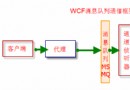
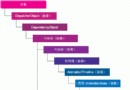
WCF 通訊透過端點實現,每個端點包含四個核心元素:
Client 端點必須與 Service 端點完全匹配(Address、Binding、Contract)才能通訊。
方案包含 Contract、Service、Hosting (Self-host)、Client、IIS Host 五個專案。以下展示關鍵程式碼與設定。
[ServiceContract]
public interface IGeneralCalculator
{
    [OperationContract]
    double Add(double x, double y);
}public class GeneralCalculatorService : IGeneralCalculator
{
public double Add(double x, double y) { return x + y; }
}Program.cs 兩種啟動方式:程式碼建立端點、或透過設定檔。
// 程式碼方式
Uri httpBase = new Uri("https://localhost:8888/generalCalculator");
Uri tcpBase = new Uri("net.tcp://localhost:9999/generalCalculator");
using (ServiceHost host = new ServiceHost(typeof(GeneralCalculatorService), httpBase, tcpBase))
{
    host.AddServiceEndpoint(typeof(IGeneralCalculator), new BasicHttpBinding(), "");
    host.AddServiceEndpoint(typeof(IGeneralCalculator), new NetTcpBinding(), "");
    // 啟用 Metadata
    ServiceMetadataBehavior behavior = host.Description.Behaviors.Find<ServiceMetadataBehavior>();
    if (behavior == null) { behavior = new ServiceMetadataBehavior(); host.Description.Behaviors.Add(behavior); }
    behavior.HttpGetEnabled = true;
    host.Opened += delegate { Console.WriteLine("Calculator Service has begun to listen"); };
    host.Open();
    Console.Read();
}
App.config 設定檔方式:
<services>
  <service name="Artech.WCFService.Service.GeneralCalculatorService" behaviorConfiguration="calculatorServieBehavior">
    <endpoint address="" binding="basicHttpBinding" contract="Artech.WCFService.Contract.IGeneralCalculator" />
    <endpoint address="" binding="netTcpBinding" contract="Artech.WCFService.Contract.IGeneralCalculator" />
    <host>
      <baseAddresses>
        <add baseAddress="https://localhost:8888/generalcalculator" />
        <add baseAddress="net.tcp://localhost:9999/generalCalculator" />
      </baseAddresses>
    </host>
  </service>
</services>
<behaviors>
  <serviceBehaviors>
    <behavior name="calculatorServieBehavior">
      <serviceMetadata httpGetEnabled="true" />
    </behavior>
  </serviceBehaviors>
</behaviors>.svc 檔:<%@ ServiceHost Service="Artech.WCFService.Service.GeneralCalculatorService" %>
Web.config 類似 Self-host 但無 baseAddresses(由 IIS 提供)。
<client>
  <endpoint name="selfHostEndpoint_http" address="https://localhost:8888/generalCalculator" binding="basicHttpBinding" contract="Artech.WCFService.Contract.IGeneralCalculator" />
  <endpoint name="selfHostEndpoint_tcp" address="net.tcp://localhost:9999/generalCalculator" binding="netTcpBinding" contract="Artech.WCFService.Contract.IGeneralCalculator" />
  <endpoint name="iisHostEndpoint" address="https://localhost/wcfservice/GeneralCalculatorService.svc" binding="basicHttpBinding" contract="Artech.WCFService.Contract.IGeneralCalculator" />
</client>
Client 程式碼透過 ClientBase<T> 呼叫,建構函式可傳入 endpointConfigurationName、Binding+Address 等。
Address 包含 URI (必要)、Identity (可選,用於驗證)、Headers (可選,用於路由、驗證等進階案例)。可在設定檔中加入 Headers:
<endpoint ...>
  <headers>
    <role>admin</role>
  </headers>
</endpoint>
Binding 是 BindingElement 集合,分三層:
| 層級 | 選項 | 必要性 |
|---|---|---|
| Transaction | TransactionFlowBindingElement | 否 |
| Reliability | ReliableSessionBindingElement | 否 |
| Security | SecurityBindingElement | 否 |
| Encoding | Text, Binary, MTOM, Custom | 是 |
| Transport | TCP, Named Pipes, HTTP, HTTPS, MSMQ, Custom | 是 |
每個 Binding 必須包含一個 Transport 與一個 Encoding Element,Protocol Element 視需求加入。