.NET 平台歷經 .NET Remoting、XML Web Services、WSE、Enterprise Services、MSMQ 等技術。Remoting 在 .NET 內部成熟且支援多傳輸/編碼、雙向通訊;Web Services 提供跨平台互通;WSE 強化安全、可靠傳訊、交易與大數據傳輸。但這些技術各自為政、程式模型不一。WCF 整合上述技術,提供一致的程式模型構建分布式應用。
建立五個專案:
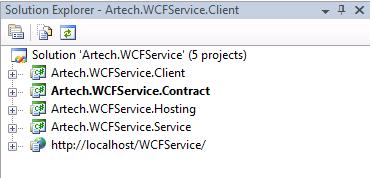
在 Contract 專案定義介面:
[ServiceContract]
public interface ICalculator
{
    [OperationContract]
    double Add(double x, double y);
}使用屬性宣告式編程:[ServiceContract] 標記介面,[OperationContract] 標記方法。建議 Contract 與 Implementation 分離。
Contract 定義服務可用操作與簽名,從訊息交換角度決定 MEP (One-way, Request/Response, Duplex)。Request/Response 模式下即使回傳 void,仍會回傳空 SOAP Message。
public class CalculatorService : ICalculator
{
    public double Add(double x, double y) { return x + y; }
}Host 本質:將服務置於執行程序,以端點暴露並監聽請求。同一服務可註冊多端點支援不同傳輸。
Uri baseUri = new Uri("https://localhost:8080/calculatorService");
using (ServiceHost host = new ServiceHost(typeof(CalculatorService), baseUri))
{
    BasicHttpBinding binding = new BasicHttpBinding();
    host.AddServiceEndpoint(typeof(ICalculator), binding, "");
    // 啟用 Metadata
    ServiceMetadataBehavior behavior = host.Description.Behaviors.Find<ServiceMetadataBehavior>();
    if (behavior == null) { behavior = new ServiceMetadataBehavior(); host.Description.Behaviors.Add(behavior); }
    behavior.HttpGetEnabled = true; behavior.HttpGetUrl = baseUri;
    host.Opened += delegate { Console.WriteLine("Calculator Service begin to listen via {0}", host.BaseAddresses[0]); };
    host.Open();
    Console.Read();
}
啟動後可在瀏覽器輸入 Metadata 位址驗證。
App.config:
<services>
  <service name="Artech.WCFService.Service.CalculatorService" behaviorConfiguration="calculatorBehavior">
    <host><baseAddresses><add baseAddress="https://localhost:8888/GeneralCalculator"/></baseAddresses></host>
    <endpoint address="" binding="basicHttpBinding" contract="Artech.WCFService.Contract.ICalculator" />
  </service>
</services>
<behaviors>
  <serviceBehaviors>
    <behavior name="calculatorBehavior"><serviceMetadata httpGetEnabled="true" httpGetUrl="" /></behavior>
  </serviceBehaviors>
</behaviors>
Program.cs 簡化為:
using (ServiceHost host = new ServiceHost(typeof(CalculatorService)))
{
    host.Opened += delegate { Console.WriteLine("Calculator Service begin to listen via {0}", host.BaseAddresses[0]); };
    host.Open(); Console.Read();
}
設定檔方式便於部署時調整 Address/Binding,無需重新編譯。
Client 僅需 Contract 與通訊設定。繼承 ClientBase<TChannel> 簡化呼叫:
public class CalculatorClient : ClientBase<ICalculator>, ICalculator
{
    public CalculatorClient() : base() { }
    public double Add(double x, double y) { return this.Channel.Add(x, y); }
}
Client 端 App.config:
<client>
  <endpoint address="https://localhost:8080/calculatorService" binding="basicHttpBinding" contract="Artech.WCFService.Contract.ICalculator" />
</client>
Program.cs 呼叫:
using (CalculatorClient client = new CalculatorClient())
{
    Console.WriteLine("x + y = {2} where x = {0} and y = {1}", 1, 2, client.Add(1, 2));
    Console.Read();
}
至此完成第一個 WCF 服務與用戶端的建立與執行。