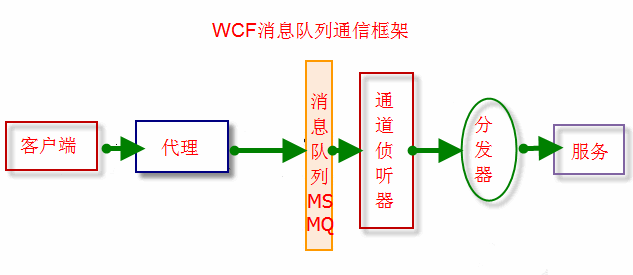
MSMQ (Microsoft Message Queuing) 提供可靠的非同步、離線訊息傳遞。WCF 透過 NetMsmqBinding 整合 MSMQ,賦予服務「高可用性、負載平緩、作業補償」能力。
<security mode="None">,避免憑證與 AD 依賴。[ServiceContract(Namespace = "https://www.cnblogs.com/frank_xl/")]
public interface IWCFMSMQService {
[OperationContract(IsOneWay = true)]
void SayHelloMSMQ(string name);
}
public class WCFMSMQService : IWCFMSMQService {
public WCFMSMQService() {
Console.WriteLine("Instance created at {0}", DateTime.Now);
}
public void SayHelloMSMQ(string name) {
Console.WriteLine("Hello! {0} at {1}", name, DateTime.Now);
}
}<services>
<service name="WCFService.WCFMSMQService" behaviorConfiguration="WCFService.WCFServiceBehavior">
<endpoint address="net.msmq://localhost/Private/FrankWCFMSMQ"
binding="netMsmqBinding" bindingConfiguration="msmq"
contract="WCFService.IWCFMSMQService" />
<endpoint address="mex" binding="mexHttpBinding" contract="IMetadataExchange" />
<host><baseAddresses><add baseAddress="https://localhost:8001/" /></baseAddresses></host>
</service>
</services>
<bindings>
<netMsmqBinding>
<binding name="msmq" durable="false" exactlyOnce="false">
<security mode="None">
<transport msmqProtectionLevel="None"/>
<message clientCredentialType="None"/>
</security>
</binding>
</netMsmqBinding>
</bindings>var proxy = new WCFMSMQServiceClient("NetMsmqBinding_IWCFMSMQService");
Console.WriteLine("First Call at {0}", DateTime.Now);
proxy.SayHelloMSMQ("Frank");
Thread.Sleep(2000);
Console.WriteLine("Second Call at {0}", DateTime.Now);
proxy.SayHelloMSMQ("Frank Xu");
Thread.Sleep(2000);
Console.WriteLine("Last Call at {0}", DateTime.Now);
proxy.SayHelloMSMQ("Frank Xu Lei");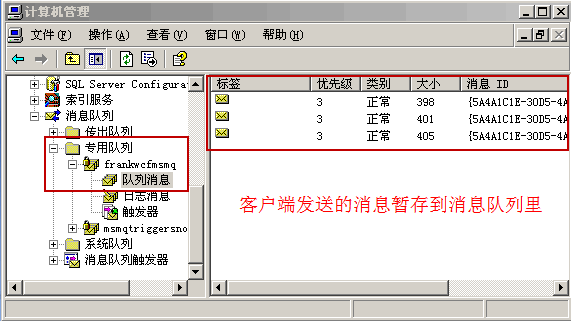
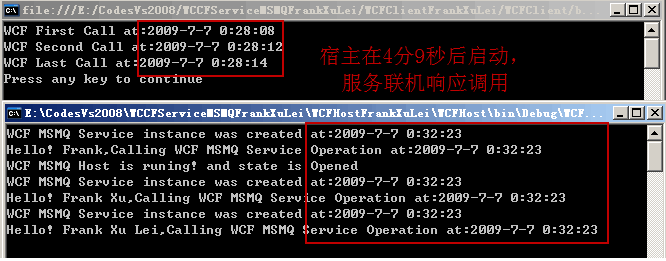
exactlyOnce="true")、持久訊息 (durable="true") 以確保不遺失。WCF + MSMQ 以最小代碼變更賦予服務離線處理能力,是實現高可用、可擴充分散式架構的關鍵技術之一。