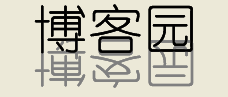
private void Form1_Paint(object sender, PaintEventArgs e)
{
    Graphics g = e.Graphics;
    g.SmoothingMode = SmoothingMode.AntiAlias;

    string text = "博客園";
    using (Font font = new Font("幼圓", 40, FontStyle.Regular))
    using (Brush foreBrush = Brushes.Black)
    using (Brush backBrush = Brushes.Gray)
    {
        SizeF size = g.MeasureString(text, font);
        int posX = (this.Width - (int)size.Width) / 2;
        int posY = (this.Height - (int)size.Height) / 2;

        g.TranslateTransform(posX, posY); // 移至中心

        // 計算字體基線高度,用於翻轉後的垂直對齊
        int ascent = font.FontFamily.GetCellAscent(font.Style);
        int spacing = font.FontFamily.GetLineSpacing(font.Style);
        int lineHeight = (int)font.GetHeight(g);
        int height = lineHeight * ascent / spacing;

        // 保存狀態,縱向縮放 -1 實現鏡像
        GraphicsState state = g.Save();
        g.ScaleTransform(1, -1.0F);
        g.DrawString(text, font, backBrush, 0, -height); // 倒影(灰色)
        g.Restore(state);

        // 原文字
        g.DrawString(text, font, foreBrush, 0, -height);
    }
}
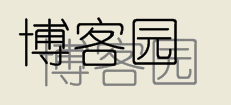
陰影實現同前文:灰色文字偏移繪製,前景文字覆蓋。建議將偏移量設置為字體大小的 5%-10% 以獲得自然效果。
Font、Brush、Image 均實現 IDisposable,務必在 using 塊中使用或手動 Dispose(),防止 GDI+ 對象泄漏導致「Parameter is not valid」異常。