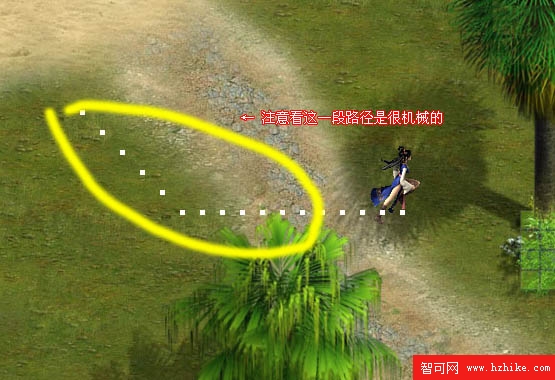
可結合 A* 創造優美移動(如帝國時代改進型 A*)。回顧第七節:純 A* 路徑無障礙時仍有折疊(見下圖)。
主角地圖座標與副本地圖像素一一對應。例:主角 (356,248) 對應副本像素 (356,248)。可寫函數取副本該點顏色,映射回主角地圖知曉當前狀態(障礙/可行/傳送點)。
NormalMove:第一節直線移動,修正腳底定位,記錄目標 Target。AStarMove:前幾節 A* 尋路移動。根據副本地圖拾色結果調用對應模式。
private void Carrier_MouseLeftButtonDown(object sender, MouseButtonEventArgs e) {
    Point p = e.GetPosition(Carrier);
    if (pickColor(Deeper, (int)p.X, (int)p.Y) != Colors.Black) {
        target = p;
        NormalMove(p);
    }
}

BitmapSource Deeper = new BitmapImage(new Uri(@"Map\Deeper.jpg", UriKind.Relative));
int X, Y; Point target;

private void dispatcherTimer1_Tick(object sender, EventArgs e) {
    X = Convert.ToInt32(Canvas.GetLeft(Spirit) + SpiritCenterX * GridSize);
    Y = Convert.ToInt32(Canvas.GetTop(Spirit) + SpiritCenterY * GridSize);
    message.Text = pickColor(Deeper, X, Y).ToString();

    if (pickColor(Deeper, X, Y) == Colors.Black)
        AStarMove(target);
    else if (pickColor(Deeper, X, Y) == Colors.Yellow) {
        storyboard.Stop();
        Canvas.SetLeft(Spirit, 200 - SpiritCenterX * GridSize);
        Canvas.SetTop(Spirit, 20 - SpiritCenterY * GridSize);
    }

    rect = new Rectangle();
    rect.Fill = new SolidColorBrush(Colors.Snow);
    rect.Width = 5; rect.Height = 5;
    Carrier.Children.Add(rect);
    Canvas.SetLeft(rect, X);
    Canvas.SetTop(rect, Y);
}
即時拾色主角腳底座標:黑→啟動 A*;黃→傳送;白點記錄軌跡。