通過先繪製偏移的灰色文字,再繪製原位置的前景文字,營造立體感。
private void Form1_Paint(object sender, PaintEventArgs e)
{
    string text = "博客園";
    using (Brush shadowBrush = Brushes.Gray)
    using (Brush foreBrush = Brushes.Black)
    using (Font font = new Font("幼圓", 40, FontStyle.Regular))
    {
        Graphics g = e.Graphics; // 推薦用 e.Graphics 而非 CreateGraphics()
        SizeF size = g.MeasureString(text, font);
        float posX = (this.Width - size.Width) / 4;
        float posY = (this.Height - size.Height) / 3;

        // 陰影偏移 20 像素
        g.DrawString(text, font, shadowBrush, posX + 20, posY + 20);
        // 前景
        g.DrawString(text, font, foreBrush, posX, posY);
    }
}

private void Form1_Paint(object sender, PaintEventArgs e)
{
    using (TextureBrush brush = new TextureBrush(Image.FromFile(Application.StartupPath + @"\myPicture.jpg")))
    using (Font font = new Font("隸書", 60))
    {
        e.Graphics.DrawString("博客園", font, brush, new PointF(0, 0));
    }
}
關鍵點: TextureBrush 以圖片作為填充圖案,文字輪廓即成為圖片的裁剪區域。
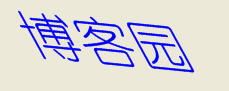
private void Form1_Paint(object sender, PaintEventArgs e)
{
    Graphics g = e.Graphics;
    g.SmoothingMode = SmoothingMode.AntiAlias;

    using (Font font = new Font("Arial", 40, FontStyle.Italic)) // 字體自帶斜體
    using (Brush brush = Brushes.Blue)
    {
        // 或使用 Matrix.Shear 實現幾何傾斜
        Matrix m = new Matrix();
        m.Shear(0.3f, 0); // X 方向剪切
        g.Transform = m;
        g.DrawString("博客園", font, brush, 50, 50);
        g.ResetTransform();
    }
}
TextureBrush(Image) 將圖片映射為畫刷。FontStyle.Italic 或 Matrix.Shear 幾何變換。e.Graphics 並配合 using 釋放非托管資源。