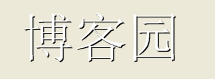
private void Form1_Paint(object sender, PaintEventArgs e)
{
    string text = "博客園";
    using (Font font = new Font("宋體", 40, FontStyle.Regular))
    using (Brush backBrush = Brushes.Black)  // 深色作陰面
    using (Brush foreBrush = Brushes.White)  // 淺色作亮面
    {
        Graphics g = e.Graphics;
        SizeF size = g.MeasureString(text, font);
        float posX = (this.Width - size.Width) / 2;
        float posY = (this.Height - size.Height) / 2;

        // 先畫深色偏移 1 像素(陰面)
        g.DrawString(text, font, backBrush, posX + 1, posY + 1);
        // 再畫淺色原位置(亮面)
        g.DrawString(text, font, foreBrush, posX, posY);
    }
}
原理: 模擬光源從左上方照射,右下邊緣投影產生立體浮雕感。偏移量可根據字體大小調整(通常 1-3 像素)。
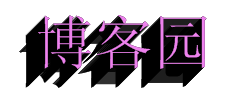
private void Form1_Paint(object sender, PaintEventArgs e)
{
    string text = "博客園";
    using (Font font = new Font("Times New Roman", 40, FontStyle.Regular))
    using (Brush backBrush = Brushes.Black)
    using (Brush foreBrush = Brushes.Violet)
    {
        Graphics g = e.Graphics;
        g.Clear(Color.White);
        SizeF size = g.MeasureString(text, font);
        float posX = (this.Width - size.Width) / 2;
        float posY = (this.Height - size.Height) / 3;

        // 多次繪製深色文字,每次遞減偏移,形成疊墨邊緣
        for (int i = 0; i < 20; i++)
        {
            g.DrawString(text, font, backBrush, posX - i, posY + i);
        }
        // 最後繪製前景色
        g.DrawString(text, font, foreBrush, posX, posY);
    }
}
原理: 連續偏移繪製深色文字,模擬油墨在紙張邊緣擴散堆疊的視覺效果,最後以鮮豔前景色覆蓋核心區域。
| 效果 | 核心手法 | 視覺特徵 |
|---|---|---|
| 浮雕 | 雙層繪製 + 1像素對角偏移 | 鋼印/浮雕立體感 |
| 印版 | 多層疊加 + 漸變偏移 | 油墨擴散/復古印刷感 |
OnPaint 中執行可能導致閃爍或卡頓。Bitmap 緩存,OnPaint 直接 DrawImage。BufferedGraphics 雙緩衝機制。