private void Form1_Paint(object sender, PaintEventArgs e)
{
    Graphics g = e.Graphics;
    g.TextRenderingHint = TextRenderingHint.ClearTypeGridFit;
    g.SmoothingMode = SmoothingMode.AntiAlias;

    using (Font font = new Font("Times New Roman", 48))
    using (SolidBrush grayBrush = new SolidBrush(Color.Gray))
    using (SolidBrush colorBrush = new SolidBrush(Color.BlueViolet))
    {
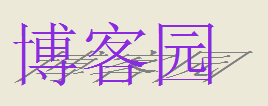
        string text = "博客園";

        // 構建複合變換矩陣:剪切 -> 縮放 -> 平移
        Matrix matrix = new Matrix();
        matrix.Shear(-1.5f, 0.0f);   // X 方向剪切(傾斜)
        matrix.Scale(1, 0.5f);       // Y 方向壓縮 50%(投影扁平化)
        matrix.Translate(130, 88);   // 平移到目標位置

        // 繪製投影(陰影)
        g.Transform = matrix;
        g.DrawString(text, font, grayBrush, new PointF(0, 30));

        // 重置變換,繪製正常文字
        g.ResetTransform();
        g.DrawString(text, font, colorBrush, new PointF(0, 30));
    }
}
TextRenderingHint.ClearTypeGridFit:開啟 ClearType 亞像素渲染,文字鋒利度最高。SmoothingMode.AntiAlias:幾何邊緣抗鋸齒,配合文字渲染提升整體質量。SolidBrush:純色畫刷,配合 Color 結構指定 ARGB 值。Color.FromArgb(alpha, color) 實現漸變透明投影。OnPaint,打造統一視覺風格。本系列共 6 篇,依次介紹:投影、浮雕、印版、倒影、陰影、旋轉、紋理、傾斜等藝術字效果,掌握 Graphics、Matrix、Brush、Font 核心類即可舉一反三。