網遊中物品欄、裝備欄、技能欄、快捷列的圖標需支援雙向拖放,且有類型限制(技能不可放入物品欄、非裝備不可放入裝備欄、被動技能不可拖放)。本節實作物品欄與裝備欄的拖放與雙擊切換兩種模式。
使用 Silverlight Toolkit ListBoxDragDropTarget,設定 DragDrop.AllowDrop="True",內部 ListBox 項目即可拖放。
預設 VirtualizingStackPanel 不支援內部拖放,需改用 StackPanel,但 StackPanel 僅單行/單列。解決方案:使用 WrapPanel 實現自動換行網格。
<toolkit:ListBoxDragDropTarget x:Name="dragDropTarget" window:DragDrop.AllowDrop="True">
    <ListBox x:Name="listBox" Background="Transparent"
             ScrollViewer.HorizontalScrollBarVisibility="Disabled"
             ScrollViewer.VerticalScrollBarVisibility="Disabled">
        <ListBox.ItemsPanel>
            <ItemsPanelTemplate>
                <toolkit:WrapPanel Orientation="Horizontal" />
            </ItemsPanelTemplate>
        </ListBox.ItemsPanel>
    </ListBox>
</toolkit:ListBoxDragDropTarget>ObservableCollection 集合變更自動通知 UI 更新,優於 List。從 XML 讀取物品資料建立 QXIcon 並加入集合。
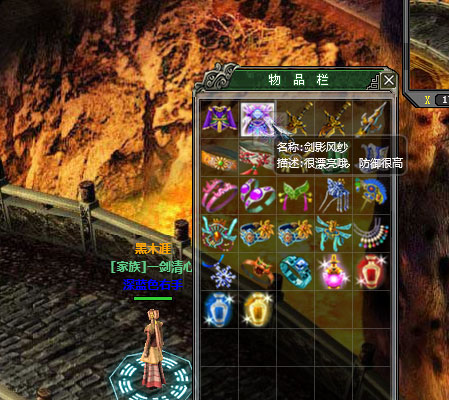
<Items>
  <Item Code="0" Category="1" IconCode="45" EquipCode="0" Name="武威之逐日衣"
        Description="★★★★☆閃避很高" Value="0,0,0,0,200,0,..." />
  <Item Code="1" Category="1" IconCode="46" EquipCode="0" Name="劍影風紗"
        Description="很漂亮哦,防御很高" Value="0,0,0,0,0,0,0,0,0,200,..." />
  <Item Code="2" Category="0" IconCode="47" EquipCode="0" Name="滅神之刃"
        Description="小心,很容易秒殺" Value="0,1450,8044,10,10,0,..." />
  ...
</Items>
Value 對應 21 個基礎屬性。綁定後物品欄顯示效果:
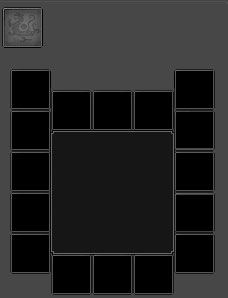
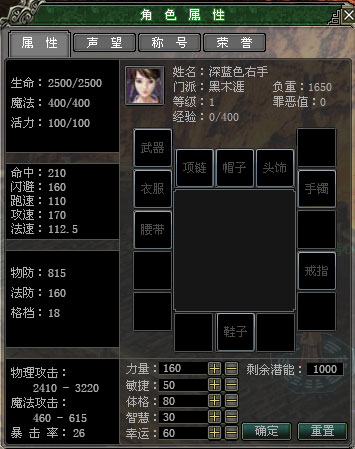
裝備欄位置不規則,採用每個裝備格一個 ListBoxDragDropTarget + ListBox 組合,自由定位 9 件裝備:
ItemDragStarting:開始拖曳ItemDragCompleted:拖曳完成(含短暫卡頓,疑似遍歷開銷)ItemDroppedOnSource:放回原 ListBoxDrop(目標)→ ItemDroppedOnTarget(來源):跨 ListBox 放置DragEnter、DragLeave、DragOver、GiveFeedback、QueryContinueDrag從 ListBox 拖到 WrapPanel 會出現 JS 無法除錯錯誤。StackPanel 間拖放正常。確認為 WrapPanel Bug。嘗試 PagedCollectionView 分頁同樣失敗。無奈自行實作事件邏輯。
註冊事件,判斷物品類型是否可放置(藥水不可裝備、帽子不可放鞋子位):
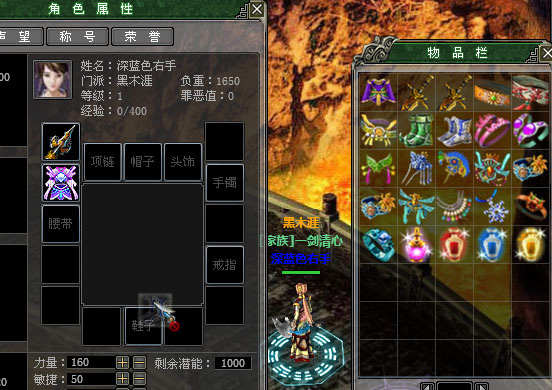
為 QXIcon 新增 MouseLeftButtonDoubleClick 事件,使用 250ms 計時器偵測雙擊:
doubleClickTimer = new DispatcherTimer() { Interval = TimeSpan.FromMilliseconds(250) };
doubleClickTimer.Tick += (s, e) => { doubleClickTimer.Stop(); };

this.MouseLeftButtonDown += (s, e) => {
    if (doubleClickTimer.IsEnabled)
    {
        doubleClickTimer.Stop();
        if (MouseLeftButtonDoubleClick != null) MouseLeftButtonDoubleClick(s, e);
    }
    else { doubleClickTimer.Start(); }
};裝備變更需重算主角屬性,並更新角色外觀(紙娃娃系統),具體邏輯視遊戲而定。
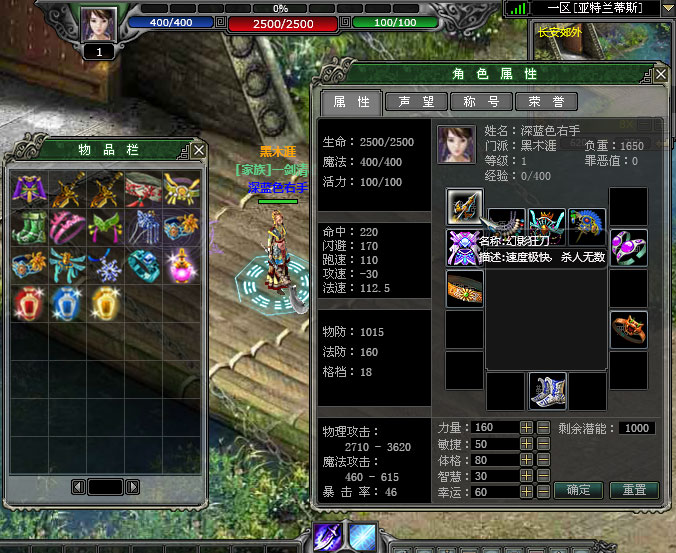
DragDropTarget 限制多、Bug 存在,未完善前自行實作拖放邏輯可控性更高(掌握來源、目標、替換對象)。期待工具包持續改進。
原始碼:目錄下載 / 線上演示:https://silverfuture.cn
出處:https://alamiye010.cnblogs.com/