圖(Graph)用於表示節點間關係。C# 中以節點物件集合表示頂點,鄰接矩陣表示邊關係。本文為複習筆記,程式碼附詳盡註解。
class Vertex {
    public string Data;
    public bool IsVisited;
    public Vertex(string vertexData) {
        Data = vertexData;
    }
}
每個節點包含資料欄位與是否被拜訪旗標。
public class Graph {
    private const int MaxVertices = 10;
    private Vertex[] vertices;
    public int[,] AdjMatrix;
    private int VertexCount = 0;

    public Graph() {
        AdjMatrix = new int[MaxVertices, MaxVertices];
        vertices = new Vertex[MaxVertices];
        for (int i = 0; i < MaxVertices; i++)
            for (int j = 0; j < MaxVertices; j++)
                AdjMatrix[i, j] = 0;
    }

    public void AddVertex(string v) {
        vertices[VertexCount] = new Vertex(v);
        VertexCount++;
    }

    public void AddEdge(int v1, int v2) {
        AdjMatrix[v1, v2] = 1; // 有向邊
    }

    public void DisplayVertex(int pos) {
        Console.Write(vertices[pos].Data + " ");
    }
}適用於有向無環圖(DAG),將所有頂點線性化。步驟:
// 尋找無後繼節點
private int FindNoSuccessor() {
    for (int i = 0; i < VertexCount; i++) {
        bool hasEdge = false;
        for (int j = 0; j < VertexCount; j++) {
            if (AdjMatrix[i, j] == 1) { hasEdge = true; break; }
        }
        if (!hasEdge) return i;
    }
    return -1;
}

// 刪除節點與對應矩陣行列
private void DeleteVertex(int v) {
    if (v <= VertexCount - 1) {
        for (int i = v; i < VertexCount; i++) vertices[i] = vertices[i + 1];
        for (int j = v; j < VertexCount; j++) MoveRow(j, VertexCount);
        for (int k = v; k < VertexCount - 1; k++) MoveCol(k, VertexCount - 1);
        VertexCount--;
    }
}
private void MoveRow(int row, int len) { /* 移動矩陣行 */ }
private void MoveCol(int col, int len) { /* 移動矩陣列 */ }public void TopSort() {
int originalCount = VertexCount;
Stack result = new Stack();
while (VertexCount > 0) {
int curr = FindNoSuccessor();
if (curr == -1) { Console.WriteLine("圖含環路,無法拓樸排序"); return; }
result.Push(vertices[curr].Data);
DeleteVertex(curr);
}
Console.Write("拓樸排序順序: ");
while (result.Count > 0) Console.Write(result.Pop() + " ");
}從起始節點深入到底,再回溯探索其他路徑。使用堆疊輔助。
private int GetAdjUnvisitedVertex(int v) {
    for (int j = 0; j < VertexCount; j++)
        if (AdjMatrix[v, j] == 1 && !vertices[j].IsVisited) return j;
    return -1;
}

public void DepthFirstSearch() {
    Stack stack = new Stack();
    vertices[0].IsVisited = true; DisplayVertex(0); stack.Push(0);
    while (stack.Count > 0) {
        int v = GetAdjUnvisitedVertex((int)stack.Peek());
        if (v == -1) stack.Pop();
        else { vertices[v].IsVisited = true; DisplayVertex(v); stack.Push(v); }
    }
    // 重置旗標
    for (int i = 0; i < VertexCount; i++) vertices[i].IsVisited = false;
}層層遍歷,使用佇列輔助。
public void BreadthFirstSearch() {
    Queue queue = new Queue();
    vertices[0].IsVisited = true; DisplayVertex(0); queue.Enqueue(0);
    while (queue.Count > 0) {
        int v1 = (int)queue.Dequeue();
        int v2 = GetAdjUnvisitedVertex(v1);
        while (v2 != -1) {
            vertices[v2].IsVisited = true; DisplayVertex(v2); queue.Enqueue(v2);
            v2 = GetAdjUnvisitedVertex(v1);
        }
    }
    for (int i = 0; i < VertexCount; i++) vertices[i].IsVisited = false;
}建立圖形:
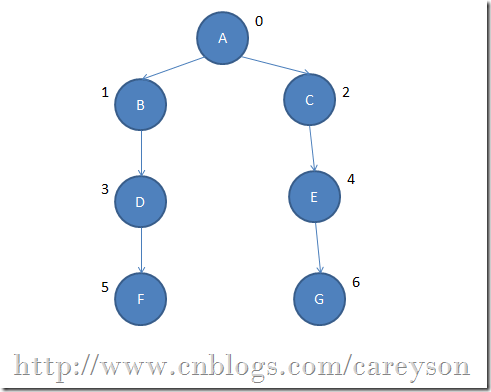
static void Main() {
    Graph g = new Graph();
    g.AddVertex("A"); g.AddVertex("B"); g.AddVertex("C"); g.AddVertex("D");
    g.AddVertex("E"); g.AddVertex("F"); g.AddVertex("G");
    g.AddEdge(0,1); g.AddEdge(0,2); g.AddEdge(1,3); g.AddEdge(2,4);
    g.AddEdge(3,5); g.AddEdge(4,6);
    Console.WriteLine("\n深度優先遍歷:"); g.DepthFirstSearch();
    Console.WriteLine("\n廣度優先遍歷:"); g.BreadthFirstSearch();
    Console.ReadKey();
}
執行結果顯示 DFS 與 BFS 遍歷順序差異。