在 Panel (或 FlowLayoutPanel/TableLayoutPanel) 內放置多個 Button,預設靠左對齊。調整 Anchor、Dock 皆無法直接達成「按鈕群組整體水平置中」且「視窗縮放時保持置中」。
Dock = Fill 或固定大小。FlowDirection = LeftToRight (預設)WrapContents = false (不換行)AutoSize = true (依內容調整大小)Anchor = Top | Left | Right (隨父容器寬度調整)TextAlign 無效,需程式碼設定)。private void CenterButtonsInPanel(Panel container, params Button[] buttons)
{
if (container == null || buttons == null || buttons.Length == 0) return;
// 確保按鈕不在自動排版容器中
foreach (var btn in buttons)
{
btn.Anchor = AnchorStyles.None; // 移除錨點,由程式碼控制位置
}
container.Resize += (s, e) => RecalculatePositions();
RecalculatePositions();
void RecalculatePositions()
{
int totalWidth = buttons.Sum(b => b.Width) + (buttons.Length - 1) * 6; // 6px 間距
int startX = (container.ClientSize.Width - totalWidth) / 2;
if (startX < 0) startX = 0;
int y = (container.ClientSize.Height - buttons[0].Height) / 2; // 垂直置中
if (y < 0) y = 0;
int x = startX;
foreach (var btn in buttons)
{
btn.Location = new Point(x, y);
x += btn.Width + 6;
}
}
}
// 表單 Load 時呼叫
private void Form1_Load(object sender, EventArgs e)
{
CenterButtonsInPanel(panel1, btnOK, btnCancel, btnHelp);
}Anchor 設為 None (取消所有勾選)。Resize 事件動態計算。Dock = Fill、ColumnCount = 3、RowCount = 1。Percent = 50%、第 1 欄 AutoSize、第 2 欄 Percent = 50%。Anchor = None、Dock = None。此法無需程式碼,縮放自動置中,適合固定版面。
取消 Anchor:
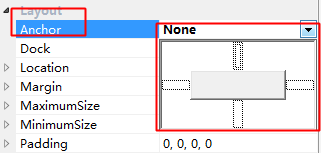
使用對齊工具:

Anchor = Left|Right 會隨容器寬度拉伸;Anchor = None 位置固定不隨容器移動。原文連結:https://www.bianceng.cn/Programming/csharp/201410/45581.htm