DataGridView 是 WinForms 最常用的資料表格控制項,但內建不支援直接在資料列嵌入下拉選單。本文示範三種實作方式:DataGridViewComboBoxColumn (內建、最簡單)、DataGridViewComboBoxCell 編輯控制項 (進階控制)、自訂編輯控制項 IDataGridViewEditingControl (完全客製化)。
var comboCol = new DataGridViewComboBoxColumn
{
    Name = "Category",
    HeaderText = "分類",
    DataSource = new[] { "水果", "蔬菜", "飲料", "零食" }, // 靜態資料源
    DisplayStyle = DataGridViewComboBoxDisplayStyle.DropDownButton,
    FlatStyle = FlatStyle.Flat,
    Width = 120
};
dataGridView1.Columns.Add(comboCol);
// 假設 Categories 資料表有 Id, Name 欄位
var dt = GetCategoriesFromDb(); // DataTable
var comboCol = new DataGridViewComboBoxColumn
{
    Name = "CategoryId",
    HeaderText = "分類",
    DataSource = dt,
    DisplayMember = "Name",    // 顯示文字
    ValueMember = "Id",        // 實際儲存值
    DataPropertyName = "CategoryId" // 對應資料列的屬性
};
dataGridView1.Columns.Add(comboCol);
public class ProductForm : Form
{
    private DataGridView _grid;
    private BindingSource _bindingSource;

    public ProductForm()
    {
        _grid = new DataGridView { Dock = DockStyle.Fill, AutoGenerateColumns = false };
        _bindingSource = new BindingSource();
        _grid.DataSource = _bindingSource;

        SetupColumns();
        LoadData();

        this.Controls.Add(_grid);
        this.Text = "商品管理 - ComboBox Column";
        this.ClientSize = new Size(800, 500);
    }

    private void SetupColumns()
    {
        _grid.Columns.AddRange(new DataGridViewColumn[]
        {
            new DataGridViewTextBoxColumn { Name="Id", HeaderText="編號", DataPropertyName="Id", ReadOnly=true, Width=60 },
            new DataGridViewTextBoxColumn { Name="Name", HeaderText="品名", DataPropertyName="Name", Width=200 },
            new DataGridViewComboBoxColumn
            {
                Name="Category", HeaderText="分類", DataPropertyName="CategoryId",
                DataSource = GetCategories(), DisplayMember="Name", ValueMember="Id",
                DisplayStyle = DataGridViewComboBoxDisplayStyle.DropDownButton,
                FlatStyle = FlatStyle.Flat, Width = 150
            },
            new DataGridViewTextBoxColumn { Name="Price", HeaderText="價格", DataPropertyName="Price", Width=100, DefaultCellStyle = new DataGridViewCellStyle { Format="C0" } }
        });
    }

    private DataTable GetCategories()
    {
        var dt = new DataTable();
        dt.Columns.Add("Id", typeof(int));
        dt.Columns.Add("Name", typeof(string));
        dt.Rows.Add(1, "水果");
        dt.Rows.Add(2, "蔬菜");
        dt.Rows.Add(3, "飲料");
        dt.Rows.Add(4, "零食");
        return dt;
    }

    private void LoadData()
    {
        var products = new List
        {
            new Product { Id=1, Name="蘋果", CategoryId=1, Price=50 },
            new Product { Id=2, Name="高麗菜", CategoryId=2, Price=30 },
            new Product { Id=3, Name="可樂", CategoryId=3, Price=25 }
        };
        _bindingSource.DataSource = products;
    }
}

public class Product
{
    public int Id { get; set; }
    public string Name { get; set; }
    public int CategoryId { get; set; }
    public decimal Price { get; set; }
}
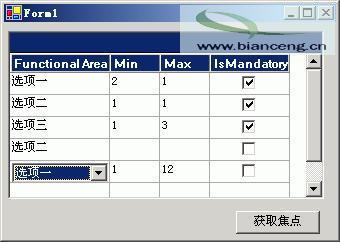
圖 01:DataGridViewComboBoxColumn 完整範例
private void DataGridView1_EditingControlShowing(object sender, DataGridViewEditingControlShowingEventArgs e)
{
    if (dataGridView1.CurrentCell.OwningColumn.Name == "Category" &&
        e.Control is ComboBox cb)
    {
        // 移除舊事件避免重複註冊
        cb.SelectionChangeCommitted -= Cb_SelectionChangeCommitted;
        cb.SelectionChangeCommitted += Cb_SelectionChangeCommitted;

        // 依據某欄位動態調整選項
        var row = dataGridView1.CurrentRow;
        if (row.Cells["Type"].Value?.ToString() == "Imported")
        {
            cb.DataSource = new[] { "進口水果", "進口零食" };
        }
        else
        {
            cb.DataSource = GetCategories().DefaultView;
            cb.DisplayMember = "Name"; cb.ValueMember = "Id";
        }
    }
}

private void Cb_SelectionChangeCommitted(object sender, EventArgs e)
{
    if (sender is ComboBox cb)
    {
        // 立即提交編輯值到 Grid
        dataGridView1.CurrentCell.Value = cb.SelectedValue;
        dataGridView1.EndEdit(); // 結束編輯模式
    }
}
public class CustomComboBox : ComboBox, IDataGridViewEditingControl
{
    DataGridView _dataGridView;
    int _rowIndex;
    bool _valueChanged;

    // 介面實作
    public DataGridView EditingControlDataGridView
    {
        get => _dataGridView;
        set => _dataGridView = value;
    }
    public object EditingControlFormattedValue
    {
        get => SelectedValue ?? Text;
        set => SelectedValue = value;
    }
    public int EditingControlRowIndex
    {
        get => _rowIndex;
        set => _rowIndex = value;
    }
    public bool EditingControlValueChanged
    {
        get => _valueChanged;
        set => _valueChanged = value;
    }
    public Cursor EditingPanelCursor => Cursors.Default;
    public bool RepositionEditingControlOnValueChange => false;

    public void ApplyCellStyleToEditingControl(DataGridViewCellStyle dataGridViewCellStyle)
    {
        Font = dataGridViewCellStyle.Font;
        ForeColor = dataGridViewCellStyle.ForeColor;
        BackColor = dataGridViewCellStyle.BackColor;
    }

    public bool EditingControlWantsInputKey(Keys keyData, bool dataGridViewWantsInputKey)
    {
        // 讓 ComboBox 處理上下鍵、Enter 鍵
        return (keyData & (Keys.Up | Keys.Down | Keys.Enter)) != 0;
    }

    public void PrepareEditingControlForEdit(bool selectAll) { }

    // 內部事件:值變更時通知 Grid
    protected override void OnSelectedIndexChanged(EventArgs e)
    {
        base.OnSelectedIndexChanged(e);
        _valueChanged = true;
        _dataGridView?.NotifyCurrentCellDirty(true);
    }
}
public class CustomComboBoxCell : DataGridViewCell
{
    public override Type EditType => typeof(CustomComboBox);
    public override Type ValueType => typeof(int);
    public override object DefaultNewRowValue => 0;

    public override void InitializeEditingControl(int rowIndex, object initialFormattedValue, DataGridViewCellStyle dataGridViewCellStyle)
    {
        base.InitializeEditingControl(rowIndex, initialFormattedValue, dataGridViewCellStyle);
        if (DataGridView.EditingControl is CustomComboBox cb)
        {
            cb.DataSource = GetDynamicDataSource(rowIndex); // 動態載入
            cb.DisplayMember = "Name"; cb.ValueMember = "Id";
            cb.SelectedValue = Value ?? 0;
        }
    }

    private object GetDynamicDataSource(int rowIndex)
    {
        // 依據其他欄位決定資料源
        var typeVal = DataGridView.Rows[rowIndex].Cells["Type"].Value?.ToString();
        return typeVal == "Imported"
            ? new[] { new { Id=10, Name="進口水果" }, new { Id=11, Name="進口零食" } }
            : GetCategories();
    }
}

public class CustomComboBoxColumn : DataGridViewColumn
{
    public CustomComboBoxColumn() : base(new CustomComboBoxCell()) { }
    public override DataGridViewCell CellTemplate => base.CellTemplate ?? new CustomComboBoxCell();
}
| 問題 | 原因 | 解決 |
|---|---|---|
| 下拉選單不顯示 | DisplayStyle 設為 Nothing | 設定 DropDownButton 或 ComboBox |
| 選取值不存回 Grid | 未處理 SelectionChangeCommitted | 加入事件並呼叫 EndEdit() |
| 資料源重複載入 | EditingControlShowing 重複註冊 | 先 -= 再 += 事件 |
| 無法輸入文字搜尋 | DropDownStyle 為 DropDownList | 改為 DropDown 並處理輸入驗證 |
DataGridViewComboBoxColumn,設定 DataSource/DisplayMember/ValueMember/DataPropertyNameEditingControlShowing 事件動態調整 ComboBox 資料源IDataGridViewEditingControl + 自訂 Cell/ColumnSelectionChangeCommitted 事件 + EndEdit() 確保值立即寫回