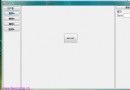
WinForms 控制項的 Region 屬性決定其可見與可點擊區域。透過掃描位圖每一列像素,將不透明像素連續區段加入 GraphicsPath,再建立 Region 指派給按鈕,即可實現任意形狀按鈕。
using System.Drawing;
using System.Drawing.Drawing2D;
using System.Windows.Forms;

public partial class Form1 : Form
{
    public Form1()
    {
        InitializeComponent();
        button3.Paint += Button3_Paint;
    }

    private void Button3_Paint(object sender, PaintEventArgs e)
    {
        button3.Cursor = Cursors.Hand;
        if (button3.Image == null) return;

        using (var bmp = new Bitmap(button3.Image))
        using (var path = CalculateControlGraphicsPath(bmp))
        {
            button3.Region = new Region(path);
        }
    }

    private static GraphicsPath CalculateControlGraphicsPath(Bitmap bitmap)
    {
        var path = new GraphicsPath();
        Color transparentColor = bitmap.GetPixel(0, 0); // 假設左上角為透明色

        for (int y = 0; y < bitmap.Height; y++)
        {
            int xStart = -1;
            for (int x = 0; x < bitmap.Width; x++)
            {
                bool opaque = bitmap.GetPixel(x, y) != transparentColor;
                if (opaque && xStart == -1) xStart = x;           // 區段開始
                if (!opaque && xStart != -1)                      // 區段結束
                {
                    path.AddRectangle(new Rectangle(xStart, y, x - xStart, 1));
                    xStart = -1;
                }
            }
            if (xStart != -1) // 行尾仍在區段中
                path.AddRectangle(new Rectangle(xStart, y, bitmap.Width - xStart, 1));
        }
        return path;
    }
}
Load 或 ImageChanged 事件計算一次,勿在 Paint 重複計算。Bitmap.LockBits + unsafe 指標存取比 GetPixel 快 100 倍以上。繼承 Button 覆寫 OnMouseEnter/OnMouseLeave/OnMouseDown/OnMouseUp 切換 Image 並重新計算 Region,或使用 PictureBox + MouseClick 事件自行繪製狀態,彈性更高。