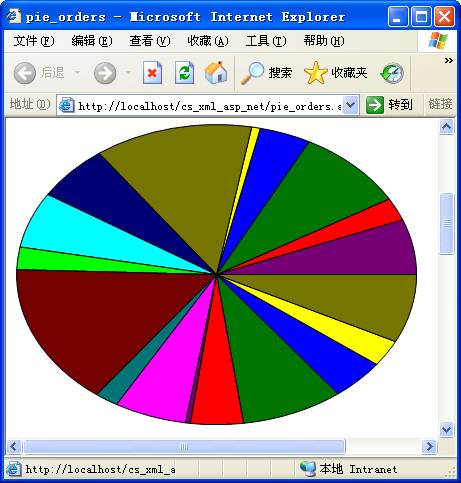
客戶需求:ASP.NET 頁面顯示二維橢圓餅圖,每個扇區具備提示文字與超連結。滑鼠懸停顯示提示,點擊導向詳細資料頁。資料來源為 Northwind 風格資料庫,主頁顯示前 10 大客戶訂單總額,點擊進入該客戶訂單明細餅圖。
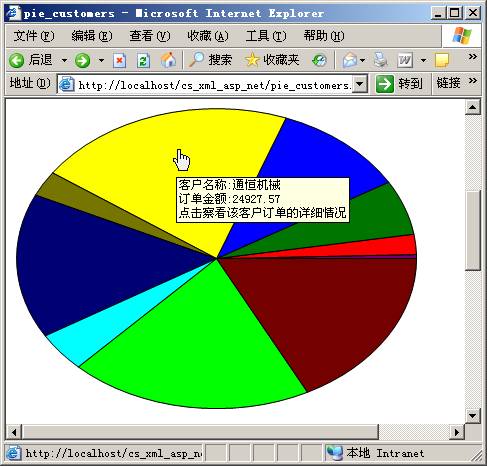
主頁 HTML 輸出核心結構:
<img src='pieimage.aspx?name=pie_customers' usemap='#dea88afea25748bda1ae28aa3e260d1a' border='0' />
<map name="dea88afea25748bda1ae28aa3e260d1a">
  <area shape="poly" coords="200,150,399,145,400,150,"
        href="pie_orders.aspx?customerid=ALFKI"
        title="客戶:三川實業 訂單總額:518.7 點擊查看詳情" />
  <area shape="poly" coords="200,150,397,125,399,135,399,145,"
        href="pie_orders.aspx?customerid=ANATR"
        title="客戶:東南實業 訂單總額:2581.95 ..." />
  <!-- 更多 area 元素 -->
</map>
採用 <img> + <map> + <area shape="poly"> 模擬扇形熱點區域,title 內建瀏覽器工具提示,href 實現導航。
餅圖抽象為兩層物件模型:
PieShapeItem。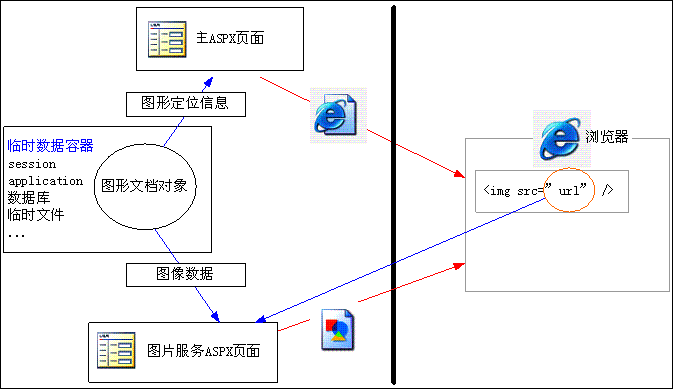
Web 無視圖控件概念,採「主頁面 + 圖片服務頁面」雙頁協作模式:
pie.aspx)。PieShape 物件樹,填充資料,生成 HTML 字串(含 <img src="pieimage.aspx?name=...">),將 PieShape 實例存入 Session[name]。pieimage.aspx?name=...。Session[name] 取得 PieShape,呼叫 CreateBitmap() 生成位圖,輸出 PNG 二進位串流。此模式避免寫入暫存檔案,無需檔案系統權限,維護簡便。HTTP 無狀態特性要求以 Session 傳遞物件樹。
PieShapeItem[Serializable]
public class PieShapeItem {
public double Value { get; set; } // 數值
public string Text { get; set; } // 提示文字
public string Link { get; set; } // 超連結
public Color Color { get; set; } // 填充顏色
internal float StartAngle { get; set; } // 起始角度 (內部計算)
internal float EndAngle { get; set; } // 結束角度 (內部計算)
}PieShape (繼承 CollectionBase)狀態刷新:計算扇區角度
public void RefreshState() {
    double TotalValue = 0;
    foreach (PieShapeItem item in this) TotalValue += item.Value;
    float AngleCount = 0;
    for (int i = Count - 1; i >= 0; i--) { // 反向遍歷符合順時針視覺習慣
        PieShapeItem item = this[i];
        float angle = (float)(360.0 * item.Value / TotalValue);
        item.StartAngle = (float)Math.Round(AngleCount, 3);
        item.EndAngle = (float)Math.Round(AngleCount + angle, 3);
        AngleCount += angle;
        // 橢圓修正:將圓形角度映射至橢圓參數方程
        item.StartAngle = (float)Math.Round(FixAngle(item.StartAngle), 3);
        item.EndAngle = (float)Math.Round(FixAngle(item.EndAngle), 3);
    }
}
private float FixAngle(float angle) {
    if (angle % 90 == 0) return angle;
    if (intWidth == intHeight) return angle; // 正圓無需修正
    double x = intWidth * Math.Cos(angle * Math.PI / 180);
    double y = intHeight * Math.Sin(angle * Math.PI / 180);
    float result = (float)(Math.Atan2(y, x) * 180 / Math.PI);
    if (result < 0) result += 360;
    return result;
}
FixAngle 依橢圓參數方程將幾何角度修正為視覺角度,確保扇區面積比例精確對應數值比例。
繪圖與路徑生成
public GraphicsPath CreatePath(PieShapeItem item) {
    GraphicsPath path = new GraphicsPath();
    path.AddPie(intLeft, intTop, intWidth, intHeight, item.StartAngle, item.EndAngle - item.StartAngle);
    return path;
}
public void Draw(Graphics g, Rectangle ClipRectangle) {
    foreach (PieShapeItem item in this) {
        using (GraphicsPath path = CreatePath(item))
        using (SolidBrush b = new SolidBrush(item.Color)) {
            g.FillPath(b, path);
            g.DrawPath(Pens.Black, path);
        }
    }
}
public Bitmap CreateBitmap() {
    Bitmap bmp = new Bitmap(intWidth + 1, intHeight + 1);
    using (Graphics g = Graphics.FromImage(bmp)) {
        g.Clear(Color.White);
        g.TranslateTransform(intLeft, intTop);
        g.SmoothingMode = SmoothingMode.HighQuality;
        Draw(g, this.Bounds);
    }
    return bmp;
}
HTML 熱點代碼生成:GetHtmlString
public string GetHtmlString(string imgsrc) {
    if (Count == 0) return "";
    string name = Guid.NewGuid().ToString("N"); // 唯一 map 名稱
    StringWriter myStr = new StringWriter();
    XmlTextWriter writer = new XmlTextWriter(myStr);
    writer.IndentChar = ' '; writer.Indentation = 3; writer.Formatting = Formatting.Indented;
    writer.WriteStartDocument();
    writer.WriteRaw("<img src='" + imgsrc + "' usemap='#" + name + "' border='0'/>");
    writer.WriteStartElement("map");
    writer.WriteAttributeString("name", name);
    foreach (PieShapeItem item in this) {
        Point[] ps = GetPoints(item); // 取得多邊形頂點模擬扇形
        writer.WriteStartElement("area");
        writer.WriteAttributeString("shape", "poly");
        writer.WriteStartAttribute("coords", null);
        for (int i=0; i<ps.Length; i++) {
            writer.WriteString(ps[i].X.ToString()); writer.WriteString(",");
            writer.WriteString(ps[i].Y.ToString()); writer.WriteString(",");
        }
        writer.WriteEndAttribute();
        if (!string.IsNullOrEmpty(item.Link)) writer.WriteAttributeString("href", item.Link);
        writer.WriteAttributeString("title", item.Text);
        writer.WriteEndElement(); // area
    }
    writer.WriteEndElement(); // map
    writer.WriteEndDocument(); writer.Close();
    string html = myStr.ToString();
    int index = html.LastIndexOf("?>");
    if (index > 0) html = html.Substring(index + 2); // 移除 XML 宣告
    return html;
}
private Point[] GetPoints(PieShapeItem item) {
    GraphicsPath path = CreatePath(item);
    path.Flatten(); // 曲線轉線段近似
    PointF[] ps = path.PathPoints;
    path.Dispose();
    Point[] ps2 = new Point[ps.Length];
    for (int i=0; i<ps.Length; i++) { ps2[i].X = (int)ps[i].X; ps2[i].Y = (int)ps[i].Y; }
    return ps2;
}
採 XmlTextWriter 產出結構化 HTML,避免字串拼接錯誤。Flatten() 將貝茲曲線近似為多段線,頂點座標即為 area coords 所需資料。
pie.aspxprivate void Page_Load(object sender, EventArgs e) {
using (OleDbConnection conn = new OleDbConnection()) {
conn.ConnectionString = "Provider=Microsoft.Jet.OLEDB.4.0;Data Source=" + Server.MapPath("demomdb.mdb");
conn.Open();
using (OleDbCommand cmd = conn.CreateCommand()) {
cmd.CommandText = @"select top 10 customers.customerid, customers.companyname as 客戶名稱,
(select sum(round(orderdetails.unitprice * orderdetails.quantity * (1.0 - orderdetails.discount), 2))
from orderdetails, orders
where orderdetails.orderid = orders.orderid and orders.customerid = customers.customerid) as 訂單總金額
from customers";
OleDbDataReader reader = cmd.ExecuteReader();
PieShape pie = new PieShape(); pie.Width = 400; pie.Height = 300;
while (reader.Read()) {
string id = reader.GetValue(0).ToString();
double val = Convert.ToDouble(reader.GetValue(2));
string text = "客戶名稱:" + reader.GetValue(1) + "\r\n訂單金額:" + reader.GetValue(2) + "\r\n點擊查看詳情";
string link = "pie_orders.aspx?customerid=" + id;
pie.Add(val, text, link); // 擴充方法自動建立 PieShapeItem 並加入集合
}
reader.Close();
pie.RefreshState();
Session["pie_customers"] = pie;
lblResult.Text = pie.GetHtmlString("pieimage.aspx?name=pie_customers");
DataGrid1.DataSource = pie; DataGrid1.DataBind(); // 輔助顯示
}
}
}pieimage.aspxprivate void Page_Load(object sender, EventArgs e) {
string name = Request.QueryString["name"];
if (string.IsNullOrEmpty(name)) return;
PieShape pie = Session[name] as PieShape;
if (pie == null) return;
using (Bitmap bmp = pie.CreateBitmap()) {
Response.ContentType = "image/png";
MemoryStream ms = new MemoryStream();
bmp.Save(ms, ImageFormat.Png);
ms.WriteTo(Response.OutputStream);
ms.Close();
}
}注意:必須先寫入 MemoryStream 再輸出至 Response.OutputStream,直接輸出會報錯。
pie_orders.aspx邏輯同主頁,依 Request.QueryString["customerid"] 查詢該客戶訂單明細,建構餅圖顯示各筆訂單金額,工具提示含訂購時間、運輸人、地點、金額。
GraphicsPath.Flatten() 巧妙解決 HTML 無扇形熱點問題,以多邊形逼近。Session 傳遞物件樹避免暫存檔。XmlTextWriter 生成標準化 HTML,可維護性極佳。