現代應用程式常需支援第三方擴充、熱插拔模組、多團隊平行開發。硬編碼相依會導致部署耦合、測試困難、版本衝突。外掛架構透過「契約介面」與「發現/組合機制」實現鬆耦合擴充。
MEF 核心概念:Export (提供)、Import (需求)、Catalog (目錄)、Container (容器)。支援屬性/建構函式/方法注入,自動解析相依圖。
namespace Contracts {
    public interface ICalculator {
        IList GetOperations();
        double Operate(IOperation op, double[] operands);
    }
    public interface IOperation {
        string Name { get; }
        int NumberOperands { get; }
    }
    public interface ICalculatorExtension {
        string Title { get; }
        string Description { get; }
        FrameworkElement GetUI();
    }
} [Export(typeof(ICalculator))]
public class BasicCalculator : ICalculator {
public IList GetOperations() => new List {
new Operation { Name = "+", NumberOperands = 2 },
new Operation { Name = "-", NumberOperands = 2 },
new Operation { Name = "*", NumberOperands = 2 },
new Operation { Name = "/", NumberOperands = 2 }
};
public double Operate(IOperation op, double[] operands) {
return op.Name switch {
"+" => operands[0] + operands[1],
"-" => operands[0] - operands[1],
"*" => operands[0] * operands[1],
"/" => operands[1] != 0 ? operands[0] / operands[1] : throw new DivideByZeroException(),
_ => throw new InvalidOperationException("Unknown operation")
};
}
}
public class Operation : IOperation {
public string Name { get; set; }
public int NumberOperands { get; set; }
} public class Bomb {
[Export("Bomb")]
public void Fire() => Console.WriteLine("you are dead!!!");
}class Program {
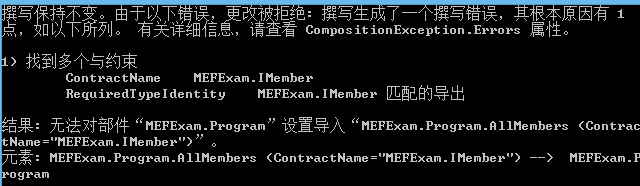
[ImportMany(typeof(ICalculator))]
public IEnumerable Calculators { get; set; }
[Import("Bomb")]
public Action Bomb { get; set; }
public void Run() {
var catalog = new DirectoryCatalog(@"c:\plugins");
var container = new CompositionContainer(catalog);
container.ComposeParts(this);
var calc = Calculators.ElementAt(1); // 取得第二個計算機
var ops = calc.GetOperations().ToDictionary(o => o.Name);
while (true) {
Console.Write("Operation? (+,-,*,/,exit): ");
var input = Console.ReadLine();
if (input == "exit") break;
if (!ops.TryGetValue(input, out var op)) continue;
double[] args = new double[op.NumberOperands];
for (int i = 0; i < op.NumberOperands; i++) {
Console.Write($"Operand {i+1}: ");
args[i] = double.Parse(Console.ReadLine());
}
Console.WriteLine($"Result: {calc.Operate(op, args)}");
}
}
public void RunBomb() {
var catalog = new DirectoryCatalog(@"c:\plugins");
var container = new CompositionContainer(catalog);
container.ComposeParts(this);
Bomb?.Invoke();
}
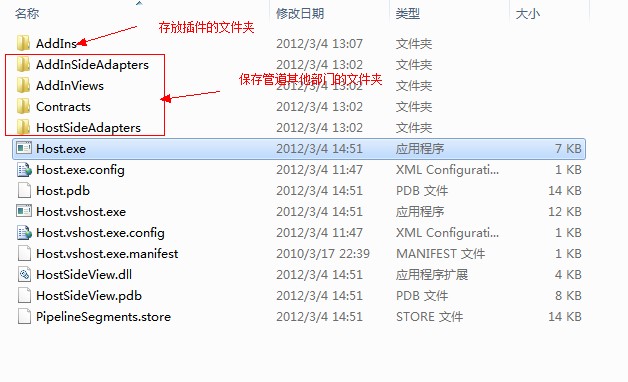
} MAF 採用 7 組件管線架構,實現增益集隔離 (獨立 AppDomain/Process)、版本獨立部署、安全性沙箱。適合高可靠性、多版本共存、不信任程式碼執行場景。
// Contract 介面
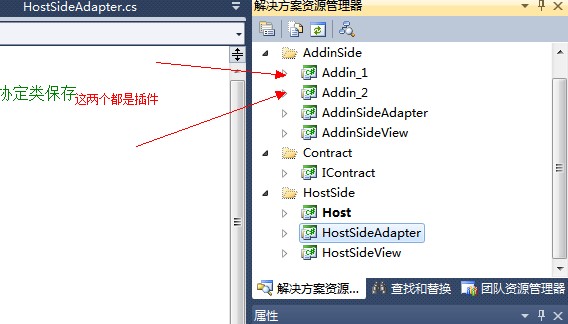
[AddInContract]
public interface IMyContract : IContract {
    string Say();
}

// Add-in 實作
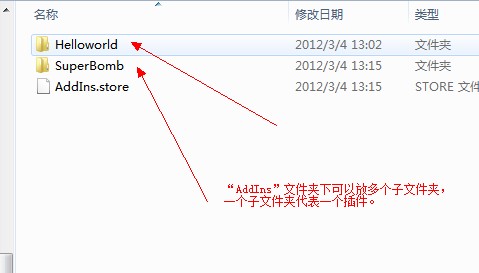
[AddIn("Helloworld", Description = "this is helloworld addin", Publisher = "GhostBear", Version = "1.0")]
public class Addin_1 : AddinSideView.AddinSideView {
    public string Say() => "Helloworld";
}

// Adapter 範例 (Add-in 端)
[AddInAdapter]
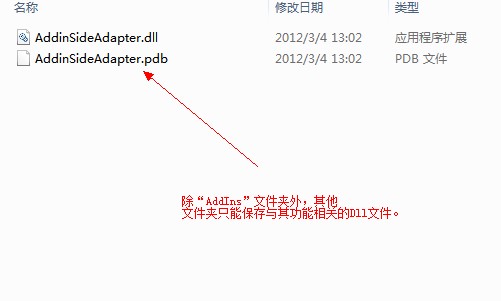
public class AddinSideAdapter : ContractBase, IContract.IMyContract {
    private AddinSideView.AddinSideView _handler;
    public AddinSideAdapter(AddinSideView.AddinSideView handler) => _handler = handler;
    public string Say() => _handler.Say();
}

// Host 啟動與隔離
var tokens = AddInStore.FindAddIns(typeof(HostSideView.HostSideView), path);
var token = ChooseCalculator(tokens);
var process = new AddInProcess(Platform.X64); // 隔離進程
process.Start();
var addin = token.Activate(process, AddInSecurityLevel.FullTrust);
Console.WriteLine($"PID: {process.ProcessId}");
Console.WriteLine(addin.Say()); | 維度 | MEF | MAF |
|---|---|---|
| 複雜度 | 低 (屬性標記) | 高 (7 組件管線) |
| 隔離等級 | 同進程 | AppDomain/Process 隔離 |
| 版本管理 | 簡單 | 完整版本控管 |
| 安全性 | 完全信任 | 可設定信任等級 |
| 適用場景 | 一般擴充、UI 外掛、規則引擎 | 不信任程式碼、多版本共存、高可靠性 |
.NET Core / .NET 5+ 建議使用 System.ComponentModel.Composition (MEF 移植版) 或 Autofac/StructureMap/DI 容器 搭配 AssemblyLoadContext 實現隔離載入。MAF 維護成本高,新專案較少採用。