本專案示範如何在 WinForms 應用程式執行時期,實現類似 Visual Studio 設計器的功能:從工具箱拖曳建立控件、滑鼠拖曳移動控件、右鍵選單刪除控件、以及透過屬性視窗即時修改控件屬性(如 Text)。
Panel 可見度,模擬工具箱展開收合。MouseDown 觸發 DoDragDrop,設計區 DragEnter/DragDrop 建立新控件並加入事件。MouseDown/MouseMove/MouseLeave 實現拖曳移動與焦點管理。ContextMenuStrip 提供刪除選項,呼叫 Control.Dispose() 釋放資源。Name、Text 顯示於屬性面板,修改文字即時同步至控件。private void button3_MouseDown(object sender, MouseEventArgs e)
{
if (e.Button == MouseButtons.Left)
{
Button btn = (Button)sender;
btn.DoDragDrop(btn, DragDropEffects.Copy);
}
}
private void panel4_DragDrop(object sender, DragEventArgs e)
{
    Button srcBtn = (Button)e.Data.GetData("System.Windows.Forms.Button");
    Button newBtn = new Button();
    newBtn.ContextMenuStrip = contextMenuStrip1;
    newBtn.Name = newBtn.Text = srcBtn.Text + "--" + name++;
    newBtn.Left = PointToClient(MousePosition).X - panel4.Left;
    newBtn.Top = PointToClient(MousePosition).Y - panel4.Top;

    newBtn.Click += button1_Click;           // 選取顯示屬性
    newBtn.MouseDown += button1_MouseDown;   // 啟動移動
    newBtn.MouseMove += button1_MouseMove;   // 拖曳移動
    newBtn.MouseLeave += button1_MouseLeave; // 結束移動
    newBtn.Parent = panel4;
}
private void button1_Click(object sender, EventArgs e)
{
    groupBox1.Text = (sender as Button).Name + "屬性";
    textBox1.Text = (sender as Button).Text;
}

private void textBox1_KeyPress(object sender, KeyPressEventArgs e)
{
    btnflag.Text = textBox1.Text;
}
private void toolStripMenuItem2_Click(object sender, EventArgs e)
{
    btnflag.Dispose(); // btnflag 為目前選中的控件
}
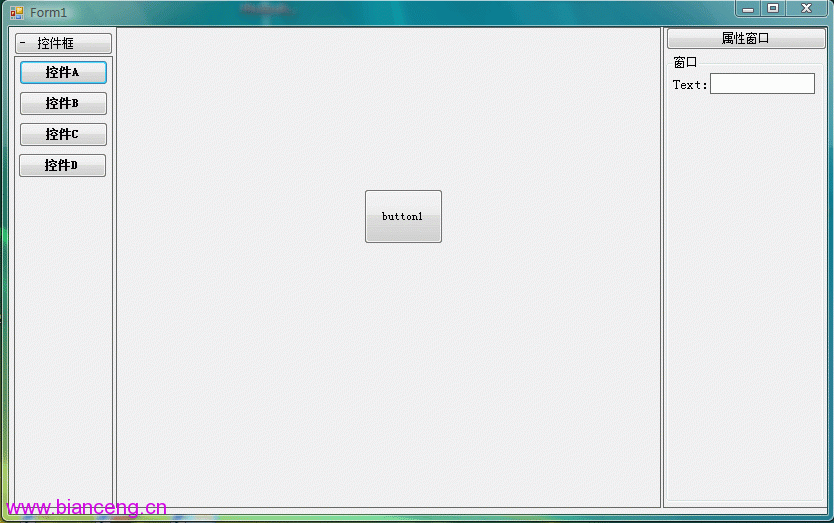
PropertyGrid 控件可支援完整屬性編輯。透過 DoDragDrop、事件綁定與動態建立控件,即可快速構建一個輕量級的執行期設計器原型。此架構可作為報表設計器、表單產生器、儀表板編輯器等應用的基礎框架。