環境準備
- 安裝 MySQL,建立資料庫
studentinfo:
CREATE DATABASE studentinfo;
- 下載 MySQL Connector/J JDBC 驅動(如
mysql-connector-java-5.0.3-bin.jar),加入 CLASSPATH 或放入 Tomcat common/lib、shared/lib。
Java 連線範例
import java.sql.*;

public class ConnectToMySQL {
    public static Connection getConnection() throws SQLException, ClassNotFoundException {
        String url = "jdbc:mysql://localhost:3306/studentinfo";
        Class.forName("com.mysql.jdbc.Driver");
        String user = "root";
        String password = "";
        return DriverManager.getConnection(url, user, password);
    }

    public static void main(String[] args) {
        try (Connection con = getConnection();
             Statement stmt = con.createStatement()) {

            stmt.execute("DROP TABLE IF EXISTS student");
            stmt.execute("CREATE TABLE student (id INT NOT NULL AUTO_INCREMENT, name VARCHAR(20) NOT NULL DEFAULT 'name', math INT NOT NULL DEFAULT 60, PRIMARY KEY(id))");
            stmt.execute("INSERT INTO student VALUES (1,'AAA',99)");
            stmt.execute("INSERT INTO student VALUES (2,'BBB',77)");
            stmt.execute("INSERT INTO student VALUES (3,'CCC',65)");

            ResultSet rs = stmt.executeQuery("SELECT * FROM student");
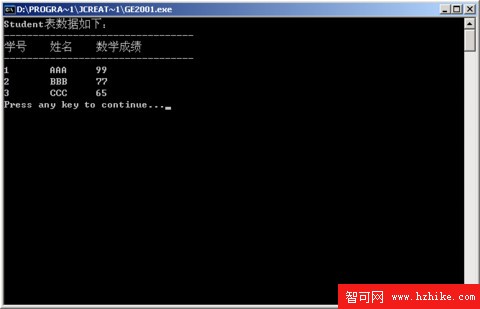
            System.out.println("學號 姓名 數學成績");
            while (rs.next()) {
                System.out.printf("%d %s %s%n", rs.getInt("id"), rs.getString("name"), rs.getString("math"));
            }
        } catch (ClassNotFoundException | SQLException e) {
            e.printStackTrace();
        }
    }
}
執行結果
注意事項