設計學生類別 Student,包含:
int)、姓名 (String)、年齡 (int)Student(int stuNo, String name, int age) 初始化三個屬性outPut() 輸出學生資訊public class Student {
private int stuNo; // 封裝:私有欄位
private String stuName;
private int stuAge;
// 建構子初始化
public Student(int stuNo, String name, int age) {
this.stuNo = stuNo;
this.stuName = name;
this.stuAge = age;
}
// 輸出資訊
public void outPut() {
System.out.printf("%s\t%d\t%d%n", stuName, stuNo, stuAge);
}
// Getter (良好習慣)
public int getStuNo() { return stuNo; }
public String getStuName() { return stuName; }
public int getStuAge() { return stuAge; }
}
public class TestStudent {
    public static void main(String[] args) {
        // 建立 6 個學生物件
        Student[] students = {
            new Student(10001, "張三", 25),
            new Student(10002, "李四", 27),
            new Student(10003, "王五", 22),
            new Student(10004, "馬六", 19),
            new Student(10005, "馮七", 22),
            new Student(10006, "秦八", 26)
        };

        // 表頭
        System.out.println("姓名\t學號\t年齡");

        // 批次輸出
        for (Student s : students) {
            s.outPut();
        }
    }
}
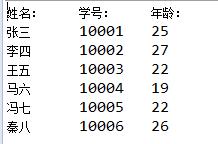
姓名	學號	年齡
張三	10001	25
李四	10002	27
王五	10003	22
馬六	10004	19
馮七	10005	22
秦八	10006	26
| 特性 | Clock 類 | Student 類 |
|---|---|---|
| 驗證邏輯 | 有 (時間範圍檢查) | 無 (簡單資料載體) |
| 建構子參數 | 三個 int | int, String, int |
| 輸出格式 | printf 格式化 | 簡單制表符分隔 |
| 錯誤處理 | 列印錯誤訊息 | 不處理 (假設輸入合法) |
| 封裝程度 | 私有欄位 + 私有驗證方法 | 私有欄位 + 公共 Getter |
public class Student {
    private int stuNo;
    private String stuName;
    private int stuAge;

    public Student(int stuNo, String name, int age) {
        if (stuNo <= 0) throw new IllegalArgumentException("學號必須為正整數");
        if (name == null || name.trim().isEmpty()) throw new IllegalArgumentException("姓名不可為空");
        if (age < 0 || age > 150) throw new IllegalArgumentException("年齡範圍 0-150");

        this.stuNo = stuNo;
        this.stuName = name;
        this.stuAge = age;
    }
    // ... 其他方法
}
// 物件陣列 (固定大小) Student[] arr = new Student[6]; // ArrayList (動態擴充、豐富 API) Listlist = new ArrayList<>(); list.add(new Student(10001, "張三", 25)); // ... list.forEach(Student::outPut); // Java 8+ Lambda 遍歷
public 導致其他套件無法使用void Student() → 變成普通方法this. 區分參數與欄位:stuNo = stuNo (自我賦值)public class 名稱不一致