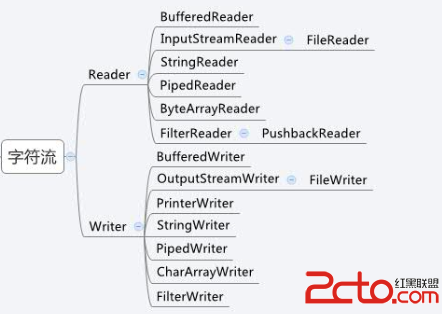
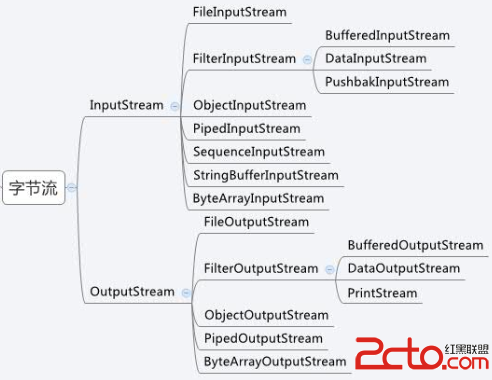
Java I/O 以流為核心抽象,本文系統梳理類結構、字符/字節流區別、核心 API 及文件操作實戰代碼。
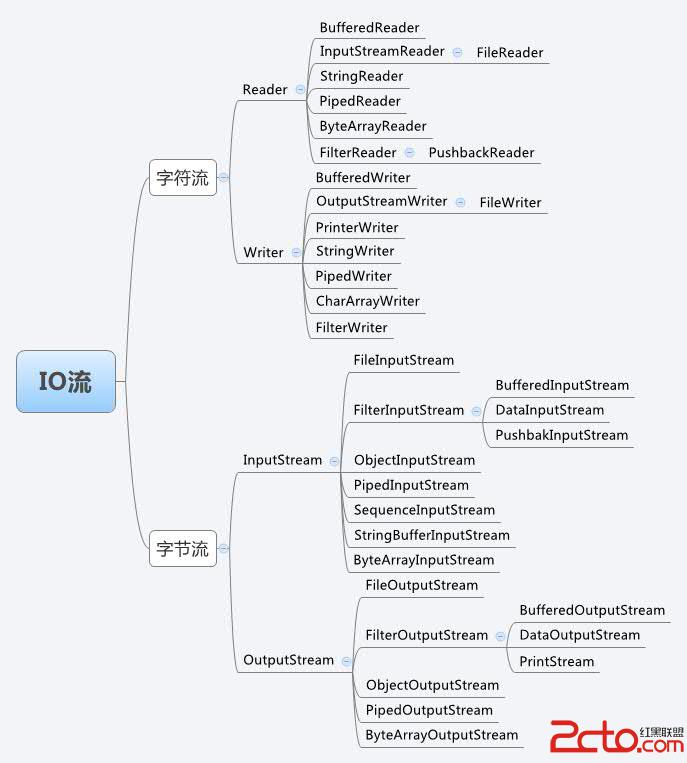
| 維度 | 字節流 | 字符流 |
|---|---|---|
| 處理單位 | 字節 | 字符 (經編碼表轉換) |
| 適用數據 | 所有類型 (圖片、視頻、音頻、二進制) | 純文本數據 |
| 緩衝區 | 直接操作文件,無緩衝 | 使用緩衝區操作 |
| 核心類 | InputStream/OutputStream | Reader/Writer |
選型原則:純文本優先字符流,其他場景用字節流
public void readFileByBufferedReader(String path) {
    File file = new File(path);
    if (file.isFile()) {
        try (FileReader fr = new FileReader(file);
             BufferedReader br = new BufferedReader(fr)) {
            String line;
            while ((line = br.readLine()) != null) {
                System.out.println(line);
            }
        } catch (IOException e) { e.printStackTrace(); }
    }
}關鍵點:try-with-resources 自動關閉資源 (Java 7+),readLine() 按行讀取高效便捷。
public void writeFileByBufferedWriter(String path) {
    File file = new File(path);
    if (file.isFile()) {
        try (FileWriter fw = new FileWriter(file, true);  // true=追加模式
             BufferedWriter bw = new BufferedWriter(fw)) {
            bw.write("新增行內容\r\n");
            bw.newLine(); // 跨平台換行
            bw.flush();   // 強制刷新緩衝區
        } catch (IOException e) { e.printStackTrace(); }
    }
}
public void readFileByFileInputStream(String path) {
    try (FileInputStream fis = new FileInputStream(path)) {
        byte[] buffer = new byte[1024];
        int len;
        while ((len = fis.read(buffer)) != -1) {
            System.out.print(new String(buffer, 0, len)); // 指定有效長度
        }
    } catch (IOException e) { e.printStackTrace(); }
}public void writeFileByFileOutputStream(String path) {
try (FileOutputStream fos = new FileOutputStream(path, true)) {
String str = "FileOutputStream 寫入內容\r\n";
fos.write(str.getBytes());
fos.flush();
} catch (IOException e) { e.printStackTrace(); }
}FileChannel.transferTo() 零拷貝Buffered 包裝類StandardCharsets.UTF_8 避免平台差異try-with-resources掌握流體系架構、編碼轉換機制、緩衝策略,是高效處理文件、網絡、壓縮等 I/O 密集型任務的基石。