解決跨平台、多分辨率、動態調整下組件位置與大小的自適應問題。Swing/AWT提供7大佈局,覆蓋從簡單到複雜的所有UI構建需求。
| 佈局 | 核心特性 | 適用場景 | 關鍵API | 優點 | 缺點 |
|---|---|---|---|---|---|
| FlowLayout | 流式排列,左右/居中/右對齊,超寬自動換行 | 工具欄、按鈕組、簡單表單 | new FlowLayout(align, hgap, vgap) | 簡單、自動換行、響應式 | 精確控制困難、組件大小固定 |
| BorderLayout | 五大區域:NORTH/SOUTH/EAST/WEST/CENTER,邊緣組件按優先尺寸,中間填滿 | 主窗體骨架:頂部導航、底部狀態、側邊欄、中心內容 | add(comp, BorderLayout.CENTER) | 經典框架結構、語義清晰 | 僅容納5組件、嵌套較繁瑣 |
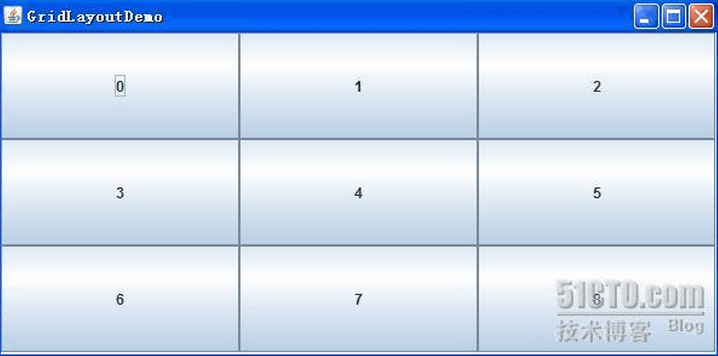
| GridLayout | 矩陣網格,行列固定,組件等分空間 | 計算器鍵盤、棋盤、表格式輸入 | new GridLayout(rows, cols, hgap, vgap) | 規則整齊、代碼極簡 | 無法跨行列合併、組件強制等大 |
| GridBagLayout | 網格包,組件可跨行列、錨點對齊、權重伸縮、內外邊距 | 複雜表單、儀表盤、需精細控制的界面 | GridBagConstraints (gbc) | 最靈活、功能最全、單佈局搞定複雜UI | API繁瑣、學習曲線陡峭、代碼冗長 |
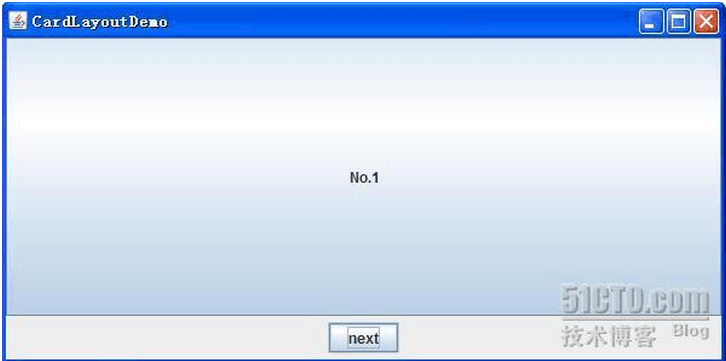
| CardLayout | 卡片疊放,同一時刻僅顯示一張,支持翻頁/跳轉 | 向導頁面、Tab切換、狀態機界面 | show(parent, "cardName") / next()/previous() | 天然支持視圖切換、內存常駐 | 非可見卡片仍佔內存、動畫需自行實現 |
| GroupLayout | 分組佈局,順序組/並行組嵌套,間隙自動管理,IDE可視化設計首選 | 複雜對話框、響應式表單、Matisse/WindowBuilder生成代碼 | createSequentialGroup() / createParallelGroup() | 功能強大、支持基線對齊、IDE友好 | 手寫代碼極難維護、幾乎必須依賴GUI設計器 |
public class CalculatorUI extends JFrame {
    public CalculatorUI() {
        setTitle("計算器");
        setDefaultCloseOperation(EXIT_ON_CLOSE);
        setLayout(new BorderLayout(5, 5));

        // 北部:顯示屏
        JTextField display = new JTextField();
        display.setEditable(false);
        display.setHorizontalAlignment(JTextField.RIGHT);
        display.setFont(new Font("Monospaced", Font.BOLD, 24));
        add(display, BorderLayout.NORTH);

        // 中部:按鍵盤 (4行 x 4列)
        JPanel keypad = new JPanel(new GridLayout(4, 4, 5, 5));
        String[] keys = {
            "7", "8", "9", "/",
            "4", "5", "6", "*",
            "1", "2", "3", "-",
            "0", ".", "=", "+"
        };
        for (String key : keys) {
            JButton btn = new JButton(key);
            btn.setFont(new Font("SansSerif", Font.BOLD, 18));
            keypad.add(btn);
        }
        add(keypad, BorderLayout.CENTER);

        pack();
        setLocationRelativeTo(null);
        setResizable(false);
    }

    public static void main(String[] args) {
        SwingUtilities.invokeLater(() -> new CalculatorUI().setVisible(true));
    }
}
public class FormDemo extends JFrame {
    public FormDemo() {
        setLayout(new GridBagLayout());
        GridBagConstraints gbc = new GridBagConstraints();
        gbc.insets = new Insets(5, 5, 5, 5); // 統一邊距
        gbc.fill = GridBagConstraints.HORIZONTAL;
        gbc.anchor = GridBagConstraints.WEST;

        // 第1行:用戶名
        gbc.gridx = 0; gbc.gridy = 0; gbc.weightx = 0;
        add(new JLabel("用戶名:"), gbc);

        gbc.gridx = 1; gbc.weightx = 1.0; // 輸入框佔滿剩餘寬度
        JTextField username = new JTextField(20);
        add(username, gbc);

        // 第2行:密碼
        gbc.gridx = 0; gbc.gridy = 1; gbc.weightx = 0;
        add(new JLabel("密碼:"), gbc);

        gbc.gridx = 1; gbc.weightx = 1.0;
        JPasswordField password = new JPasswordField(20);
        add(password, gbc);

        // 第3行:跨列按鈕
        gbc.gridx = 0; gbc.gridy = 2; gbc.gridwidth = 2; // 跨2列
        gbc.fill = GridBagConstraints.NONE;
        gbc.anchor = GridBagConstraints.CENTER;
        JPanel btnPanel = new JPanel(new FlowLayout(FlowLayout.CENTER, 10, 0));
        btnPanel.add(new JButton("登錄"));
        btnPanel.add(new JButton("註冊"));
        add(btnPanel, gbc);

        pack();
    }
}
public class WizardDemo extends JFrame {
    private CardLayout cardLayout = new CardLayout();
    private JPanel cardPanel = new JPanel(cardLayout);

    public WizardDemo() {
        add(cardPanel);

        // 三張卡片
        cardPanel.add(createStep1(), "step1");
        cardPanel.add(createStep2(), "step2");
        cardPanel.add(createStep3(), "step3");

        // 底部導航欄
        JPanel nav = new JPanel();
        JButton prev = new JButton("上一步");
        JButton next = new JButton("下一步");
        JButton finish = new JButton("完成");
        nav.add(prev); nav.add(next); nav.add(finish);
        add(nav, BorderLayout.SOUTH);

        prev.addActionListener(e -> cardLayout.previous(cardPanel));
        next.addActionListener(e -> cardLayout.next(cardPanel));
        finish.addActionListener(e -> dispose());

        pack();
    }

    private JPanel createStep1() { /* 返回面板 */ }
    private JPanel createStep2() { /* 返回面板 */ }
    private JPanel createStep3() { /* 返回面板 */ }
}
Swing/AWT屬於維護模式,新項目建議:
佈局管理器是GUI開發的「骨架」。掌握Flow/Border/Grid三基礎佈局可應對80%簡單界面;GridBagLayout是瑞士軍刀,解決疑難雜症;CardLayout專治視圖切換;GroupLayout留給設計器生成。新項目優先考慮JavaFX/Compose/Web現代棧,Swing僅作維舊項目或嵌入式場景選擇。