依據調用對象與編輯對象,處理輸入值並傳回父對象編輯框:
if (object_name.equals("registScreen")) {
    if (editor.equals("regist_name")) {
        if (args_t[3] != "" || args_t[3] != null || args_t[4] != "" || args_t[4] != null) {
            args[0] = object_name; args[1] = editor; args[2] = this.canvasText;
            args[3] = args_t[3]; args[4] = args_t[4];
        }
        controller.handleEvent(UIController.EventID.EVENT_USER_REGIST_EDIT_BACK, args);
    } else if (editor.equals("regist_passwd")) {
        if (args_t[2] != "" || args_t[2] != null || args_t[4] != "" || args_t[4] != null) {
            args[0] = object_name; args[1] = editor; args[2] = args_t[2];
            args[3] = this.canvasText; args[4] = args_t[4];
        }
        controller.handleEvent(UIController.EventID.EVENT_USER_REGIST_EDIT_BACK, args);
    } else if (editor.equals("regist_passwd_re")) {
        if (args_t[2] != "" || args_t[2] != null || args_t[3] != "" || args_t[3] != null) {
            args[0] = object_name; args[1] = editor; args[2] = args_t[2];
            args[3] = args_t[3]; args[4] = this.canvasText;
        }
        controller.handleEvent(UIController.EventID.EVENT_USER_REGIST_EDIT_BACK, args);
    }
}
private TextEdit textEdit_name;
textEdit_name = new TextEdit(this);
object_name = ((String)args[0] != null) ? (String)args[0] : "";
editor = ((String)args[1] != null) ? (String)args[1] : "";
username = ((String)args[2] != null) ? (String)args[2] : "";
passwd = ((String)args[3] != null) ? (String)args[3] : "";
passwd_re = ((String)args[4] != null) ? (String)args[4] : "";
private void redraw() {
    switch (currentlySelectedIndex) {
        case 0: cursorBlinkOn2 = false; cursorBlinkOn3 = false; editor = "regist_name"; break;
        case 1: cursorBlinkOn1 = false; cursorBlinkOn3 = false; editor = "regist_passwd"; break;
        case 2: cursorBlinkOn1 = false; cursorBlinkOn2 = false; editor = "regist_passwd_re"; break;
        default: ;
    }
    // ...
}
private void redraw() {
    // ...
    textEdit_name.drawTextBox(this, graphics, username, textEdit_name_x, textEdit_name_y, cursorBlinkOn1);
    textEdit_passwd.drawTextBox(this, graphics, passwd, textEdit_passwd_x, textEdit_passwd_y, cursorBlinkOn2);
    textEdit_passwd.drawTextBox(this, graphics, passwd_re, textEdit_passwd_re_x, textEdit_passwd_re_y, cursorBlinkOn3);
    textEdit_name.flushGraphics();
}
實現效果如圖所示:
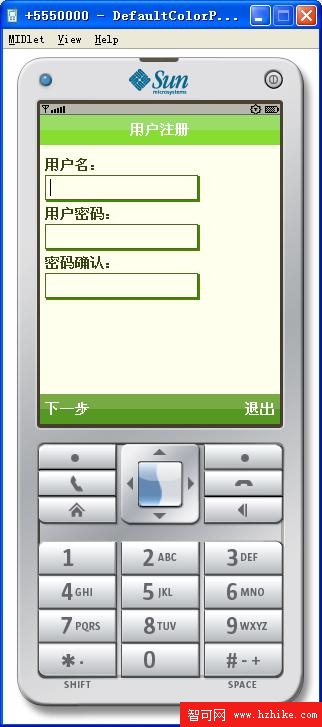
圖 1 編輯框效果