【更新】 本文將適時更新,目前非終稿,如有不當之處敬請指正。
【問題描述】 介紹設計模式的文章與書很多,但只有使用時才能理解其妙處。接上篇《Java ME 連載(二)——低級界面繪圖之選單》,本文一則解釋 UIController,一則結合實例與大家交流學習 MVC 設計模式。
【理論】什麼是 MVC?
MVC 即模型、視圖、控制。模型是對資料使用時的封裝;視圖是顯示內容的具體表示;控制包含視圖控制器與方法封裝。
【實例】
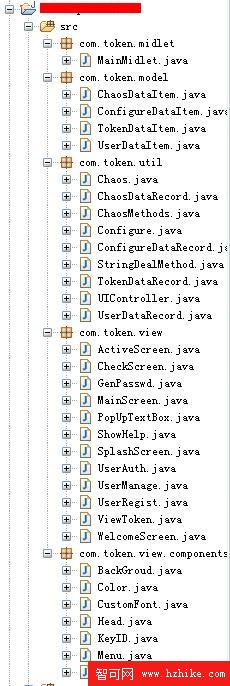
圖 1 工程結構
工程將用戶資料單獨封裝為 model,供控制器與視圖調用;顯示頁面封裝為視圖;視圖控制器 UIController 與常用方法封裝為 util。UIController 即控制層。
package com.token.midlet;

import java.io.IOException;
import javax.microedition.lcdui.*;
import javax.microedition.midlet.*;
import com.token.util.UIController;

public class MainMidlet extends MIDlet {
    private Display display;
    private static UIController controller;

    public MainMidlet() {
        super();
        display = Display.getDisplay(this);
    }

    protected void startApp() throws MIDletStateChangeException {
        controller = new UIController(this);
        try { controller.init(); }
        catch (IOException e) { e.printStackTrace(); }
    }

    protected void pauseApp() { this.notifyPaused(); }

    protected void destroyApp(boolean arg0) throws MIDletStateChangeException {
        controller = null;
    }

    public void setCurrent(Displayable disp) { display.setCurrent(disp); }
    public void setCurrent(Alert alert, Displayable disp) { display.setCurrent(alert, disp); }
    public Displayable getCurrent() { return display.getCurrent(); }

    public void exit(boolean arg0) {
        try { destroyApp(arg0); notifyDestroyed(); }
        catch (MIDletStateChangeException e) {}
    }
}
package com.token.model;

import com.token.util.StringDealMethod;

public class UserDataItem {
    private int id;
    public String name = null;
    public String passwd = null;

    public UserDataItem(String name, String passwd) { this.name = name; this.passwd = passwd; }

    public UserDataItem(int id, byte[] data) {
        this.id = id;
        String temp = new String(data);
        String temp_sub[] = StringDealMethod.split(temp, ",");
        this.name = temp_sub[0];
        this.passwd = temp_sub[1];
    }

    public int getId() { return id; }
    public void setId(int id) { this.id = id; }
    public String getName() { return name; }
    public void setName(String name) { this.name = name; }
    public String getPasswd() { return passwd; }
    public void setPasswd(String passwd) { this.passwd = passwd; }

    public byte[] getBytes() {
        String temp = null;
        if (name == null || passwd == null) return null;
        else temp = name + "," + passwd;
        return temp.getBytes();
    }
}
package com.token.util;

import java.io.IOException;
import javax.microedition.lcdui.*;
import com.token.midlet.MainMidlet;
import com.token.model.*;
import com.token.view.*;

public class UIController {
    private MainMidlet midlet;
    private TokenDataRecord tokenRecord;
    private WelcomeScreen welcomeScreen;
    private UserRegist reg;
    private ActiveScreen activeScreen;
    private MainScreen mainScreen;
    private GenPasswd gen;
    private CheckScreen check;
    private ViewToken viewToken;
    private UserManage manage;
    private ShowHelp help;
    private UserAuth auth;
    private PopUpTextBox textBox;
    int id = 1;

    public UIController(MainMidlet midlet) { this.midlet = midlet; tokenRecord = new TokenDataRecord(); }

    public void init() throws IOException {
        try {
            SplashScreen splashScreen = new SplashScreen();
            setCurrent(splashScreen);
            Thread.sleep(1000);
            Configure.configureColor();
            initObject();
            if (tokenRecord.db_getRecord(1) == null) {
                ChaosMethods method = new ChaosMethods();
                TokenDataItem tokenItem = new TokenDataItem(1, (method.ChaosInitCode() + ",false").getBytes());
                id = tokenRecord.db_addRecord(tokenItem);
            }
            TokenDataItem tokenItem1 = tokenRecord.db_getRecord(id);
            if (tokenItem1.getStatus().equals("false")) {
                this.handleEvent(UIController.EventID.EVENT_NEXT_WELCOME_SCREEN, null);
            } else {
                String flag = "0";
                Object[] args = {flag, ""};
                this.handleEvent(UIController.EventID.EVENT_MAIN_SCREEN, args);
            }
        } catch (InterruptedException e) { e.printStackTrace(); }
    }

    private void initObject() {
        welcomeScreen = new WelcomeScreen(this);
        reg = new UserRegist(this);
        activeScreen = new ActiveScreen(this);
        // ...
        textBox = new PopUpTextBox(this, "輸入文本", "", 1000, TextField.ANY);
    }

    public void setCurrent(Displayable disp) { midlet.setCurrent(disp); }
    public void setCurrent(Alert alert, Displayable disp) { midlet.setCurrent(alert, disp); }

    public static class EventID {
        private EventID() {}
        public static final byte EVENT_EXIT = 0;
        public static final byte EVENT_NEXT_WELCOME_SCREEN = 1;
        public static final byte EVENT_NEXT_USER_REGIST_SCREEN = 2;
        public static final byte EVENT_USER_REGIST_EDIT = 3;
        public static final byte EVENT_USER_REGIST_EDIT_BACK = 4;
        public static final byte EVENT_NEXT_ACTIVE_SCREEN = 5;
        // ...
    }

    public void handleEvent(int eventID, Object[] args) {
        switch (eventID) {
            case EventID.EVENT_EXIT: midlet.exit(false); break;
            case EventID.EVENT_NEXT_WELCOME_SCREEN:
                welcomeScreen.show(); midlet.setCurrent(welcomeScreen); break;
            case EventID.EVENT_NEXT_USER_REGIST_SCREEN:
            case EventID.EVENT_USER_REGIST_EDIT_BACK:
                reg.show(args);
                Thread thread = new Thread(reg); thread.start();
                midlet.setCurrent(reg); break;
            case EventID.EVENT_USER_REGIST_EDIT:
                textBox.init(args); midlet.setCurrent(textBox); break;
            case EventID.EVENT_NEXT_ACTIVE_SCREEN:
                activeScreen.show(args);
                Thread thread = new Thread(activeScreen); thread.start();
                midlet.setCurrent(activeScreen); break;
            // ...
            default: break;
        }
    }
}