J2ME 的 javax.microedition.io.Connector 雖支援本地檔案存取(需在模擬器安全設定開啟權限),但預設不支援建立新檔案,且 API 受限。本文提供一個完整的 MIDlet 範例,示範如何以 XOR 算法對本地檔案進行加密/解密(對稱操作),並處理路徑格式與密碼驗證。
Connector.openOutputStream 無法建立新檔,輸出路徑需指向既有檔案。file:///c:/13.jpg(三斜線 + 絕對路徑)。// 密碼轉整數鍵值:將各字元 byte 值累加
private int getKey(String pass) {
byte[] b = pass.getBytes();
int key = 0;
for (byte v : b) key += (v & 0xFF);
return key;
}
// XOR 加解密(對稱)
int b = in.read();
while (b != -1) {
out.write(b ^ key);
b = in.read();
}
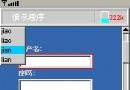
Form 包含輸入路徑、輸出路徑、密碼、確認密碼、操作類型選單、進度條與狀態列。CommandListener 區分「OK」(執行加密/解密)與「Exit」。finally 區塊確保 InputStream/OutputStream 正確關閉。public class EncryptTool extends MIDlet implements CommandListener {
private Form mainForm;
private TextField tfInPath, tfOutPath, tfPass, tfPass2;
private ChoiceGroup cgType; // encrypt / decrypt(實際上 XOR 對稱,此欄位僅示意)
private Command cmdOk, cmdExit;
private Ticker ticker;
// ... 初始化 UI、getter 方法略 ...
public void commandAction(Command c, Displayable d) {
if (c == cmdExit) { destroyApp(true); notifyDestroyed(); return; }
if (c != cmdOk) return;
String inPath = tfInPath.getString().trim();
String outPath = tfOutPath.getString().trim();
String pass = tfPass.getString();
String pass2 = tfPass2.getString();
if (inPath.isEmpty() || outPath.isEmpty()) { showMsg("路徑不可為空"); return; }
if (!pass.equals(pass2)) { showMsg("兩次密碼不一致"); return; }
int key = getKey(pass);
InputStream in = null; OutputStream out = null;
try {
in = Connector.openInputStream(inPath);
out = Connector.openOutputStream(outPath);
int val;
while ((val = in.read()) != -1) out.write(val ^ key);
showMsg("完成!密碼:" + pass + " 請妥善保管");
} catch (Exception ex) {
showMsg("失敗:" + ex.getMessage());
ex.printStackTrace();
} finally {
closeQuietly(in); closeQuietly(out);
}
}
// 輔助方法略
}
FileConnection 支援度,並處理大檔案分塊讀寫避免 OOM。Gauge 顯示進度,提升使用者體驗。完整原始碼已整理於上方,可直接複製至 NetBeans/EclipseMe 專案中編譯測試。