從混雜字符串 "3a7s10@5d2a6s17s56;33" 中提取所有數字,轉為整數集合 [3, 7, 10, 5, 2, 6, 17, 56, 33]。
import java.util.regex.Matcher;
import java.util.regex.Pattern;
import java.util.ArrayList;
import java.util.List;

public class NumberExtractor {
    public static List<Integer> extractNumbers(String input) {
        List<Integer> result = new ArrayList<>();
        if (input == null || input.isEmpty()) return result;

        // 1. 非數字替換為空格
        Pattern pattern = Pattern.compile("[^0-9]");
        Matcher matcher = pattern.matcher(input);
        String onlyNumbers = matcher.replaceAll(" ").trim();

        // 2. 按空格分割獲取數字字符串數組
        String[] numStrs = onlyNumbers.split("\\s+");

        // 3. 轉換為 Integer
        for (String s : numStrs) {
            if (!s.isEmpty()) {
                result.add(Integer.parseInt(s));
            }
        }
        return result;
    }

    public static void main(String[] args) {
        String str = "3a7s10@5d2a6s17s56;33";
        List<Integer> numbers = extractNumbers(str);
        System.out.println(numbers); // [3, 7, 10, 5, 2, 6, 17, 56, 33]
    }
}[^0-9]:匹配「非 0-9 字符」,配合 replaceAll(" ") 將所有非數字統一替換為空格。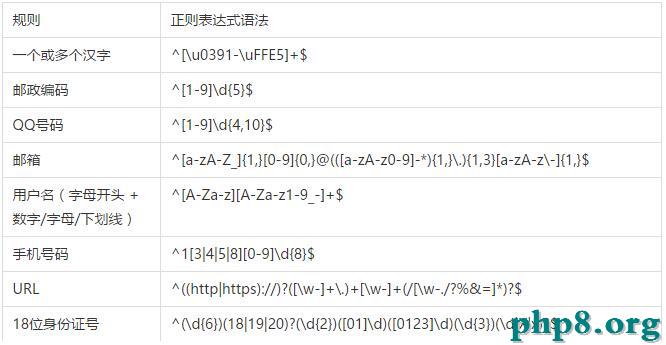
\d / [0-9]:數字\D / [^0-9]:非數字\w:字母數字下劃線\s:空白字符+:≥1 次,*:≥0 次,?:0/1 次():分組捕獲若需保留「10」而非拆分為「1」「0」,改用 \\d+ 直接匹配:
Pattern p = Pattern.compile("\\d+");
Matcher m = p.matcher(input);
while (m.find()) {
    System.out.println(Integer.parseInt(m.group()));
}
// 輸出:3, 7, 10, 5, 2, 6, 17, 56, 33
此法更簡潔,性能略優,推薦實戰使用。
正則表達式是文本處理利器,掌握 Pattern/Matcher 雙引擎與常用元字符,能輕鬆解決提取、替換、驗證等 90% 字符串問題。實戰中優先考慮 \\d+ 直接匹配數字組,代碼更清晰。