Eclipse JDT (Java Development Tools) 提供強大的 AST (Abstract Syntax Tree) API,支持 Java 代碼的程序化構建、解析、編譯、運行。本文通過兩個示例項目 ASTMain (構建並運行類) 和 ASTExplorer (解析並可視化 AST) 系統講解核心用法。
ast.newTypeDeclaration() 等)ASTParser parser = ASTParser.newParser(AST.JLS2);
parser.setSource("".toCharArray()); // 必須設置源,否則訪問單元拋異常
CompilationUnit unit = (CompilationUnit) parser.createAST(null);
unit.recordModifications(); // 啟用修改記錄,後續 rewrite 需要
AST ast = unit.getAST(); // 獲取節點工廠PackageDeclaration pkg = ast.newPackageDeclaration();
unit.setPackage(pkg);
pkg.setName(ast.newSimpleName("astexplorer"));TypeDeclaration cls = ast.newTypeDeclaration();
cls.setName(ast.newSimpleName("SampleComposite"));
cls.setModifiers(Modifier.PUBLIC);
unit.types().add(cls);
// Javadoc
Javadoc jc = ast.newJavadoc();
TagElement tag = ast.newTagElement();
tag.fragments().add(ast.newTextElement("Sample SWT Composite class created using the ASTParser"));
jc.tags().add(tag);
tag = ast.newTagElement();
tag.setTagName(TagElement.TAG_AUTHOR);
tag.fragments().add(ast.newSimpleName("Manoel Marques"));
jc.tags().add(tag);
cls.setJavadoc(jc);VariableDeclarationFragment vdf = ast.newVariableDeclarationFragment();
vdf.setName(ast.newSimpleName("minimumSize"));
FieldDeclaration fd = ast.newFieldDeclaration(vdf);
fd.setModifiers(Modifier.PRIVATE);
fd.setType(ast.newSimpleType(ast.newSimpleName("Point")));
cls.bodyDeclarations().add(fd);MethodDeclaration ctor = ast.newMethodDeclaration();
ctor.setConstructor(true);
ctor.setName(ast.newSimpleName("SampleComposite"));
// 參數
SingleVariableDeclaration param = ast.newSingleVariableDeclaration();
param.setName(ast.newSimpleName("size"));
param.setType(ast.newSimpleType(ast.newSimpleName("Point")));
ctor.parameters().add(param);
// 構造器體
Block body = ast.newBlock();
cls.bodyDeclarations().add(ctor);
ctor.setBody(body);
// 語句:GridLayout gridLayout = new GridLayout();
VariableDeclarationStatement vds = ast.newVariableDeclarationStatement(
ast.newVariableDeclarationFragment("gridLayout"));
vds.setType(ast.newSimpleType(ast.newSimpleName("GridLayout")));
vds.getFragment().setInitializer(ast.newClassInstanceCreation("GridLayout"));
body.statements().add(vds);
// 語句:this.setLayout(gridLayout) - 使用 Assignment 方式
Assignment assign = ast.newAssignment();
assign.setLeftHandSide(ast.newSimpleName("this.setLayout"));
assign.setRightHandSide(ast.newSimpleName("gridLayout"));
body.statements().add(ast.newExpressionStatement(assign));public char[] getContents() {
Document doc = new Document();
TextEdit edits = unit.rewrite(doc, null); // 合並修改
edits.apply(doc);
return doc.get().toCharArray();
}static class CompilationUnitImpl implements ICompilationUnit {
private CompilationUnit unit;
// 實現 getContents(), getMainTypeName(), getPackageName(), getFileName()
// 關鍵:getContents() 同上面 rewrite 邏輯
}Compiler compiler = new Compiler(
new NameEnvironmentImpl(unit),
DefaultErrorHandlingPolicies.proceedWithAllProblems(),
new CompilerOptions(settings),
requestor,
new DefaultProblemFactory(Locale.getDefault())
);
compiler.compile(new ICompilationUnit[] { unit });for (IProblem p : requestor.getProblems()) {
if (p.isError()) System.err.println("Error: " + p.getMessage() + " line:" + p.getSourceLineNumber());
else if (p.isWarning()) System.out.println("Warning: " + p.getMessage());
}ClassLoader loader = new CustomClassLoader(getClass().getClassLoader(), requestor.getResults());
String className = unit.getPackageName() + "." + unit.getMainTypeName();
Class clazz = loader.loadClass(className);
Method main = clazz.getMethod("main", String[].class);
main.invoke(null, (Object) new String[0]);static class CustomClassLoader extends ClassLoader {
private Map<String, byte[]> classMap;
CustomClassLoader(ClassLoader parent, List<ClassFile> classes) {
classMap = new HashMap<>();
for (ClassFile cf : classes) {
classMap.put(CharOperation.toString(cf.getCompoundName()), cf.getBytes());
}
}
protected Class findClass(String name) throws ClassNotFoundException {
byte[] bytes = classMap.get(name);
if (bytes != null) return defineClass(name, bytes, 0, bytes.length);
return super.findClass(name);
}
}ASTParser parser = ASTParser.newParser(AST.JLS2);
parser.setKind(ASTParser.K_COMPILATION_UNIT); // 或 K_CLASS_BODY_DECLARATIONS 等
parser.setSource(sourceString.toCharArray());
CompilationUnit cu = (CompilationUnit) parser.createAST(monitor); // monitor 可取消長解析cu.accept(new ASTVisitor() {
public boolean visit(TypeDeclaration node) {
System.out.println("Class: " + node.getName());
return true; // 繼續遍歷子節點
}
public void endVisit(MethodDeclaration node) {
System.out.println("Method end: " + node.getName());
}
});preVisit → visit → endVisit → postVisitvisit() 返回 false 跳過子樹cu.getCommentList() 單獨訪問cu.getProblems() 獲取 IProblem[]ASTNode.copySubtree(targetAST, node)ProgressMonitorDialog 跑後台線程,UI 線程 Display.syncExec 刷新synchronize(node.getAST())Stringgg 類不存在僅編譯器能查出)ICompilationUnit.getContents() 耗時,建議緩存ASTMain:構建含 SWT 按鈕窗口的類 → 編譯 → 運行 main() 彈窗ASTExplorer:三面板 (AST Tree、源碼高亮、解析錯誤),點擊樹節點高亮源碼位置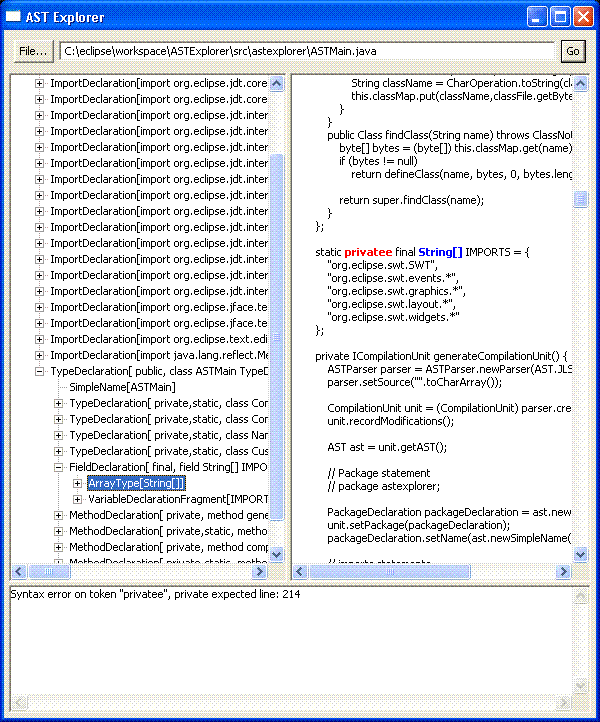
圖 1. 運行中的 ASTExplorer:選中節點源碼藍色高亮,錯誤紅色標記
掌握 ASTParser 開啟了代碼生成、靜態分析、重構工具、DSL 實現等無限可能。關鍵路徑:Parser → CompilationUnit → AST 構建/遍歷 → rewrite → 編譯 → ClassLoader 運行。建議下載示例代碼邊跑邊讀,探索更多 JDT 服務。