遊戲角色死亡、過場動畫、狀態異常時需將畫面轉為灰階。傳統做法準備灰階圖片增加 JAR 體積,MIDP 2.0 可即時運算轉換。
灰階像素特徵:R = G = B。將彩色像素的三通道平均值作為統一灰階值:
int r = (argb[i] & 0x00FF0000) >> 16;
int g = (argb[i] & 0x0000FF00) >> 8;
int b =  argb[i] & 0x000000FF;

int gray = (r + g + b) / 3;  // 平均法 (亦可用加權: 0.299R + 0.587G + 0.114B)

argb[i] = (0xFF000000) | (gray << 16) | (gray << 8) | gray;import java.io.IOException;
import javax.microedition.lcdui.Canvas;
import javax.microedition.lcdui.Graphics;
import javax.microedition.lcdui.Image;
public class GrayscaleCanvas extends Canvas {
Image image;
int[] argb;
int alpha = 0; // 透明度動畫參數
public GrayscaleCanvas() {
try {
image = Image.createImage("/test.png");
} catch (IOException e) {
e.printStackTrace();
}
argb = new int[image.getWidth() * image.getHeight()];
image.getRGB(argb, 0, image.getWidth(), 0, 0,
image.getWidth(), image.getHeight());
// 預先計算灰階像素
for (int i = 0; i < argb.length; i++) {
int r = (argb[i] & 0x00FF0000) >> 16;
int g = (argb[i] & 0x0000FF00) >> 8;
int b = argb[i] & 0x000000FF;
int gray = (r + g + b) / 3;
argb[i] = 0xFF000000 | (gray << 16) | (gray << 8) | gray;
}
}
protected void paint(Graphics g) {
g.setColor(0xFFFFFF);
g.fillRect(0, 0, getWidth(), getHeight());
g.drawImage(image, 0, 0, Graphics.TOP | Graphics.LEFT);
g.drawRGB(argb, 0, image.getWidth(), 0, 100,
image.getWidth(), image.getHeight(), true);
g.drawString(String.valueOf(alpha), 10, 90, Graphics.TOP | Graphics.LEFT);
}
}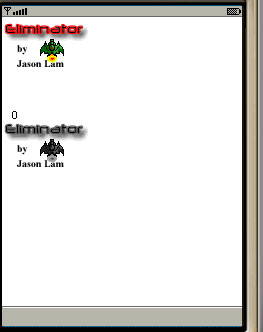
上方為原圖,下方為灰階轉換後圖片。程式碼亦示範如何在 paint() 中同時繪製原圖與處理後像素陣列做對比。
gray = (int)(0.299*r + 0.587*g + 0.114*b) 更符合人眼視覺感知系列文章:(一) 半透明 | (二) 漸變透明動畫 | (三) 灰階轉換 | (四) 動態變色