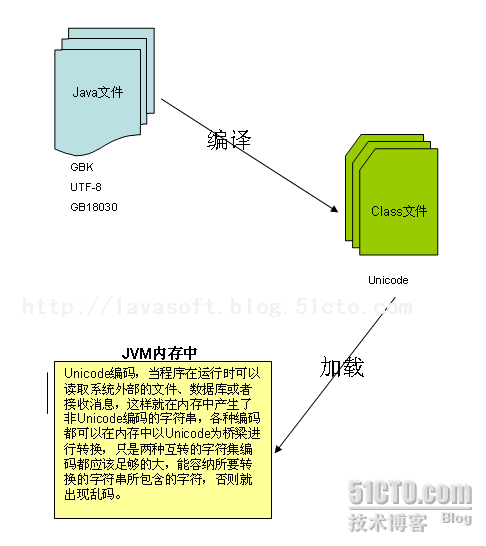
亂碼本質:邊界處編碼/解碼不匹配。
javac -encoding 指定。CONSTANT_String_info)。String 物件內部為 char[] (UTF-16 代碼單元)。String.getBytes() **不帶參數** 時,使用**平台預設編碼** 將 UTF-16 轉為 byte[] —— **亂碼禍根**。System.out.println(Charset.defaultCharset()); // Windows 中文版通常輸出 GBK
| 邊界 | 典型場景 | 關鍵原則 |
|---|---|---|
| 檔案 I/O | FileReader/Writer, InputStreamReader/Writer | **顯式指定 Charset**,勿依賴預設值 |
| 網路傳輸 | HTTP Header, JSON, XML, Protobuf | 協議規範編碼 (HTTP: Content-Type charset; JSON: 必須 UTF-8) |
| 資料庫 | JDBC URL, 表/欄位字符集 | 連接字串指定 characterEncoding,表欄位一致 |
// 讀取 GBK 檔案 → 內存 String (UTF-16)
String content = new String(Files.readAllBytes(path), "GBK");

// 內存 String → 寫入 GBK 檔案
Files.write(path, content.getBytes("GBK"));
// ✅ 正確
byte[] bytes = string.getBytes(StandardCharsets.UTF_8);
String str = new String(bytes, StandardCharsets.UTF_8);
Reader reader = new InputStreamReader(inputStream, StandardCharsets.UTF_8);
Writer writer = new OutputStreamWriter(outputStream, StandardCharsets.UTF_8);

// ❌ 錯誤:依賴平台預設編碼
byte[] bytes = string.getBytes();
String str = new String(bytes);
utf8 只支援 3 字節,需用 utf8mb4)。<properties><project.build.sourceEncoding>UTF-8</project.build.sourceEncoding></properties>。編碼問題不可怕,**可怕的是邊界模糊**。記住:JVM 內部 UTF-16,外部統一 UTF-8,邊界顯式轉碼。這是解決 99% 亂碼問題的黃金法則。