LINQ to SQL 透過 `.dbml` 設計師將資料庫結構自動對應為實體類別,徹底改變傳統三層架構中「手寫 Model、手寫 DAL」的痛點。本文以 Northwind 資料庫為例,完整示範:建立方案結構、DBML 產生實體與 DataContext、DAL 封裝 LINQ 查詢、BLL 傳遞查詢條件、Web Form 繫結 GridView,並分析架構優缺點與改進方向。
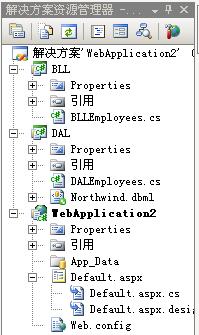
Solution: LinqThreeTier
├── WebApplication (ASP.NET Web Application)  // 表現層
├── DAL (Class Library)                        // 資料存取層 + DBML
└── BLL (Class Library)                        // 業務邏輯層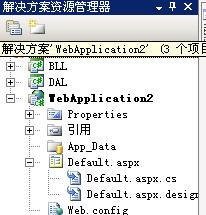
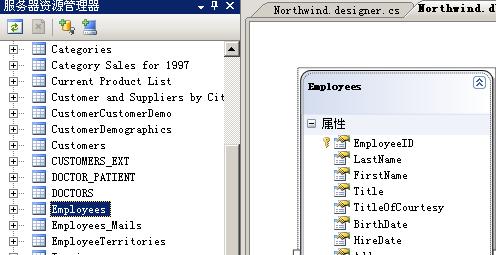
// NorthwindDataContext 建構子修改
public NorthwindDataContext()
    : base(ConfigurationManager.ConnectionStrings["NorthwindConnectionString"].ConnectionString, mappingSource)
{
    OnCreated();
}將自動產生程式碼的 `namespace DAL` 改為 `Auto.DAL`,方便跨層引用。
namespace Auto.DAL
{
    public class DALEmployees
    {
        private readonly NorthwindDataContext _db = new NorthwindDataContext();

        /// 依城市取得員工清單
        public IQueryable<Employee> GetList(string city)
        {
            return from e in _db.Employees
                   where e.City == city
                   select e;
        }
    }
}namespace Auto.BLL
{
public class BLLEmployees
{
public IQueryable<Employee> GetList(string city)
{
var dal = new DALEmployees();
return dal.GetList(city); // 透傳參數
}
}
}<asp:GridView ID="GridView1" runat="server" AutoGenerateColumns="true" />using Auto.BLL;
namespace WebApplication
{
public partial class _Default : System.Web.UI.Page
{
protected void Page_Load(object sender, EventArgs e)
{
if (!IsPostBack) GetList("London");
}
private void GetList(string city)
{
var bll = new BLLEmployees();
GridView1.DataSource = bll.GetList(city);
GridView1.DataBind();
}
}
}
| 優點 | 缺點/改進 |
|---|---|
| DBML 自動產生 Model + DAL 基礎,開發極快 | 參數傳遞仍用基本型別,缺乏 DTO 封裝 |
| LINQ 強型別、IntelliSense、編譯期檢查 | DAL 直接 `new DataContext()`,缺乏連線/交易管理(建議注入或 UnitOfWork) |
| 延遲執行 `IQueryable` 彈性組合查詢 | 實體類別耦合資料表結構,跨層傳遞易洩露持久化細節 |
| 資料表變更僅需更新 DBML,自動同步 | 未展示 Repository 模式,測試性較弱 |
LINQ to SQL + DBML 讓三層架構落地變得前所未有的輕鬆,適合中小型專案快速原型。隨著系統增長,建議逐步導入 Repository、DTO、DI 等模式,平滑演進至現代化架構。