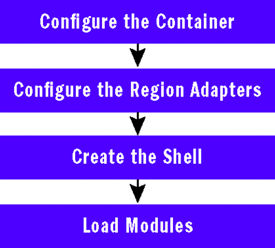
WPF/Silverlight 雖強大於 UI 表現,但無法解決大型專案的可維護性難題。Microsoft Patterns & Practices 團隊推出 WPF Composite Application Guidance (Prism),提供模組化、區域管理、命令、事件聚合等核心服務,協助建構鬆散耦合、可獨立開發/測試/部署的複合應用程式。本文系統解析 Prism 4 大核心概念:Bootstrapper/Container、Module 初始化、Region/RegionManager、View/Presentation Model/Command/EventAggregator。
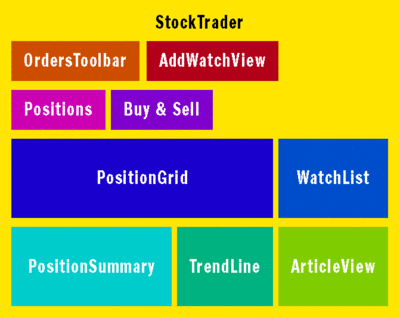
| 概念 | 說明 |
|---|---|
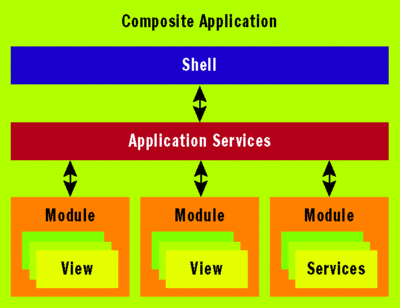
| Module | 功能垂直切片,含 View、ViewModel、Service,獨立組件 |
| Shell | 主視窗宿主,定義 Region,不包含具體業務邏輯 |
| Region | UI 佔位符(ContentControl/ItemsControl/Selector),Module 在運行時注入 View |
| Service | 跨模組共用功能(Logger、EventAggregator、ModuleLoader 等),透過 Container 管理 |
public class StockTraderRIBootstrapper : UnityBootstrapper
{
    private readonly EntLibLoggerAdapter _logger = new EntLibLoggerAdapter();

    protected override IModuleEnumerator GetModuleEnumerator()
    {
        return new StaticModuleEnumerator()
            .AddModule(typeof(NewsModule))
            .AddModule(typeof(MarketModule))
            .AddModule(typeof(WatchModule), "MarketModule")
            .AddModule(typeof(PositionModule), "MarketModule", "NewsModule");
    }

    protected override ILoggerFacade LoggerFacade => _logger;

    protected override void ConfigureContainer()
    {
        Container.RegisterType<IShellView, Shell>();
        base.ConfigureContainer();
    }

    protected override DependencyObject CreateShell()
    {
        var presenter = Container.Resolve<ShellPresenter>();
        var view = presenter.View;
        view.ShowView();
        return view as DependencyObject;
    }
}public interface IModule { void Initialize(); }
public class WatchModule : IModule
{
    private readonly IUnityContainer _container;
    private readonly IRegionManager _regionManager;

    public WatchModule(IUnityContainer container, IRegionManager regionManager)
    {
        _container = container;
        _regionManager = regionManager;
    }

    public void Initialize()
    {
        RegisterViewsAndServices();

        var watchListPM = _container.Resolve<IWatchListPresentationModel>();
        _regionManager.Regions["WatchRegion"].Add(watchListPM.View);

        var addWatchPresenter = _container.Resolve<IAddWatchPresenter>();
        _regionManager.Regions["MainToolbarRegion"].Add(addWatchPresenter.View);
    }

    private void RegisterViewsAndServices()
    {
        _container.RegisterType<IWatchListService, WatchListService>(new ContainerControlledLifetimeManager());
        _container.RegisterType<IWatchListView, WatchListView>();
        _container.RegisterType<IWatchListPresentationModel, WatchListPresentationModel>();
        _container.RegisterType<IAddWatchView, AddWatchView>();
        _container.RegisterType<IAddWatchPresenter, AddWatchPresenter>();
    }
}
<ItemsControl Grid.Row="1" Grid.Column="1" x:Name="MainToolbar"
    cal:RegionManager.RegionName="MainToolbarRegion">
    <ItemsControl.ItemsPanel>
        <ItemsPanelTemplate><WrapPanel /></ItemsPanelTemplate>
    </ItemsControl.ItemsPanel>
</ItemsControl>| 模式 | 核心 | 適用 |
|---|---|---|
| Presentation Model | Model 擁有 UI 狀態與行為,View 純繫結渲染 | WPF 資料繫結/樣板/命令豐富時 |
| Supervising Controller | Presenter 處理 UI 邏輯,View 委派並回呼簡單操作 | 需精細控制 UI 元素啟用/顯示時 |
public class PositionSummaryPresentationModel : IPositionSummaryPresentationModel, INotifyPropertyChanged
{
    public PositionSummaryPresentationModel(IPositionSummaryView view, ...) { ... }
    public IPositionSummaryView View { get; set; }
    public ObservableCollection<PositionSummaryItem> PositionSummaryItems { get; set; }
}
public class TrendLinePresenter : ITrendLinePresenter
{
    private readonly IMarketHistoryService _service;
    public TrendLinePresenter(ITrendLineView view, IMarketHistoryService service) { ... }
    public ITrendLineView View { get; set; }
    public void OnTickerSymbolSelected(string symbol)
    {
        var history = _service.GetPriceHistory(symbol);
        View.UpdateLineChart(history);
        View.SetChartTitle(symbol);
    }
}
public class WatchListService
{
    public ObservableCollection<string> WatchItems { get; }
    public DelegateCommand<string> AddWatchCommand { get; }

    public WatchListService(IMarketFeedService feed)
    {
        WatchItems = new ObservableCollection<string>();
        AddWatchCommand = new DelegateCommand<string>(AddWatch);
    }

    private void AddWatch(string symbol)
    {
        WatchItems.Add(symbol);
        // 呼叫服務...
    }
}
// 定義事件(共用組件)
public class TickerSymbolSelectedEvent : CompositeWpfEvent<string> { }

// 發布者:PositionSummaryPresentationModel
private void View_TickerSymbolSelected(object sender, DataEventArgs<string> e)
{
    _trendLinePresenter.OnTickerSymbolSelected(e.Value);
    EventAggregator.GetEvent<TickerSymbolSelectedEvent>().Publish(e.Value);
}

// 訂閱者:NewsController
public void Run()
{
    regionManager.Regions["NewsRegion"].Add(articlePM.View);
    EventAggregator.GetEvent<TickerSymbolSelectedEvent>()
        .Subscribe(ShowNews, ThreadOption.UIThread);
}
public void ShowNews(string symbol) => articlePM.SetTickerSymbol(symbol);掌握 Prism 四大支柱——Bootstrapper/Container、Module/Region、View/Presentation Pattern、Command/EventAggregator,即能駕馭企業級 WPF 複合應用程式架構。