NetTcpBinding 使用 TCP 協定、二進位編碼,專為 WCF-to-WCF 高效能通訊設計,不支援跨平台互操作。其傳輸安全分三類:
本文專注 Message 安全模式的四種客戶端驗證場景,皆採自宿主 Console 應用、程式碼配置方式。
[ServiceContract(Namespace = "https://chnking.com")]
public interface IGetIdentity
{
    [OperationContract]
    string Get(string ClientIdentity);
}

public class GetIdentity : IGetIdentity
{
    public string Get(string ClientIdentity)
    {
        return "服務端Identity是'" + ServiceSecurityContext.Current.PrimaryIdentity.Name +
               "'\r\n客戶端Identity是 '" + ClientIdentity + "'";
    }
}
僅用服務端憑證透過 WS-Trust 建立安全通道,提供訊息完整性、機密性與服務端身分驗證,客戶端匿名。
NetTcpBinding binding = new NetTcpBinding();
binding.Security.Mode = SecurityMode.Message;
binding.Security.Message.ClientCredentialType = MessageCredentialType.None;
Uri baseAddress = new Uri("net.tcp://localhost:8056/WCFService/");
ServiceHost host = new ServiceHost(typeof(GetIdentity), baseAddress);
host.AddServiceEndpoint(typeof(IGetIdentity), binding, "GetIdentity");
// 必須設定服務端憑證
host.Credentials.ServiceCertificate.SetCertificate("CN=win2008");
host.Open();
NetTcpBinding binding = new NetTcpBinding();
binding.Security.Mode = SecurityMode.Message;
binding.Security.Message.ClientCredentialType = MessageCredentialType.None;
EndpointAddress ea = new EndpointAddress("net.tcp://win2008:8056/WCFService/GetIdentity");
GetIdentityClient client = new GetIdentityClient(binding, ea);
// 略過伺服器憑證驗證(測試用)
client.ClientCredentials.ServiceCertificate.Authentication.CertificateValidationMode = X509CertificateValidationMode.None;
string result = client.Get(WindowsIdentity.GetCurrent().Name);
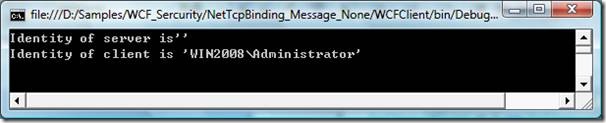
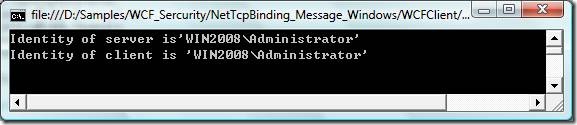
在 Message 安全通道上疊加 Windows 身分驗證,客戶端 Windows 身分流向服務端。
此模式最具實務價值:客戶端提供使用者名稱/密碼,服務端自訂驗證邏輯並建立 GenericPrincipal 進行角色基礎授權(RBAC)。
// 自訂驗證器
public class CustomUserNamePasswordValidator : UserNamePasswordValidator
{
    public override void Validate(string userName, string password)
    {
        if (userName == "chnking" && password == "jjz666")
        {
            string[] roles = { "admin", "operator" };
            Thread.CurrentPrincipal = new GenericPrincipal(new GenericIdentity("chnking", "Custom"), roles);
        }
        else
            throw new SecurityTokenException("使用者名稱或密碼無效!");
    }
}

// 宿主配置
NetTcpBinding binding = new NetTcpBinding();
binding.Security.Mode = SecurityMode.Message;
binding.Security.Message.ClientCredentialType = MessageCredentialType.UserName;
ServiceHost host = new ServiceHost(typeof(GetIdentity), baseAddress);
// 關鍵:關閉預設 Windows 群組映射,改用自訂 Principal
host.Authorization.PrincipalPermissionMode = PrincipalPermissionMode.None;
host.Credentials.UserNameAuthentication.UserNamePasswordValidationMode = UserNamePasswordValidationMode.Custom;
host.Credentials.UserNameAuthentication.CustomUserNamePasswordValidator = new CustomUserNamePasswordValidator();
host.Credentials.ServiceCertificate.SetCertificate("CN=win2008");
host.Open();
[PrincipalPermission(SecurityAction.Demand, Role = "admin")]
public string Get(string ClientIdentity) { ... }
NetTcpBinding binding = new NetTcpBinding();
binding.Security.Mode = SecurityMode.Message;
binding.Security.Message.ClientCredentialType = MessageCredentialType.UserName;
GetIdentityClient client = new GetIdentityClient(binding, ea);
client.ClientCredentials.UserName.UserName = "chnking";
client.ClientCredentials.UserName.Password = "jjz666";
client.ClientCredentials.ServiceCertificate.Authentication.CertificateValidationMode = X509CertificateValidationMode.None;
string result = client.Get(WindowsIdentity.GetCurrent().Name);
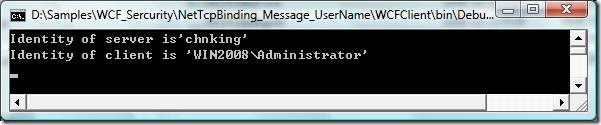
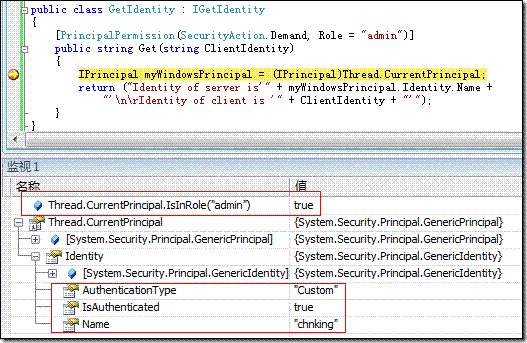
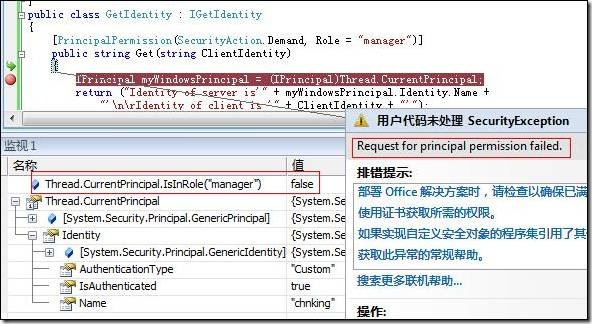
若將角色改為 "manager",chnking 因不屬該角色而拋出「Access is denied」。
雙向憑證驗證:服務端憑證建立安全通道,客戶端憑證識別身分。服務端取得 ServiceSecurityContext.Current.PrimaryIdentity.Name 為憑證主體名稱與指紋。
// 服務端:關閉客戶端憑證驗證(測試用)
host.Credentials.ClientCertificate.Authentication.CertificateValidationMode = X509CertificateValidationMode.None;

// 客戶端:指定客戶端憑證
client.ClientCredentials.ClientCertificate.SetCertificate("CN=TestClient", StoreLocation.CurrentUser, StoreName.My);

啟用 MapClientCertificateToWindowsAccount = true 後,可在 Active Directory 環境將客戶端憑證一對一或多對一映射至 Windows 帳號,進而套用 Windows ACL 控制存取。設定方式可透過程式碼或組態檔 <clientCertificate authentication certificateValidationMode="None" mapClientCertificateToWindowsAccount="True" />。