開發 WCF 客戶端有三種主流方式:Visual Studio「加入服務參考」、命令列工具 svcutil.exe、手工程式碼撰寫。本文逐一實作並比較優缺點。
https://localhost:39113/WCFServiceText/WCFStudentText.svcServiceReference1),確定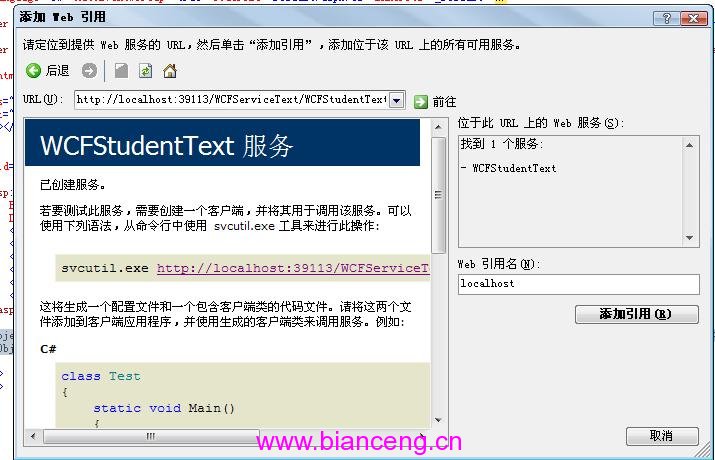
自動完成:下載 WSDL、產生 Proxy 類別 (實作服務合約)、產生 App.config/Web.config 客戶端區段。
<asp:GridView ID="GridView1" runat="server" DataSourceID="ObjectDataSource1" ... />
<asp:ObjectDataSource ID="ObjectDataSource1" runat="server"
TypeName="ServiceReference1.WCFStudentText" SelectMethod="GetStudent" />TypeName:Proxy 類別完整名稱 (含命名空間)SelectMethod:Proxy 方法名稱svcutil.exe https://localhost:39113/WCFServiceText/WCFStudentText.svc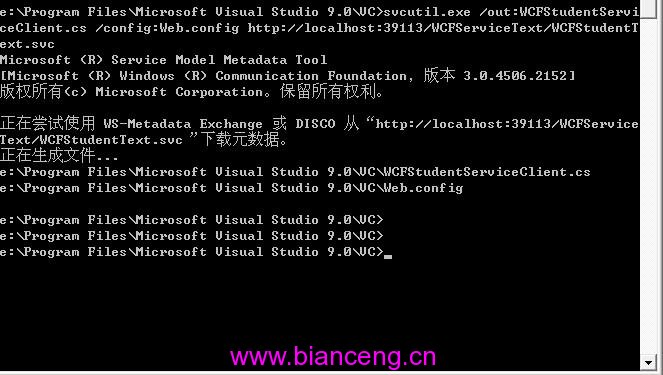
產出檔案:
WCFStudentServiceClient.cs:Proxy 類別原始碼Web.config / output.config:客戶端配置將兩檔案加入專案,修改 ObjectDataSource 的 TypeName 指向新 Proxy 類別即可使用。適合 CI/CD 流程自動化產生 Proxy。
根據 svcutil.exe 產出的 Proxy 碼手工複製修改。Proxy 類別繼承 ClientBase<TChannel> 並實作服務合約,提供 5 個建構函式多載:
public partial class StuServiceContractClient : ClientBase<IStuServiceContract>, IStuServiceContract
{
    public StuServiceContractClient() { }
    public StuServiceContractClient(string endpointConfigurationName) : base(endpointConfigurationName) { }
    public StuServiceContractClient(string endpointConfigurationName, string remoteAddress) : base(endpointConfigurationName, remoteAddress) { }
    public StuServiceContractClient(string endpointConfigurationName, EndpointAddress remoteAddress) : base(endpointConfigurationName, remoteAddress) { }
    public StuServiceContractClient(Binding binding, EndpointAddress remoteAddress) : base(binding, remoteAddress) { }

    public void AddStudent(Student stu) => base.Channel.AddStudent(stu);
    public Student[] GetStudent() => base.Channel.GetStudent();
}endpointConfigurationName:對應 <client><endpoint name="..."> 的 nameremoteAddress:可覆寫配置檔中的位址Binding / EndpointAddress:完全程式化控制| 方式 | 優點 | 缺點 | 適用場景 |
|---|---|---|---|
| VS 加入參考 | 視覺化、自動同步、IntelliSense | 專案耦合、大型專案重新產生慢 | 一般開發、快速原型 |
| svcutil.exe | 可自動化、無 VS 依賴、版本控管友善 | 需手動加入專案、更新需重跑 | CI/CD、團隊協作、自動化建置 |
| 手工程式碼 | 完全控制、理解內部機制 | 維護成本高、易出錯 | 學習、特殊動態需求、極簡部署 |