本文以「學生資料管理服務」為例,完整示範 WCF 服務開發全流程:服務合約與資料合約定義、服務實作、.svc 檔案、Web.config 端點組態。
以介面 + [ServiceContract] / [OperationContract] 定義作業:
namespace WCFStudent
{
    [ServiceContract]
    public interface IStuServiceContract
    {
        [OperationContract]
        void AddStudent(Student stu);

        [OperationContract]
        StudentCollection GetStudent();
    }

    [DataContract]
    public class Student
    {
        private string _stuName, _stuSex, _stuSchool;
        [DataMember] public string StuName { get { return _stuName; } set { _stuName = value; } }
        [DataMember] public string StuSex { get { return _stuSex; } set { _stuSex = value; } }
        [DataMember] public string StuSchool { get { return _stuSchool; } set { _stuSchool = value; } }
    }

    public class StudentCollection : List<Student> { }
}[ServiceContract]:標記介面為服務合約[OperationContract]:暴露為服務作業[DataContract] / [DataMember]:定義序列化資料結構 (預設 DataContractSerializer)資料存取邏輯封裝於 StudentManage 靜態類別 (示範用 DataTable 模擬);服務類別 WCFStudentText 實作介面:
public class WCFStudentText : IStuServiceContract
{
    public void AddStudent(Student stu)
        => StudentManage.AddStudent(stu.StuName, stu.StuSex, stu.StuSchool);

    public StudentCollection GetStudent()
    {
        var list = StudentManage.GetStudent();
        var coll = new StudentCollection();
        // 透過 IEnumerator 迭代 DataView 轉填 Student 物件
        ...
        return coll;
    }
}新增「AJAX-enabled WCF Service」或「WCF Service」,修改標記:
<%@ ServiceHost Service="WCFStudent.WCFStudentText" %><system.serviceModel>
<services>
<service name="WCFStudent.WCFStudentText" behaviorConfiguration="ServiceBehavior">
<endpoint address="" binding="wsHttpBinding" contract="WCFStudent.IStuServiceContract">
<identity><dns value="localhost" /></identity>
</endpoint>
<endpoint address="mex" binding="mexHttpBinding" contract="IMetadataExchange" />
</service>
</services>
<behaviors>
<serviceBehaviors>
<behavior name="ServiceBehavior">
<serviceMetadata httpGetEnabled="true" />
<serviceDebug includeExceptionDetailInFaults="false" />
</behavior>
</serviceBehaviors>
</behaviors>
</system.serviceModel>service name:必須為完整實作類別名稱endpoint contract:對應服務合約介面mexHttpBinding:啟用中繼資料發供應用參考serviceMetadata httpGetEnabled="true":允許 HTTP GET 取得 WSDL瀏覽 .svc 檔案,顯示「服務已建立」頁面即成功。
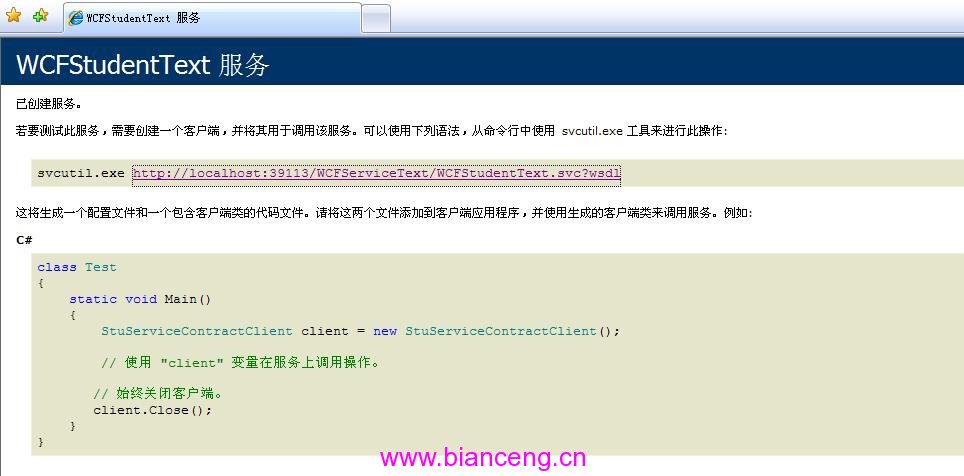
下一篇將介紹客戶端開發三種方式。