Castle ActiveRecord 是建構在 NHibernate 之上的輕量級 ORM 框架,利用 .NET 2.0 的泛型特性大幅簡化了資料存取層的開發。本文將透過一個完整的範例,示範如何在 ASP.NET 專案中快速整合並使用 Castle ActiveRecord。
首先建立一個新的 ASP.NET Web 應用程式專案,然後在專案中加入對 Castle.ActiveRecord.dll 的參考。確保專案目標框架設定為 .NET Framework 2.0 或以上版本。
在 .NET 2.0 中,得益於泛型的引入,業務實體只需繼承 ActiveRecordBase<T> 泛型基類,即可自動獲得 FindAll、Save、Delete 等靜態方法,無需自行實作。
[ActiveRecord("Employees")]
public class Employee : ActiveRecordBase<Employee>
{
    private string employeeID;
    private string lastName;
    private string city;
    private string address;
    private string homePhone;
    private string country;

    [PrimaryKey(PrimaryKeyType.Assigned)]
    public string EmployeeID
    {
        get { return employeeID; }
        set { employeeID = value; }
    }

    [Property]
    public string LastName
    {
        get { return lastName; }
        set { lastName = value; }
    }

    [Property]
    public string City
    {
        get { return city; }
        set { city = value; }
    }

    [Property]
    public string Address
    {
        get { return address; }
        set { address = value; }
    }

    [Property]
    public string HomePhone
    {
        get { return homePhone; }
        set { homePhone = value; }
    }

    [Property]
    public string Country
    {
        get { return country; }
        set { country = value; }
    }
}
在 Web.config 中加入 Castle ActiveRecord 所需的組態區段與連線字串,設定內容與 1.1 版本大同小異:
<?xml version="1.0"?>
<configuration>
  <configSections>
    <section name="activerecord"
             type="Castle.ActiveRecord.Framework.Config.ActiveRecordSectionHandler, Castle.ActiveRecord"/>
  </configSections>
  <connectionStrings>
    <add name="NorthWind"
         connectionString="Data Source=RJ-097;Initial Catalog=Northwind;User ID=sa;Password=sa"/>
  </connectionStrings>
  <activerecord isWeb="true">
    <config>
      <add key="hibernate.connection.driver_class" value="NHibernate.Driver.SqlClientDriver"/>
      <add key="hibernate.dialect" value="NHibernate.Dialect.MsSql2000Dialect"/>
      <add key="hibernate.connection.provider" value="NHibernate.Connection.DriverConnectionProvider"/>
      <add key="hibernate.connection.connection_string" value="ConnectionString = ${NorthWind}"/>
    </config>
  </activerecord>
</configuration>
在 Global.asax 的 Application_Start 事件中初始化 ActiveRecord,載入組態並掃描實體組件:
void Application_Start(object sender, EventArgs e)
{
    Castle.ActiveRecord.Framework.IConfigurationSource source =
        System.Configuration.ConfigurationManager.GetSection("activerecord")
        as Castle.ActiveRecord.Framework.IConfigurationSource;
    Castle.ActiveRecord.ActiveRecordStarter.Initialize(typeof(Employee).Assembly, source);
}
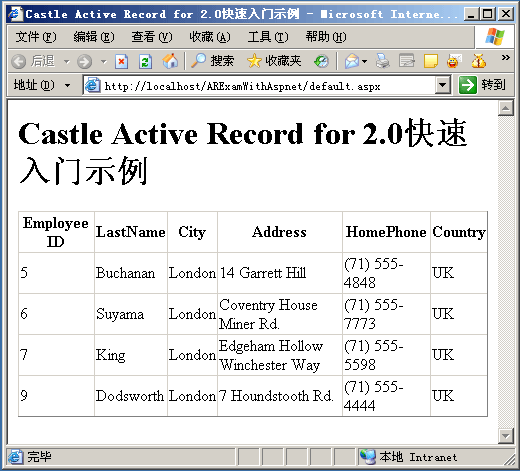
初始化完成後,即可像操作普通物件一樣存取資料庫。以下範例使用 GridView 顯示國家為 UK 的員工清單:
<%@ Page Language="C#" AutoEventWireup="true" CodeFile="Default.aspx.cs" Inherits="_Default" %>
<html>
<head runat="server">
    <title>Castle ActiveRecord for .NET 2.0 快速入門示例</title>
</head>
<body>
    <form id="form1" runat="server">
        <h1>Castle ActiveRecord for .NET 2.0 快速入門示例</h1>
        <asp:GridView ID="GridView1" AutoGenerateColumns="false" runat="server">
            <Columns>
                <asp:BoundField HeaderText="Employee ID" DataField="EmployeeID" />
                <asp:BoundField HeaderText="LastName" DataField="LastName" />
                <asp:BoundField HeaderText="City" DataField="City" />
                <asp:BoundField HeaderText="Address" DataField="Address" />
                <asp:BoundField HeaderText="HomePhone" DataField="HomePhone" />
                <asp:BoundField HeaderText="Country" DataField="Country" />
            </Columns>
        </asp:GridView>
    </form>
</body>
</html>
protected void Page_Load(object sender, EventArgs e)
{
    this.GridView1.DataSource = Employee.FindAllByProperty("Country", "UK");
    this.GridView1.DataBind();
}

本文示範了 Castle ActiveRecord 在 .NET 2.0 環境下的基本使用流程:建立專案、定義實體、設定組態、初始化框架、操作資料。後續將深入探討關聯關係、查詢優化、交易管理等進階主題。完整範例原始碼可供下載參考。