伺服器的任務很單純:持續監聽客戶端連線請求,並對收到的訊息做出回應。雖然我們要打造的是「世界上最簡陋的伺服器」,但仍有幾個關鍵細節必須注意,否則輕易導致介面凍結或資源洩漏。
監聽迴圈屬於封鎖式作業,若直接在 UI 執行緒執行,整個視窗將失去回應。解決方案是啟動一條背景執行緒專責監聽:
Thread td = new Thread(Listen);
td.IsBackground = true; // 關鍵:設為背景執行緒
td.Start();
若不將執行緒標記為背景執行緒,當使用者關閉視窗時,主程式雖結束,但前景執行緒仍在運作,導致進程殘留。設定 td.IsBackground = true 可讓執行緒隨應用程式一同終止。
在監聽執行緒中直接操作 UI 控制項(如 RichTextBox)會拋出跨執行緒例外。必須透過委派與 Invoke 回到 UI 執行緒更新介面:
public delegate void ChangeRichTextBoxHandler(RichTextBox rtb, string str);
public void ChangeRichTextBox(RichTextBox rtb, string str)
{
    rtb.AppendText(str);
}

// 在監聽執行緒中呼叫:
Invoke(new ChangeRichTextBoxHandler(ChangeRichTextBox), this.richTextBox1, "有客戶端連接了我");
無限迴圈若無休眠會佔滿 CPU 核心。加入 Thread.Sleep(1) 可大幅降低 CPU 使用率,且不影響連線接收(作業系統網路堆疊會緩衝封包)。
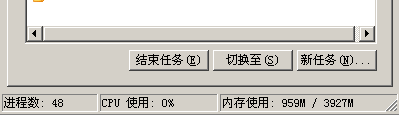
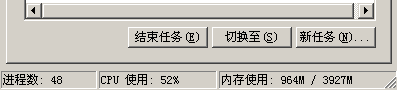
using System;
using System.Collections.Generic;
using System.ComponentModel;
using System.Data;
using System.Drawing;
using System.Linq;
using System.Text;
using System.Windows.Forms;
using System.Threading;
using System.Net;
using System.Net.Sockets;

namespace Server
{
    public partial class Form1 : Form
    {
        public Form1() { InitializeComponent(); }

        private void button1_Click(object sender, EventArgs e)
        {
            Thread td = new Thread(Listen);
            td.IsBackground = true;
            td.Start();
            this.button1.Enabled = false;
            MessageBox.Show("伺服器成功開啟");
        }

        public delegate void ChangeRichTextBoxHandler(RichTextBox rtb, string str);
        public void ChangeRichTextBox(RichTextBox rtb, string str)
        {
            rtb.AppendText(str);
        }

        private void Listen()
        {
            IPAddress ip = Dns.GetHostAddresses(Dns.GetHostName())[0];
            int port = Int32.Parse(this.textBox1.Text.Trim());
            TcpListener tl = new TcpListener(ip, port);
            tl.Start();

            while (true)
            {
                if (tl.Pending())
                {
                    Socket newSocket = tl.AcceptSocket();
                    byte[] buff = new byte[9];
                    int length = newSocket.Receive(buff);
                    string command = Encoding.Default.GetString(buff);
                    if (command == "conServer")
                    {
                        Invoke(new ChangeRichTextBoxHandler(ChangeRichTextBox),
                               this.richTextBox1, "有客戶端連接了我");
                    }
                }
                Thread.Sleep(1); // 關鍵:降低 CPU 佔用
            }
        }
    }
}
using System;
using System.Collections.Generic;
using System.ComponentModel;
using System.Data;
using System.Drawing;
using System.Linq;
using System.Text;
using System.Windows.Forms;
using System.Net;
using System.Net.Sockets;
using System.Threading;

namespace Client
{
    public partial class Form1 : Form
    {
        public Form1() { InitializeComponent(); }

        private void button1_Click(object sender, EventArgs e)
        {
            TcpClient tcpClient = new TcpClient();
            tcpClient.Connect(Dns.GetHostAddresses(Dns.GetHostName())[0],
                              Convert.ToInt32(this.textBox1.Text.Trim()));
            NetworkStream nwStream = tcpClient.GetStream();
            string cmd = "conServer";
            Byte[] bytes = Encoding.Default.GetBytes(cmd.ToCharArray());
            nwStream.Write(bytes, 0, bytes.Length);
        }
    }
}
完整專案原始碼:世界上最簡陋的服務器.rar