資料繫結將 UI 控制項屬性與資料來源物件屬性顯式連結,自動同步雙向變更並支援型別轉換。本章涵蓋繫結語法、資料上下文、顯式來源、值轉換器等核心概念。
以 Binding 物件取代手動指派:
<!-- 屬性元素語法 -->
<TextBox>
  <TextBox.Text>
    <Binding Path="Age" />
  </TextBox.Text>
</TextBox>

<!-- 標記延伸簡寫 -->
<TextBox Text="{Binding Path=Age}" />
<TextBox Text="{Binding Age}" />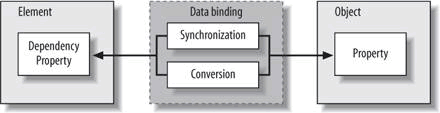
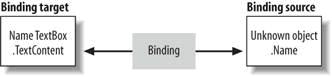
TextBox.Text)。Person.Age)。Path 指定來源屬性路徑,支援巢狀屬性(Address.City)、索引器(Items[0])等。繫結引擎向上巡覽視覺樹尋找最近非空的 DataContext(定義於 FrameworkElement)。
<Grid x:Name="grid" DataContext="{StaticResource Tom}">
  <TextBox Text="{Binding Path=Name}" />
  <TextBox Text="{Binding Path=Age}" />
</Grid>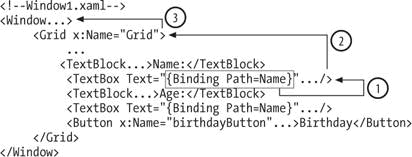
grid.DataContext = person;。INotifyPropertyChanged,UI 才能即時更新;否則需手動呼叫 BindingExpression.UpdateTarget()。在 XAML 資源中直接實例化資料物件(需有預設建構函式),再指派給 DataContext:
<?Mapping XmlNamespace="local" ClrNamespace="PersonBinding" ?>
<Window xmlns:local="local">
  <Window.Resources>
    <local:Person x:Key="Tom" Name="Tom" Age="9" />
  </Window.Resources>
  <Grid DataContext="{StaticResource Tom}"> ... </Grid>
</Window>
後台代碼透過 FindResource("Tom") 取得實例進行操作(如生日遞增年齡)。
單一畫面多資料來源時,直接在 Binding 指定 Source:
<TextBox Text="{Binding Path=Name, Source={StaticResource Tom}}" />
<TextBox Text="{Binding Path=Name, Source={StaticResource John}}" />DataContext 適合「多控制項共享單一來源」。Source 適合「多來源並存」,來源關係一目瞭然。當來源與目標屬性型別不同時(如 int Age → Brush Foreground),實作 IValueConverter:
public class AgeToForegroundConverter : IValueConverter {
  public object Convert(object value, Type targetType, ...) {
    int age = int.Parse(value.ToString());
    return age > 25 ? Brushes.Red : Brushes.Black;
  }
  public object ConvertBack(object value, ...) {
    throw new NotImplementedException(); // 單向繫結無需實作
  }
}
XAML 註冊並使用:
<Window.Resources>
  <local:AgeToForegroundConverter x:Key="AgeToForegroundConverter" />
</Window.Resources>
<TextBox Text="{Binding Age}"
         Foreground="{Binding Age, Converter={StaticResource AgeToForegroundConverter}}" />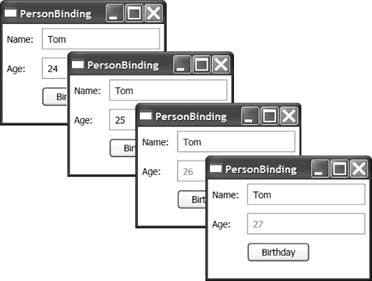
HeightToBackgroundConverter)避免濫用通用轉換器。ConvertBack 僅雙向繫結需實作。資料繫結消除大量同步樣板代碼,配合 DataContext 繼承與 IValueConverter 型別適配,構建乾淨、可維護的 MVVM 基礎設施。