RDLC (Report Definition Language Client-side) 與伺服器端 RDL 最大差異在於資料來源:RDL 原生支援 Analysis Services (SSAS) Cube,RDLC 則需透過程式碼間接存取。本文示範最彈性的做法——**將 ADOMD.NET 查詢邏輯封裝為 CLR 方法,直接作為 RDLC 的 ObjectDataSource**,並在 ASP.NET 網頁呈現報表。
| 方案 | 優點 | 缺點 |
|---|---|---|
| 資料庫連結伺服器 + 預存程序 | 邏輯集中於 SQL Server,RDLC 僅呼叫 SP | 需額外維護連結伺服器、權限設定較繁 |
| ADOMD.NET 封裝方法 (本文採用) | 邏輯在 C# 易除錯、支援複雜 MDX/DMX、無需 Reporting Services | 需部署 ADOMD.NET 組件、連線字串管理 |
Microsoft.AnalysisServices.AdomdClient.dll (通常位於 C:\Program Files\Microsoft.NET\ADOMD.NET\110)。範例 MDX:查詢產品類別銷售額及佔比。
public class SalesDataItem {
  public string ProductPath { get; set; }  // 產品層級路徑
  public double SalesAmount { get; set; }  // 網路銷售額
  public double SalesRatio { get; set; }   // 佔總額比例
}
using Microsoft.AnalysisServices.AdomdClient;

public static class CubeDataProvider {
  public static List GetProductSales() {
    var result = new List();
    using (var conn = new AdomdConnection()) {
      conn.ConnectionString = "Integrated Security=SSPI;Persist Security Info=True;" +
                              "Initial Catalog=AdventureWorksDW2012Multidimensional-EE;Data Source=.";
      conn.Open();

      var mdx = new StringBuilder();
      mdx.AppendLine("WITH ");
      mdx.AppendLine("MEMBER [Measures].[Sale Amount Ratio] AS ");
      mdx.AppendLine("'[Measures].[Internet Sales Amount]/([Measures].[Internet Sales Amount], [Product].[Product Categories].[All])', ");
      mdx.AppendLine("FORMAT_STRING = '0.00%' ");
      mdx.AppendLine("SELECT ");
      mdx.AppendLine("{[Measures].[Internet Sales Amount], [Measures].[Sale Amount Ratio]} ON 0,");
      mdx.AppendLine("NON EMPTY [Product].[Product Categories].[Product].MEMBERS ON 1");
      mdx.AppendLine("FROM [Adventure Works]");

      using (var cmd = new AdomdCommand(mdx.ToString(), conn))
      using (var dr = cmd.ExecuteReader()) {
        while (dr.Read()) {
          result.Add(new SalesDataItem {
            ProductPath = $"{dr[0]}-{dr[1]}-{dr[2]}",
            SalesAmount = double.Parse(dr[3].ToString()),
            SalesRatio = double.Parse(dr[4].ToString())
          });
        }
      }
    }
    return result;
  }
}
CubeDataProvider.GetProductSales 方法。ProductPath、SalesAmount、SalesRatio。SalesAmount 用 N0、SalesRatio 用 P2。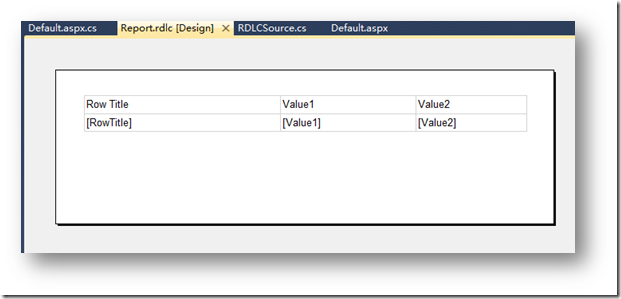
<%@ Register Assembly="Microsoft.ReportViewer.WebForms, Version=11.0.0.0, Culture=neutral, PublicKeyToken=89845dcd8080cc91"
    Namespace="Microsoft.Reporting.WebForms" TagPrefix="rsweb" %>
<asp:ScriptManager ID="ScriptManager1" runat="server" />
<rsweb:ReportViewer ID="ReportViewer1" runat="server" Width="100%" Height="600px">
  <LocalReport ReportPath="Report.rdlc">
    <DataSources>
      <asp:ObjectDataSource ID="ObjectDataSource1" runat="server"
          TypeName="MyProject.CubeDataProvider"
          SelectMethod="GetProductSales" />
    </DataSources>
  </LocalReport>
</rsweb:ReportViewer>
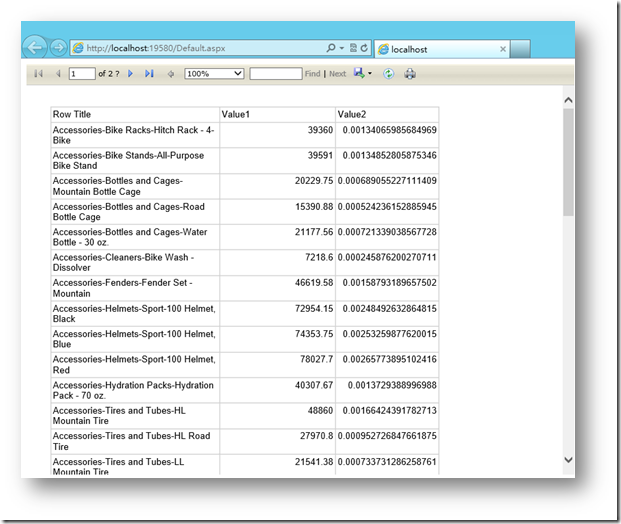
執行專案即可看到 Cube 資料呈現於 RDLC 報表中。
web.config <connectionStrings>,避免硬編碼。以 ADOMD.NET 封裝 MDX 查詢為 RDLC ObjectDataSource,兼具彈性與開發效率,是客戶端報表存取 SSAS Cube 的最佳實踐之一。同樣技術亦可套用於 WinForms、WPF 等桌面報表場景。