自定義類型 Scope { Min, Max } 配合 TypeConverter 可在屬性網格顯示為 "10, 200" 並支援字串雙向轉換。但用戶必須記住格式、手動輸入逗號、無法單獨修改 Min/Max,一旦格式錯誤拋出異常。**理想體驗:屬性網格自動展開子屬性 Min/Max 獨立編輯。**
public class ScopeConverter : TypeConverter {
    // ... 現有 CanConvertFrom/To, ConvertFrom/To 保持不變 ...

    // 1. 聲明支援子屬性
    public override bool GetPropertiesSupported(ITypeDescriptorContext context) => true;

    // 2. 返回目標類型的所有屬性描述符
    public override PropertyDescriptorCollection GetProperties(ITypeDescriptorContext context, object value, Attribute[] attributes) {
        // 直接獲取 Scope 類型的所有屬性 (Min, Max 等)
        return TypeDescriptor.GetProperties(typeof(Scope), attributes);
    }
}
| 修改前 | 修改後 |
|---|---|
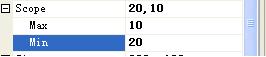 | Scope 節點可展開,顯示 Min、Max 兩個獨立子屬性,各自有類型編輯器 (數字輸入框) |
GetPropertiesSupported 返回 true 告訴設計器:「這個類型有可瀏覽的子屬性」。GetProperties 返回 PropertyDescriptorCollection,設計器據此為每個子屬性創建編輯 UI。TypeDescriptor.GetProperties(typeof(Scope), attributes) 自動應用 Scope 類上定義的 [Browsable]、[Category]、[Description]、[DefaultValue] 等屬性特性。
public class Scope {
    [Category("Range")]
    [DisplayName("Minimum Value")]
    [Description("The minimum allowed value.")]
    [DefaultValue(0)]
    public int Min { get; set; }

    [Category("Range")]
    [DisplayName("Maximum Value")]
    [Description("The maximum allowed value.")]
    [DefaultValue(100)]
    public int Max { get; set; }

    [Browsable(false)] // 隱藏不想讓設計器看到的屬性
    public int InternalId { get; set; }

    [ReadOnly(true)] // 設計器中唯讀
    public int ComputedRange => Max - Min;
}
這些特性會被 TypeDescriptor.GetProperties 自動識別並應用到屬性網格的子屬性顯示中。
Scope 已存在,通過 TypeConverter 暴露其公共屬性。**父屬性本身不可為 null** (或需在 GetProperties 中處理 null 返回空集合)。ExpandableObjectConverter):父屬性類型標記 [TypeConverter(typeof(ExpandableObjectConverter))],效果類似但機制不同,適用於匿名內部類或需完全控制展開行為的場景。本文方案更輕量、語義更清晰 (明確聲明支援子屬性)。
public class ScopeConverter : TypeConverter {
    public override bool CanConvertFrom(ITypeDescriptorContext context, Type sourceType)
        => sourceType == typeof(string) || base.CanConvertFrom(context, sourceType);

    public override bool CanConvertTo(ITypeDescriptorContext context, Type destinationType)
        => destinationType == typeof(string) || destinationType == typeof(InstanceDescriptor) || base.CanConvertTo(context, destinationType);

    public override object ConvertTo(ITypeDescriptorContext context, CultureInfo culture, object value, Type destinationType) {
        if (destinationType == typeof(string) && value is Scope scope)
            return $"{scope.Min},{scope.Max}";
        if (destinationType == typeof(InstanceDescriptor) && value is Scope scope) {
            var ctor = typeof(Scope).GetConstructor(new[] { typeof(int), typeof(int) });
            return new InstanceDescriptor(ctor, new object[] { scope.Min, scope.Max });
        }
        return base.ConvertTo(context, culture, value, destinationType);
    }

    public override object ConvertFrom(ITypeDescriptorContext context, CultureInfo culture, object value) {
        if (value is string s) {
            var parts = s.Split(',');
            if (parts.Length != 2) throw new ArgumentException("Invalid format. Expected 'Min,Max'");
            return new Scope { Min = int.Parse(parts[0]), Max = int.Parse(parts[1]) };
        }
        return base.ConvertFrom(context, culture, value);
    }

    // 關鍵:啟用子屬性編輯
    public override bool GetPropertiesSupported(ITypeDescriptorContext context) => true;
    public override PropertyDescriptorCollection GetProperties(ITypeDescriptorContext context, object value, Attribute[] attributes)
        => TypeDescriptor.GetProperties(typeof(Scope), attributes);
}
TypeConverter 時,**務必重寫 GetPropertiesSupported 和 GetProperties** 啟用子屬性編輯。Category、DefaultValue、ReadOnly 等),零額外代碼獲得豐富設計時體驗。ConvertFrom/To) 和實例描述符 (InstanceDescriptor),實現**字串編輯**、**子屬性編輯**、**代碼序列化**三位一體的完整設計時支援。