Form):完整視窗,AcceptButton/CancelButton、DialogResult、驗證邏輯。GetEditStyle 返回 Modal,EditValue 調用 editorService.ShowDialog(dialog),根據 DialogResult.OK 決定是否返回新值。[Editor(typeof(MyModalEditor), typeof(UITypeEditor))]。ScopeEditorDialog)
public partial class ScopeEditorDialog : Form {
    private Scope _scope; // 內部持有副本,不直接修改原對象

    public ScopeEditorDialog(Scope scope) {
        InitializeComponent(); // 包含 txtMin, txtMax, btnOK, btnCancel
        _scope = scope;
        txtMin.Text = scope.Min.ToString();
        txtMax.Text = scope.Max.ToString();
    }

    // 驗證邏輯
    private void txtMin_Validating(object sender, CancelEventArgs e) {
        if (!int.TryParse(txtMin.Text, out _)) { e.Cancel = true; ShowError("最小值必須為整數"); }
    }
    private void txtMax_Validating(object sender, CancelEventArgs e) {
        if (!int.TryParse(txtMax.Text, out _)) { e.Cancel = true; ShowError("最大值必須為整數"); }
    }

    // OK 按鈕點擊:驗證通過才關閉
    private void btnOK_Click(object sender, EventArgs e) {
        if (ValidateChildren()) { // 觸發所有 Validating
            _scope.Min = int.Parse(txtMin.Text);
            _scope.Max = int.Parse(txtMax.Text);
            DialogResult = DialogResult.OK; // 關鍵:設置 DialogResult 關閉模態對話框
        }
    }

    // Cancel 按鈕:直接關閉,DialogResult.Cancel
    // 設計器中設置 btnCancel.DialogResult = DialogResult.Cancel 即可,無需代碼

    // 供 UITypeEditor 讀取結果
    public Scope Scope => _scope;
}
ScopeEditor)
public class ScopeEditor : UITypeEditor {
    public override UITypeEditorEditStyle GetEditStyle(ITypeDescriptorContext context) {
        return (context?.Instance != null) ? UITypeEditorEditStyle.Modal : base.GetEditStyle(context);
    }

    public override object EditValue(ITypeDescriptorContext context, IServiceProvider provider, object value) {
        if (context?.Instance != null && provider != null) {
            var editorService = (IWindowsFormsEditorService)provider.GetService(typeof(IWindowsFormsEditorService));
            if (editorService != null) {
                var control = (MyListControl)context.Instance;
                using (var dlg = new ScopeEditorDialog(control.Scope)) { // 傳入當前值副本
                    if (editorService.ShowDialog(dlg) == DialogResult.OK) { // 模態顯示,阻塞直到關閉
                        return dlg.Scope; // 返回編輯後的值
                    }
                }
            }
        }
        return value; // 取消或異常返回原值
    }
}
[Browsable(true)]
[Editor(typeof(ScopeEditor), typeof(UITypeEditor))]
public Scope Scope {
    get => _scope;
    set { _scope = value; }
}
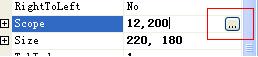
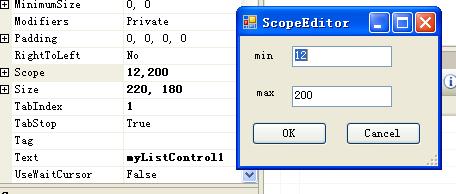
| 環節 | 模態對話框 | 下拉式 |
|---|---|---|
GetEditStyle | UITypeEditorEditStyle.Modal | UITypeEditorEditStyle.DropDown |
| 編輯器 UI 基類 | Form | UserControl |
| 顯示方法 | editorService.ShowDialog(dialog) | editorService.DropDownControl(control) |
| 結果判斷 | DialogResult == DialogResult.OK | 直接讀取控件屬性 (Leave 事件已提交) |
| 取消語義 | 原生 DialogResult.Cancel,不修改內部副本 | Esc/焦點離開邏輯手動控制 (_canceling 旗標) |
| 驗證機制 | ValidateChildren() + Validating 事件 | Validating 事件 + e.Cancel |
FormBorderStyle = FixedDialog、MaximizeBox = False、MinimizeBox = False、StartPosition = CenterParent。_scope),OK 時才更新副本並返回,Cancel 直接丟棄,保證原對象不被污染。ValidateChildren() 在 OK 時調用,確保所有 Validating 通過才允許關閉。HelpButton = true、HelpRequested 事件顯示上下文幫助,提升專業度。ModalUITypeEditorBase<TDialog, TValue>,具體屬性只需實現對話框與值轉換。模態對話框編輯器為複雜屬性提供專業級編輯體驗。核心在於 UITypeEditor 衍生類返回 Modal 風格,利用 IWindowsFormsEditorService.ShowDialog 顯示 Form 衍生對話框,通過 DialogResult.OK 確認提交。配合數據副本隔離、完整驗證流程、標準 Windows 對話框交互,構建符合用戶預期的屬性編輯體驗。